Training a Segmentation Model on a Colab TPU Runtime and Exporting It to LiteRT for Android

It was past eleven at night, the validation accuracy had just settled at a respectable 0.94, and I had one cell left to run before bed: export, convert, confirm it loads, done. The conversion finished in under a second, which should have been my first clue. I loaded the file, ran one validation image through it, and watched the output come back as a row of NaN.
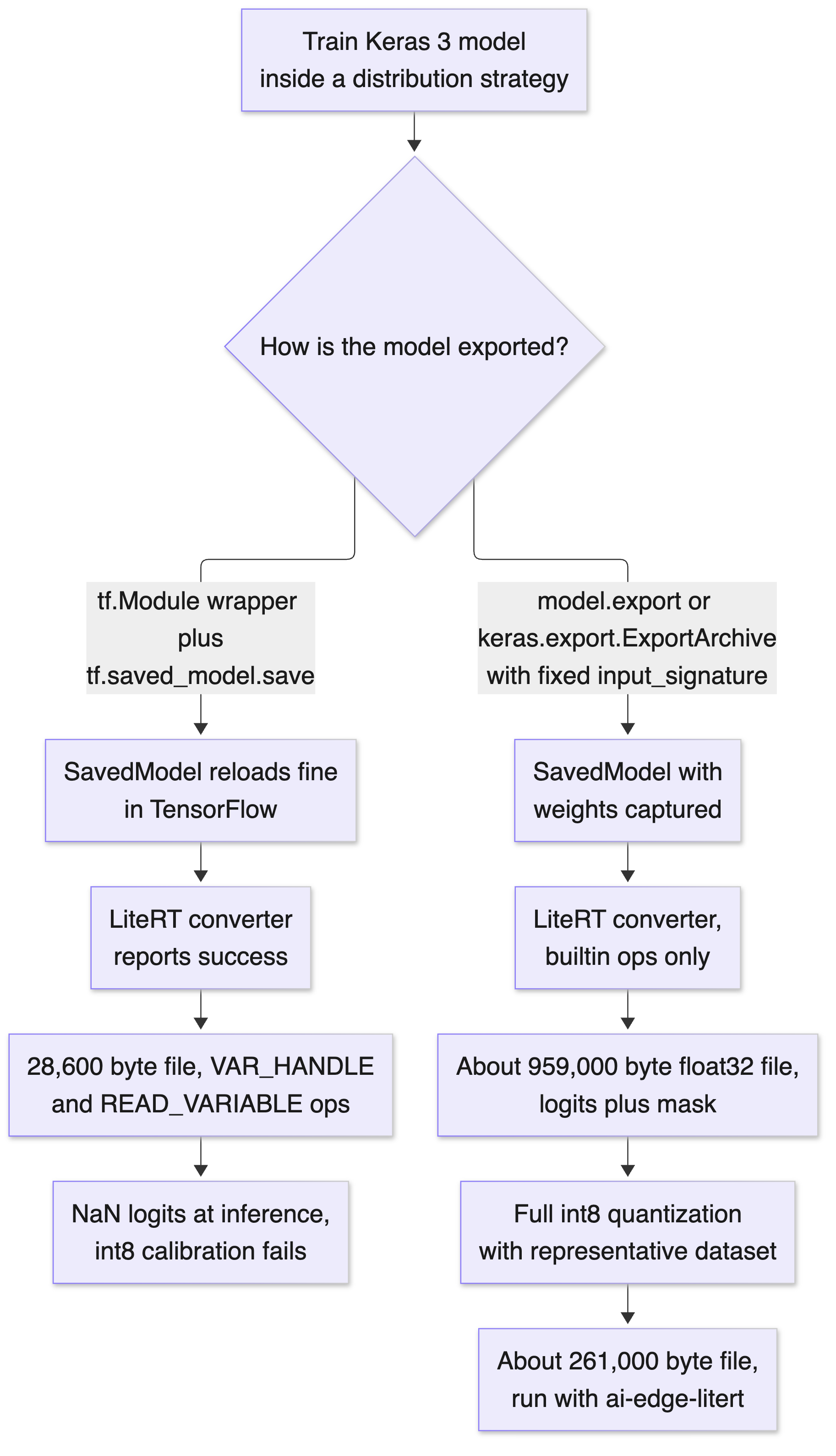
Here is a file that should not exist. My converter reported success and handed me a 28,600 byte LiteRT model. The network behind it has 238,163 parameters, and at float32 precision those weights alone need about 950,000 bytes, roughly 33 times the size of the file sitting on my disk. By rights the conversion should have failed. Instead the file loaded, it ran, and every logit it returned was NaN. No error, no warning, nothing in the converter log hinting that anything was wrong. The SavedModel I converted it from was perfectly healthy, which is the detail that should actually worry you: if your test plan is "reload the SavedModel and compare outputs," this bug walks straight past it, every time.
That silent weight drop is the main finding here, and the fix is short once you know it exists. Along the way I also hit a resize op that needs the full TensorFlow runtime on the phone, a dynamic batch dimension that sneaks shape arithmetic into the graph, a deprecation warning that names a deletion version older than the TensorFlow I was running, and a quantization result that was better than I expected (with a caveat I will not hide).
# What this article covers
- What the title actually means
- Concepts you need before the first cell runs
- Meet Fernleaf Labs, the case study
- What I measured, and what I only read about
- Getting a TPU runtime in Colab today
- The conversion that succeeded and shipped no weights
- How a dynamic batch dimension leaks into the graph
- The bicubic resize that drags in the full TensorFlow runtime
- The fix, end to end
- Quantization results on the fixed model
- Latency on an Apple M4 CPU
- Shipping it on Android with LiteRT
- A pre-flight checklist before you trust a converted file
- Where Fernleaf ended up, and what a real TPU run still has to prove
# What the title actually means
Let's decode it piece by piece, because every noun in that title is doing work.
Segmentation model
Hover to expand Tap to expandA model that labels every pixel of an image instead of giving the whole image one label. A classifier looks at a leaf photo and says "blight"; a segmentation model paints over the photo and says "these pixels are healthy leaf, these pixels are lesion, these pixels are background". The output is a mask with the same height and width as the input.
Analogy: a classifier is a doctor's one-line diagnosis, a segmentation model is the same doctor circling every affected spot on an X-ray.
Why it matters: Fernleaf's app needs the circled spots, not just a yes-or-no verdict, which is why the whole pipeline below is built around a mask, not a single label.
Colab and TPU runtime
Hover to expand Tap to expandColab is Google's hosted notebook service: pick a hardware accelerator in the browser and run Python on a machine you never set up. A TPU runtime is a Colab session backed by a Tensor Processing Unit, a chip Google designed for the matrix multiplications that dominate neural network training; you write TensorFlow, JAX or Keras code and a compiler maps it onto the chip.
Analogy: Colab is a fully furnished rental workshop, and choosing a TPU runtime is asking for the one with the industrial press installed instead of a hand drill.
Why it matters: Fernleaf trains on this chip precisely because it never has to buy, configure, or maintain the hardware underneath it.
LiteRT for Android
Hover to expand Tap to expandLiteRT is the new name for TensorFlow Lite, Google's on-device inference runtime: same .tflite file format, same converter, new package names on the runtime side. "For Android" means the final consumer is a phone app running the model locally, with no server round-trip.
Analogy: it is the difference between calling a translator on the phone for every sentence and having one who has already moved in with you.
Why it matters: Fernleaf's growers work in fields with no signal, so the model has to run entirely on the device or the feature does not work at all.
Exporting
Hover to expand Tap to expandFreezing a trained model's architecture and weights into a self-contained file that a different runtime can load and run, as opposed to a live Python object that only exists inside the training session that made it. Exporting and converting are two separate steps that get talked about as one: export writes the SavedModel, conversion turns that SavedModel into a LiteRT file.
Analogy: training is cooking a meal from a recipe you can still change mid-dish, exporting is vacuum-sealing the finished plate so it survives the trip to someone else's kitchen.
Why it matters: this article's entire main bug lives in that seal, not in the recipe. The model trained correctly; the export step is what silently lost the weights.
Put together: train a pixel-labelling model on Google's training chip in a notebook, then shrink and convert it so a phone can run it. The training half is well documented. The export half is where things break quietly.
# Concepts you need before the first cell runs
A few ideas come up repeatedly. If you know them, skim. If not, this section is the cheat sheet (I wish someone had handed me one).
Distribution strategy
Hover to expand Tap to expandTensorFlow's abstraction for "run this training on more than one device". You create a strategy object, build your model inside strategy.scope(), and the variables get created on the right devices. TPUStrategy is the one for TPUs. MirroredStrategy is the one for multiple GPUs, and it also runs happily on a single CPU, which is why I used it as my stand-in for a TPU.
Analogy: it is a shift supervisor who assigns the exact same instructions to whichever machines are on the floor, one chip or eight, without rewriting the instructions.
Why it matters: swapping TPUStrategy for MirroredStrategy was the only line I changed between my CPU stand-in and what Fernleaf runs on a real TPU.
SavedModel
Hover to expand Tap to expandTensorFlow's on-disk format for a model: the computation graph, the trained variables, and one or more named entry points. It is the usual input to the LiteRT converter, and the thing this whole article's main bug hides inside of.
Analogy: it is a shipped appliance with its wiring and factory settings already sealed inside, not a box of parts you assemble yourself.
Why it matters: a SavedModel can reload perfectly in TensorFlow and still have its weights fail to carry over once the converter opens it up, which is exactly what happened to me.
Signature
Hover to expand Tap to expandOne of a SavedModel's named entry points. Think of it like a function declaration: it says "this endpoint takes a float32 tensor named image of shape 1 by 128 by 128 by 3, and returns a dict with mask and logits". The converter reads the signature to decide the input and output shapes of the LiteRT model.
Analogy: it is the posted delivery slot at a loading dock, stating exactly what size package goes in and what comes back out.
Why it matters: the converter trusts the signature completely, so an unpinned shape here becomes an unpinned shape in the phone app, with the shape-arithmetic cost shown in section seven.
Static vs. dynamic shape
Hover to expand Tap to expandA static shape is a tensor shape where every dimension is a known number. A dynamic shape has at least one unknown dimension, usually written None, most often the batch size. Keras models default to a dynamic batch dimension, which is exactly what section seven below is about.
Analogy: a static shape is a picture frame cut to one photo's exact size, a dynamic shape is a frame that has to figure out its own size every time a new photo arrives.
Why it matters: figuring out that size at runtime is extra work the graph has to do on every single inference call, even though the app only ever sends one photo.
XLA
Hover to expand Tap to expandThe compiler that turns TensorFlow and JAX computations into TPU instructions. It works best when shapes are fixed, and that preference shows up directly in Google's TPU batch-size guidance later in this article.
Analogy: it is a translator who works fastest from a script written in advance, and has to improvise, slower, when the speaker changes the wording live.
Why it matters: it is the underlying reason Google's own TPU guidance asks for batch sizes that are multiples of 64, not an arbitrary preference.
Flex op
Hover to expand Tap to expandGoogle's docs call these "Select TensorFlow ops": a TensorFlow operation that LiteRT has no native kernel for. The converter can still emit it, but then the phone needs an extra library containing a slice of the full TensorFlow runtime just to execute that one op.
Analogy: it is a specialty wrench a mechanic does not keep on the belt, so the whole toolbox from the truck has to be carried in for one bolt.
Why it matters: Fernleaf's one leftover bicubic resize layer needed exactly one of these, and Google's own numbers put the cost at several extra megabytes of APK size.
Quantization
Hover to expand Tap to expandStoring weights, and optionally activations, as 8-bit integers instead of 32-bit floats. The file gets roughly 4x smaller and integer math is often faster on phone CPUs. A representative dataset is the small sample of real inputs you feed the converter so it can measure the range of values flowing through each layer and pick the integer scaling for each one.
Analogy: it is rounding prices to the nearest rupee instead of tracking every paisa, the numbers get smaller and faster to work with, and are usually close enough.
Why it matters: it shrank Fernleaf's file from about 937 KB to roughly 255 KB with no accuracy loss on the validation set, which section ten measures in full.
XNNPACK delegate
Hover to expand Tap to expandXNNPACK is the optimized CPU backend LiteRT uses by default. When the interpreter prints "Created TensorFlow Lite XNNPACK delegate for CPU", that is the backend taking over the supported ops. A delegate is the general name for a plug-in that runs some or all of a model on specialised hardware or a faster code path.
Analogy: it is a specialist chef who cooks a fixed menu very fast, but has to hand a dish back to the general kitchen the moment it is not on that menu.
Why it matters: a flex op is exactly a dish that specialist cannot cook, which is why one forces the slower, general-purpose runtime back in.
# Meet Fernleaf Labs, the case study
# The case we will follow: Fernleaf Labs (fictional)
Who: A small agritech team building an Android app that lets growers photograph a leaf and see exactly which regions show disease.
The situation: They train a compact U-Net style segmentation model in Colab on a TPU runtime, then convert it to LiteRT so it runs offline in fields with no signal.
What broke: Their first export path produced a LiteRT file that converted cleanly, loaded cleanly, and returned NaN for every pixel, because the trained weights never made it into the file.
What it cost: A model that looks shipped but outputs garbage, plus a resize layer that would have pulled several megabytes of extra TensorFlow runtime into the app.
Where we end up: A fixed-shape export through Keras's own export API, full integer quantization with no change in pixel accuracy on the validation set, and a short checklist that catches the silent failure before it reaches a phone.
Fernleaf is invented. The model, code, bugs and every number in the tables are real outputs from my machine; the company is a frame so the decisions have a reason behind them.
Fernleaf's model is a small U-Net: three downsampling blocks, a bottleneck, three upsampling blocks with skip connections, and a 1x1 convolution giving one logit per class per pixel (background, healthy leaf, lesion). Input is a 128 by 128 colour image with raw 0 to 255 values, rescaled inside the model.
import keras

IMG, CLASSES = 128, 3

def build(bicubic_head=False):
    inp = keras.Input((IMG, IMG, 3), name="image")
    x = keras.layers.Rescaling(1 / 255.0)(inp)
    skips = []
    for f in (16, 32, 64):
        x = keras.layers.Conv2D(f, 3, padding="same", use_bias=False)(x)
        x = keras.layers.BatchNormalization()(x)
        x = keras.layers.ReLU()(x)
        skips.append(x)
        x = keras.layers.MaxPooling2D()(x)
    x = keras.layers.Conv2D(128, 3, padding="same", activation="relu")(x)
    for f, s in zip((64, 32, 16), reversed(skips)):
        x = keras.layers.Conv2DTranspose(f, 2, strides=2, padding="same")(x)
        x = keras.layers.Concatenate()([x, s])
        x = keras.layers.Conv2D(f, 3, padding="same", use_bias=False)(x)
        x = keras.layers.BatchNormalization()(x)
        x = keras.layers.ReLU()(x)
    if bicubic_head:  # the variant that causes trouble later
        x = keras.layers.Resizing(IMG, IMG, interpolation="bicubic")(x)
    out = keras.layers.Conv2D(CLASSES, 1, name="logits")(x)
    return keras.Model(inp, out)
The Rescaling layer sits inside the model on purpose: the app hands over raw camera pixels and nobody has to divide by 255 in Kotlin.
# What I measured, and what I only read about
This article mixes two kinds of claims, and I am going to keep them in separate boxes the whole way through.
Measured by me I ran everything on an Apple M4 MacBook CPU under tf.distribute.MirroredStrategy, which on this machine has exactly one replica (the CPU).
The data was synthetic: 512 training images and 64 validation images, each a noisy background with a red disc standing in for a lesion and a green square standing in for healthy tissue. The model trained for 6 epochs with Adam and sparse categorical cross-entropy.
On the validation images the trained Keras model reached a loss of 0.1974 and a pixel accuracy of 0.94. Those two numbers come from the same run, the one whose exported files I benchmark later, so everything downstream is internally consistent.
Documented by Google, not measured by me How to get a TPU in Colab, what software a Colab TPU runtime ships with, how TPUStrategy is initialised, what TPUs want from batch sizes, how LiteRT is packaged for Python and Android, and how big the Select TensorFlow ops library is. For each of these I quote or paraphrase the specific Google page.
Why is a CPU stand-in still useful? The bugs here live in the export and conversion path (Keras to SavedModel, SavedModel to LiteRT, then the interpreter), which runs on the host CPU even in a TPU notebook. A CPU run cannot tell you anything about TPU speed, TPU numerics, or whether TPU variable placement changes how a SavedModel is written. I come back to those gaps at the end.
Here is the whole pipeline, including the branch that went wrong:
# Getting a TPU runtime in Colab today
Documented behaviour Everything in this section is something I read, not something I ran.
Google's TensorFlow TPU guide1TensorFlow TPU guidetensorflow.org/guide/tpu gives the menu path: "Runtime > Change runtime type > Hardware accelerator > TPU". The specific TPU generations offered in that dropdown change over time and depend on your Colab plan. I could not find a Google page that lists the current options authoritatively, so I am not going to name one. Check the dropdown when you run this.
What I can trace is the history, from Colab's own release notes2Colab release notesdevelopers.google.com/colab/release-notes: TPU v2 was added on 2024-04-15, a v5e-1 option on 2025-01-13, and a v6e-1 (Trillium) option on 2025-05-12, which Google's own note there describes as 32 GB of HBM and roughly 918 BF16 TFLOPS, "nearly 3x" a GPU A100. A release note as recent as 2025-10-14 still listed "V2-8, V5E-1, V6E-1" as available types. Beyond that: a pinned Colab issue announcing the deprecation of TPU v2-813Colab's own deprecation notice for TPU v2-8, in favor of v5e-1github.com/googlecolab/colabtools/issues/5566 says the chip was being retired in favor of v5e-1, with removal of v2-8 expected the following month. I have not confirmed on my own account whether v2-8 is still reachable today, so check the dropdown yourself before planning around either chip.
The bigger surprise is in Colab's own runtime version FAQ3Colab runtime version FAQresearch.google.com/colaboratory/runtime-version-faq.html. For every runtime release from 2025.07 through 2026.07, the TensorFlow line carries the same note. The most recent entry reads "TensorFlow 2.20.0 (not included in TPU runtimes)". In other words, a Colab TPU runtime today does not ship with TensorFlow preinstalled. If Fernleaf's notebook does import tensorflow on a TPU runtime and expects TPUStrategy, they install a TPU-capable TensorFlow build themselves first. I have not verified which package and version combination works on the current TPU runtime, so treat that install step as something to confirm in your own notebook rather than something I am promising.
The initialisation code from the same TensorFlow TPU guide looks like this:
import tensorflow as tf

resolver = tf.distribute.cluster_resolver.TPUClusterResolver(tpu='')
tf.config.experimental_connect_to_cluster(resolver)
# This is the TPU initialization code that has to be at the beginning.
tf.tpu.experimental.initialize_tpu_system(resolver)
print("All devices: ", tf.config.list_logical_devices('TPU'))

strategy = tf.distribute.TPUStrategy(resolver)
Two lines from that guide matter for Colab users. The empty string passed as tpu "is a special address just for Colab", and on Google Compute Engine you pass your Cloud TPU's name instead. And the initialisation "has to be at the beginning of your program", so do not bolt it onto the end of a notebook that already built a model.
On shapes and batch sizes, the Cloud TPU performance guide4Cloud TPU performance guide, the batch-size-multiple-of-64 ruledocs.cloud.google.com/tpu/docs/performance-guide says the XLA compiler pads tensors automatically, that padded tensors leave part of the TPU core idle, and that "The total batch size should be a multiple of 64 (8 per TPU core)" for the common case. The TensorFlow TPU guide also repeats the training dataset so there is never a partial last batch. My CPU run used drop_remainder=True for the same reason, so the training loop never sees an odd sized batch. Keep that habit; it makes the TPU swap a one-line change.
Fernleaf's training cell, as I actually ran it, swaps TPUStrategy for MirroredStrategy and nothing else:
import numpy as np
import tensorflow as tf

strategy = tf.distribute.MirroredStrategy()   # TPUStrategy(resolver) on a TPU runtime

xtr, ytr = synth(512)   # synthetic leaf-like images and masks
xva, yva = synth(64)

with strategy.scope():
    model = build()
    model.compile(
        optimizer=keras.optimizers.Adam(1e-3),
        loss=keras.losses.SparseCategoricalCrossentropy(from_logits=True),
        metrics=["accuracy"],
    )

ds = (tf.data.Dataset.from_tensor_slices((xtr, ytr))
      .shuffle(512)
      .batch(32, drop_remainder=True))
model.fit(ds, epochs=6)
print(model.evaluate(xva, yva))   # [0.1974, 0.94] in the run used below
# The conversion that succeeded and shipped no weights
Here is the export code that bit me. It looks reasonable. I have written code exactly like it before, and I suspect many of you have too.
The goal was sensible: give the LiteRT model a fixed batch of 1 and return both the raw logits and a ready-made class mask, so the Android code gets a mask directly. The classic TensorFlow way to do that is a tf.Module with a tf.function signature:
class Serve(tf.Module):
    def __init__(self, m):
        super().__init__()
        self.m = m

    @tf.function(input_signature=[
        tf.TensorSpec([1, IMG, IMG, 3], tf.float32, name="image")])
    def serve(self, image):
        logits = self.m(image, training=False)
        return {"mask": tf.cast(tf.argmax(logits, axis=-1), tf.int32),
                "logits": logits}

mod = Serve(model)
tf.saved_model.save(mod, "fixed_sm", signatures={"serving_default": mod.serve})
tflite_bytes = tf.lite.TFLiteConverter.from_saved_model("fixed_sm").convert()
What I measured, in order:
tf.saved_model.savesucceeded. The SavedModel's checkpoint listed every layer variable and every optimizer slot.- Reloading that SavedModel in TensorFlow and calling the signature gave outputs identical to the Keras model. The maximum absolute difference was exactly 0.0.
- The LiteRT converter succeeded with no error and wrote a 28,600 byte file.
- Running that file in the ai-edge-litert interpreter produced
NaNlogits. - Dynamic-range quantization of the same SavedModel also "succeeded", again at 28,600 bytes.
- Only full integer quantization failed loudly, during calibration, with a variable-not-found error at node 40, a
READ_VARIABLEop, reporting that it failed to invoke.
The op list from tf.lite.experimental.Analyzer gave the game away. The broken file contained VAR_HANDLE and READ_VARIABLE ops, plus ADD, MUL, RSQRT and SUB (batch normalization that was never folded into the convolutions). A healthy conversion of a trained model bakes the weights in as constants and contains none of those. This file still pointed at variables, and the LiteRT interpreter had nothing to read from them.
One more measurement pointed at the cause. On the wrapper, mod.trainable_variables returned an empty list, while model.weights on the Keras model had 40 entries. The tf.Module was not tracking the Keras 3 model's variables through its attribute. The SavedModel writer still found them through the object graph (that is why the checkpoint and the reload were fine), but the converter, when it froze the graph, did not turn them into constants.
My reading of why: Keras 3 is a multi-backend library, and its layers and variables are no longer the same objects that tf.Module automatic tracking expects to find. I am stating that as a hypothesis that fits what I measured, not as a confirmed root cause. I also tried passing the Keras model explicitly as the trackable object to TFLiteConverter.from_concrete_functions; that produced the same 28,600 byte file with the same NaN output. I did not test this wrapper outside a strategy scope, so I cannot tell you whether the strategy contributes. What I can tell you is that the symptom is total and silent.
For Fernleaf, this is the nightmare case. The reload test goes green, the converter goes green, and the grower sees a blank or garbage mask.
The cheapest detector I found is a size check. Float32 weights cost 4 bytes per parameter, so a float32 LiteRT file must be at least 4 * model.count_params() bytes. For Fernleaf's 238,163 parameters that floor is 952,652 bytes. A 28,600 byte file fails that check by a factor of more than thirty. You do not need to understand the bug to catch it.
I want to be precise about what is and is not a known bug here. I did not find any existing TensorFlow issue that matches this exact failure (a tf.Module-wrapped Keras 3 model, with trained variables silently un-frozen on LiteRT conversion). What I did find is a pattern of the same converter producing quiet, wrong "success" instead of an error elsewhere: tensorflow/tensorflow#1239956TFLiteConverter silently produces a 0-op model instead of raisinggithub.com/tensorflow/tensorflow/issues/123995 describes TFLiteConverter.from_keras_model().convert() silently returning a zero-op, zero-output model instead of propagating a TypeError raised during tracing. That is a different mechanism from my dropped weights, but the shape of the problem is the same one this whole section is about: the converter's success is not proof that conversion worked.
# How a dynamic batch dimension leaks into the graph
Measured on my run: the simplest working export path, model.export(path) followed by TFLiteConverter.from_saved_model, produced a correct 961,048 byte file. So did TFLiteConverter.from_keras_model(model), at the identical size. Both kept the Keras default input shape of (None, 128, 128, 3), meaning the batch dimension is unknown.
The op list of that file had three ops the fixed-shape version did not: SHAPE, STRIDED_SLICE and PACK. The converter's error dump for a different variant showed why. Each TRANSPOSE_CONV (the learned upsampling layer) needs its output shape as an input tensor, and with an unknown batch size the graph has to compute that shape at runtime: read the input's shape, slice out the batch dimension, pack it together with the known height, width and channels. That is a small shape-arithmetic subgraph in front of every upsampling layer.
Is that a problem? On my M4 CPU, not measurably (the latency table later shows it). Fernleaf still pins the batch to 1 for practical reasons. The app only ever sends one photo, and a graph with every tensor size known at load time is less to go wrong if they later try a hardware delegate. I did not test a GPU delegate, so that last point is caution, not a measurement.
This is not an isolated quirk of my model. Conv2DTranspose layers generating extra Shape, Pack and StridedSlice ops on conversion is tracked publicly as tensorflow/tensorflow#449057Conv2DTranspose creates extra Shape, Pack and StridedSlice ops on conversiongithub.com/tensorflow/tensorflow/issues/44905, and a dynamic dimension outside the batch position has its own open issue, tensorflow/tensorflow#295908Does TFLite support input shape [1, 32, None, 3]?github.com/tensorflow/tensorflow/issues/29590, with an error reading that None is only supported in the first dimension, for shapes like one, thirty two, none, three. Neither issue is about a TPU-trained model specifically; I checked, and I could not find any open TensorFlow issue that ties TPUStrategy (or its TPUPartitionedCall or TPUReplicatedInput ops) to a TFLite conversion failure. So treat the shape-arithmetic subgraph as a known, general consequence of dynamic shapes, not a TPU-specific hazard.
# The bicubic resize that drags in the full TensorFlow runtime
Fernleaf's first architecture had one more layer: a keras.layers.Resizing(128, 128, interpolation="bicubic") before the classifier head, left over from an experiment with a lower-resolution decoder. It is a no-op in shape terms here, which made it easy to forget it was there.
With the converter restricted to builtin ops, the conversion failed. The key lines of the error, as I got them:
error: 'tf.ResizeBicubic' op is neither a custom op nor a flex op
error: failed while converting: 'main':
Some ops are not supported by the native TFLite runtime, you can enable TF kernels
fallback using TF Select. See instructions: https://www.tensorflow.org/lite/guide/ops_select
TF Select ops: ResizeBicubic
Bicubic resizing is simply not in LiteRT's builtin op set. To be sure the problem was the interpolation mode and not resizing in general, I converted a small model with bilinear and nearest-neighbour Resizing layers under the same builtins-only setting: it passed, producing RESIZE_BILINEAR and RESIZE_NEAREST_NEIGHBOR. Adding tf.lite.OpsSet.SELECT_TF_OPS to the converter's supported ops made the conversion pass, and the resulting file contained an op named FlexResizeBicubic.
Then I tried to run it with the standalone ai-edge-litert Python interpreter, and it failed at load time with this message (trimmed):
Select TensorFlow op(s), included in the given model, is(are) not supported by this
interpreter. Make sure you apply/link the Flex delegate before inference. For the
Android, it can be resolved by adding "org.tensorflow:tensorflow-lite-select-tf-ops"
dependency. ... Node number 25 (FlexResizeBicubic) failed to prepare.
So the converter's "success" and the runtime's "success" are two different things. A flex op converts fine and then needs an extra runtime library everywhere the model runs.
What does that library cost? Documented, not measured. Google's Select TensorFlow ops page9Select TensorFlow operators, the 561 KB vs. 8.0 MB APK size tabledevelopers.google.com/edge/litert/models/ops_select lists the Android Gradle dependencies as org.tensorflow:tensorflow-lite plus org.tensorflow:tensorflow-lite-select-tf-ops, says the TF ops dependency is "relatively large", and gives an example size table: 561 kB of APK size (the Android app package) for builtin ops only, versus 8.0 megabytes for builtins plus TF ops, and 1.8 megabytes for a selectively built version. Those numbers are Google's example, not Fernleaf's app.
Fernleaf's decision was easy once the cost was visible. A bicubic resize that changes nothing is not worth several megabytes and a second dependency. They deleted the layer. If you genuinely need resizing inside the model, use interpolation="bilinear" and confirm with the analyzer that no Flex prefix appears.
# The fix, end to end
Here is the export path Fernleaf ships, as one walkthrough you can paste into a notebook after training. There are two working options, and I tested both.
Option one: model.export with an explicit input signature. This is the smallest change and it fixes both the weight drop and the dynamic batch:
model.export(
    "export_fixed",
    input_signature=[tf.TensorSpec([1, IMG, IMG, 3], tf.float32, name="image")],
)
converter = tf.lite.TFLiteConverter.from_saved_model("export_fixed")
float_bytes = converter.convert()   # 958,928 bytes on my run
The resulting op set was just CONV_2D, MAX_POOL_2D, TRANSPOSE_CONV and CONCATENATION. No variable ops, no shape arithmetic, batch normalization folded away. The catch: the output is a single tensor called output_0, the raw logits. No mask.
Option two: keras.export.ExportArchive5Keras 3: Model.export() and ExportArchivekeras.io/api/models/model_saving_apis/export with a custom endpoint. This keeps the "return a ready mask" behaviour that motivated the broken wrapper, while letting Keras do the variable tracking:
archive = keras.export.ExportArchive()
archive.track(model)   # the line the tf.Module version was effectively missing

@tf.function(input_signature=[
    tf.TensorSpec([1, IMG, IMG, 3], tf.float32, name="image")])
def serve(image):
    logits = model(image, training=False)
    return {"mask": tf.cast(tf.argmax(logits, axis=-1), tf.int32),
            "logits": logits}

archive.add_endpoint("serving_default", serve)
archive.write_out("export_archive")

float_bytes = tf.lite.TFLiteConverter.from_saved_model("export_archive").convert()
open("fernleaf_float32.tflite", "wb").write(float_bytes)   # 959,332 bytes
Its op set adds only ARG_MAX and CAST for the mask. Running it in the LiteRT interpreter against the Keras model on a validation image, the largest absolute logit difference was 2.1e-06, which is ordinary float rounding.
Now the verification step, which is the part I would never skip again. It checks size, ops and numerical parity in one go:
import io, contextlib, os, re
import numpy as np
from ai_edge_litert.interpreter import Interpreter

def audit(path, keras_model, sample):
    size = os.path.getsize(path)
    floor = 4 * keras_model.count_params()
    print(f"size {size} bytes, float32 weight floor {floor} bytes")

    buf = io.StringIO()
    with contextlib.redirect_stdout(buf):
        tf.lite.experimental.Analyzer.analyze(model_path=path)
    ops = sorted(set(re.findall(r"Op#\d+ (\w+)", buf.getvalue())))
    print("ops:", ops)
    assert not {"VAR_HANDLE", "READ_VARIABLE"} & set(ops), "weights not frozen"
    assert not any(o.startswith("Flex") for o in ops), "needs Select TF ops"

    runner = Interpreter(model_path=path)
    runner.allocate_tensors()
    out = runner.get_signature_runner()(image=sample.astype(np.float32))
    ref = keras_model(sample, training=False).numpy()
    diff = float(np.abs(out["logits"] - ref).max())
    print("max abs logit diff:", diff)
    assert np.isfinite(diff) and diff < 1e-3, "LiteRT output does not match Keras"

audit("fernleaf_float32.tflite", model, xva[:1])
Note that the size check is only meaningful for a float32 file. For a quantized file, skip the floor and rely on the op and parity checks, with a looser tolerance and a comparison on the mask rather than the logits.
Run against the broken file, this function fails on the op assertion. The NaN check would catch it too. Run against the fixed file, it passes. That asymmetry is the whole point.
# Quantization results on the fixed model
With a correct float32 file in hand, Fernleaf tried two kinds of post-training quantization on the ExportArchive SavedModel.
Dynamic-range quantization only needs one line, converter.optimizations = [tf.lite.Optimize.DEFAULT]. It stores weights as 8-bit integers and keeps activations in float.
Full integer quantization needs the representative dataset defined earlier. Here is the version I ran, with the input type set to uint8 so the app can pass camera bytes straight in:
def representative_data():
    for i in range(100):
        yield {"image": xtr[i:i + 1].astype(np.float32)}

converter = tf.lite.TFLiteConverter.from_saved_model("export_archive")
converter.optimizations = [tf.lite.Optimize.DEFAULT]
converter.representative_dataset = representative_data
converter.target_spec.supported_ops = [tf.lite.OpsSet.TFLITE_BUILTINS_INT8]
converter.inference_input_type = tf.uint8
int8_bytes = converter.convert()
The converter printed input_inference_type: UINT8, output_inference_type: FLOAT32, so the input is integer and the outputs stay float, which is fine for Fernleaf. The quantized input tensor came back with a scale of about 0.99973 and a zero point of 0, so a camera byte maps almost one to one onto the quantized input.
Here is what I measured on the 64 synthetic validation images:
| Variant | File size (bytes) | Pixel accuracy vs ground truth | Mask pixels identical to float32 |
|---|---|---|---|
| float32 (ExportArchive) | 959,332 | 0.94 | reference |
| Dynamic-range quantization | 255,296 | 0.94 | 100% |
| Full int8, uint8 input Shipped | 260,912 | 0.94 | 100% |
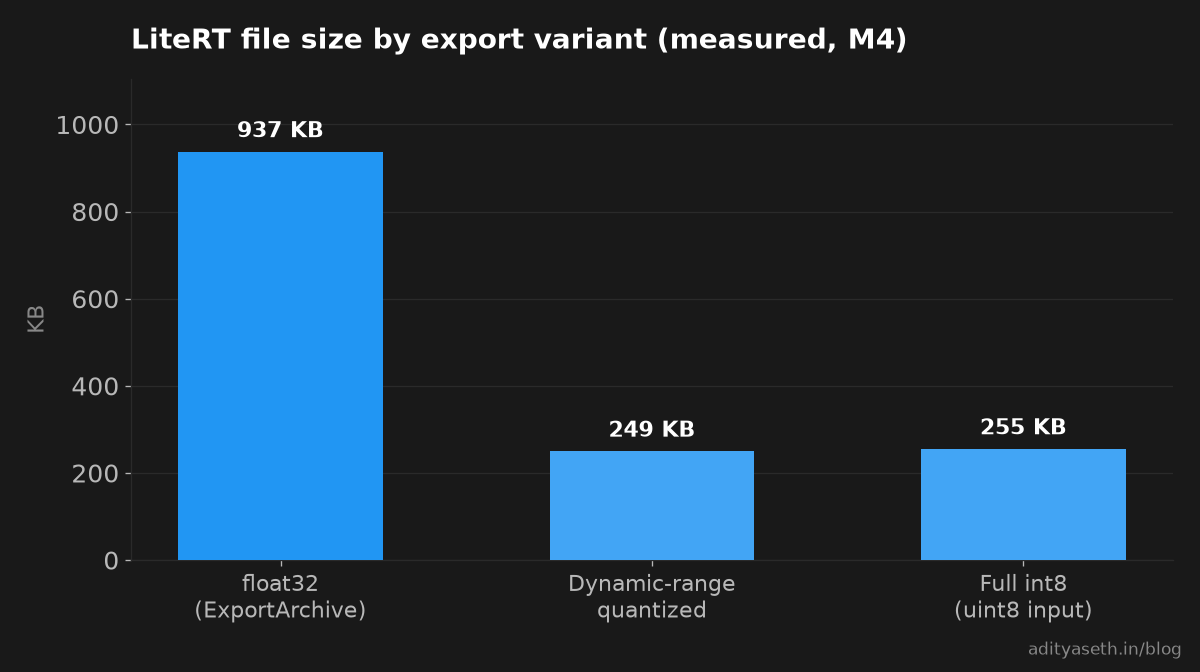
The full integer file came out slightly larger than the dynamic-range one. I had expected the opposite. The op list explains part of it: the int8 file adds QUANTIZE and DEQUANTIZE ops at the boundaries and stores quantization parameters for activations as well as weights.
The caveat I promised: identical masks on synthetic red discs and green squares is a weak test. The classes are easy to separate, so there is a lot of margin before 8-bit rounding flips a pixel. On real leaf photos, where a lesion edge fades into healthy tissue, Fernleaf should expect some boundary pixels to change and should measure intersection-over-union on real labelled images before trusting this. What the table does prove is that the export and quantization mechanics are correct: no dropped weights, no broken calibration, the right input type.
# Latency on an Apple M4 CPU
These numbers are from my Apple M4 MacBook CPU using the ai-edge-litert 2.3.0 interpreter with its default XNNPACK backend. Each row is one 1x128x128x3 input, 20 warm-up invocations, then 200 timed invocations, reported as median (p50) and 90th percentile (p90) in milliseconds. This is not a phone, and I have not run Fernleaf's model on a phone.
| Variant | Size (bytes) | 1 thread p50 / p90 (ms) | 4 threads p50 / p90 (ms) |
|---|---|---|---|
| float32 fixed batch, mask head (ExportArchive) | 959,332 | 2.145 / 2.197 | 1.147 / 1.418 |
| Dynamic-range quantization | 255,296 | 2.420 / 2.629 | 1.054 / 2.924 |
| Full int8, uint8 input Fastest | 260,912 | 1.232 / 1.612 | 0.947 / 1.024 |
| float32 dynamic batch, logits only (model.export default) | 961,048 | 1.877 / 1.989 | 1.766 / 2.528 |
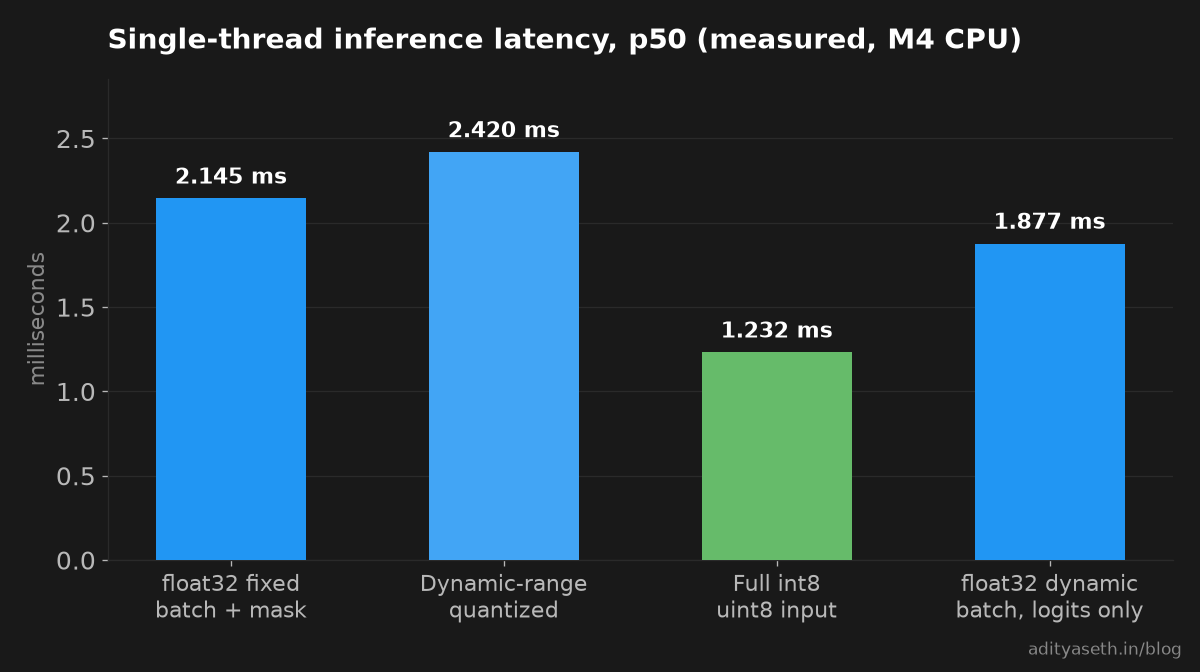
Reading this honestly takes some care, because the model is tiny and everything runs in a couple of milliseconds on the M4.
Full int8 was the fastest at one thread, at roughly 57% of the float32 median on that same M4 configuration. That is the result I would expect to carry over to phones in direction, though not in size.
Dynamic-range quantization was slower than float32 at one thread on this CPU. My guess is that the extra conversion work between integer weights and float math is not repaid by the memory saved on a model this small, but I did not profile it. Fernleaf skips this variant: same accuracy as full int8, slower, almost the same size.
The dynamic batch row is not a fair comparison with the first. It has no ARG_MAX and CAST head, and its single-thread median was actually lower on the M4. So I am not claiming the extra shape ops cost latency; on this model and CPU I could not see them. The wide p90 values at four threads most likely reflect thread scheduling on a busy laptop, so expect the tails to wander if you rerun this.
# Shipping it on Android with LiteRT
The runtime rename matters most on the app side, so here are the verified facts first.
Documented by Google's LiteRT migration guide10LiteRT migration guide, tflite-runtime to ai-edge-litertdevelopers.google.com/edge/litert/migration: the Python package changes from tflite-runtime to ai-edge-litert, imported as from ai_edge_litert.interpreter import Interpreter. On Android, the dependency changes from org.tensorflow:tensorflow-lite to the com.google.ai.edge.litert group, with companion artifacts like litert-gpu in the same group for the optional GPU delegate. The guide also says existing TensorFlow Lite packages keep working, but "all future feature updates and performance enhancements will be exclusive to LiteRT." Google's LiteRT Android page11LiteRT for Android, Interpreter API vs. CompiledModel APIdevelopers.google.com/edge/litert/android (checked October 2026) pins the current release at com.google.ai.edge.litert:litert:2.3.0, and that same page calls the Interpreter API used throughout this article "the basic inference API, maintained for backward compatibility"; the newer alternative is a Kotlin CompiledModel API (CompiledModel.create, createInputBuffers, run), which I have not used and do not cover here.
Measured on my machine: creating tf.lite.Interpreter under TensorFlow 2.21.0 printed this warning:
Warning: tf.lite.Interpreter is deprecated and is scheduled for deletion in
TF 2.20. Please use the LiteRT interpreter from the ai_edge_litert package.
See the migration guide at ai.google.dev/edge/litert/migration
Read the version number in it again. The warning announces deletion in 2.20, and I was running 2.21, where the class still exists. I would not build on that grace period. Every interpreter call in this article uses ai_edge_litert, and Fernleaf's notebooks do the same, so the Python checks and the Android app run the same runtime family.
For the app itself, the Gradle line for a builtin-ops-only model looks like this, using the version from Google's migration guide10LiteRT migration guide, tflite-runtime to ai-edge-litertdevelopers.google.com/edge/litert/migration (check for a newer one when you build):
dependencies {
    implementation 'com.google.ai.edge.litert:litert:2.3.0'
    // implementation 'com.google.ai.edge.litert:litert-gpu:2.3.0'   // only if you add a GPU delegate
}
Notice what is missing: tensorflow-lite-select-tf-ops. Deleting the bicubic layer keeps Fernleaf off it, and the audit enforces that.
On the Kotlin side, the signature is the contract: input image of shape [1, 128, 128, 3] (uint8 for the int8 build), outputs mask of shape [1, 128, 128] as int32 and logits as float32. The app colours lesion pixels from mask and passes raw camera bytes, since rescaling lives inside the model.
# A pre-flight checklist before you trust a converted file
Fernleaf turned the painful parts into a checklist that runs as a notebook cell after every training run. Each item maps to a failure I actually hit on my M4 run, except the last, which comes from the documentation.
- Export through Keras, not a hand-made
tf.Module. Usemodel.export(..., input_signature=...)orExportArchivewitharchive.track(model). - Check the float32 size floor. At least four bytes per parameter. It catches dropped weights with no inference at all.
- Grep the op list. No
VAR_HANDLEorREAD_VARIABLE(unfrozen variables), noFlexprefix (Select TensorFlow ops runtime). LooseRSQRT,MULandADDhint that batch normalization was not folded. - Compare logits against Keras and require a finite result.
NaNcompares false with everything, so checknp.isfiniteexplicitly. - Pin the batch dimension to what the app sends. For a single-photo app, that is 1.
- Check with the runtime the app uses.
ai_edge_litertin Python,com.google.ai.edge.literton Android. - Measure quantization on real images. Synthetic data proves the mechanics, not the boundaries.
- On a Colab TPU runtime, record the TensorFlow version you installed. Colab's FAQ says TPU runtimes do not include it, so the converter version is whatever you chose.
None of this is clever, and that is rather the point. The failure that cost me the most time produced no error message, and the defences against it are boring and mechanical.
# Where Fernleaf ended up, and what a real TPU run still has to prove
Fernleaf's shipping path is now short. Train in a strategy scope. Export with ExportArchive and a fixed [1, 128, 128, 3] signature that returns a mask. Convert with builtin ops only. Quantize to full int8 with a uint8 input. Run the audit. Ship a file of about 261,000 bytes to an app that depends only on the core LiteRT artifact. On my M4 CPU that file matched the float32 model's masks on every validation pixel and ran fastest of the variants I tried.
What I measured: the silent weight drop, the fact that a SavedModel reload does not detect it, the Keras export fix, the dynamic batch shape ops, the bicubic flex op, the odd deprecation version, and every figure in the tables. What I am citing from Google's pages instead: the Colab TPU menu path, TensorFlow's absence from TPU runtimes, the TPUStrategy setup, the batch size guidance, the LiteRT package names and the Select TensorFlow ops size example.
What a real TPU run still has to prove, and what I would test first with TPU access:
- Whether
model.exportfrom inside aTPUStrategyscope writes the SavedModel cleanly without extra options. If it complains about the filesystem,tf.saved_model.SaveOptionshas anexperimental_io_deviceargument; its own docstring in TensorFlow 2.21 says it "Applies in a distributed setting" and is "useful if you want to save to a local directory, such as /tmp when running in a distributed setting". I have not needed it, because I never ran on a TPU. - Whether the
tf.Moduleweight drop reproduces underTPUStrategy, or changes shape. - Whether TPU-trained weights quantize as cleanly as CPU-trained ones. I have no reason to expect a difference, but "no reason to expect" is not a measurement.
- Real latency on a mid-range Android phone, and real intersection-over-union on real leaves.
If you run any of those before I do, I would genuinely like to see the numbers. Especially the phone ones (my M4 is a very generous stand-in for a phone in a farmer's pocket).
# Sources
If you want to contact me, feel free to drop an e-mail at [email protected] or check out my website at adityaseth.in :)
Also, here's my LinkedIn.
Thank you everyone for reading,

Over and out,
Aditya Seth.
Frequently asked
- Why did a LiteRT conversion that reported success produce a file with no usable weights?
- The tf.Module wrapper around the Keras 3 model did not track its trainable variables, so when the converter froze the graph it left the weights as unfrozen variable ops instead of baked-in constants, producing a tiny file that loads and runs but returns NaN for every output.
- How can you check in advance whether a LiteRT file actually contains its trained weights?
- Compare the file's size in bytes against a floor of four bytes per parameter, since float32 weights cannot be stored any smaller than that. A file well under that floor has dropped its weights even though the converter reported no error at all.
- Why does a bicubic resize layer inside a model force a much larger Android app?
- Bicubic resizing has no builtin LiteRT kernel, so the converter emits it as a Select TensorFlow Ops flex op, which requires bundling a large slice of the full TensorFlow runtime that Google's own published example measures at several extra megabytes of APK size.
- Does fixing a dynamic batch dimension change a model's exported graph, not just the app code calling it?
- Yes. Pinning the batch size removes the shape arithmetic ops that a dynamic batch dimension normally adds in front of each upsampling layer, leaving a simpler graph built only from convolution, pooling, and transpose convolution operations.
Comments