Shipping Gemini in a Mobile App Without Leaking Your Quota: Firebase AI Logic, App Check, and Per-User Limits
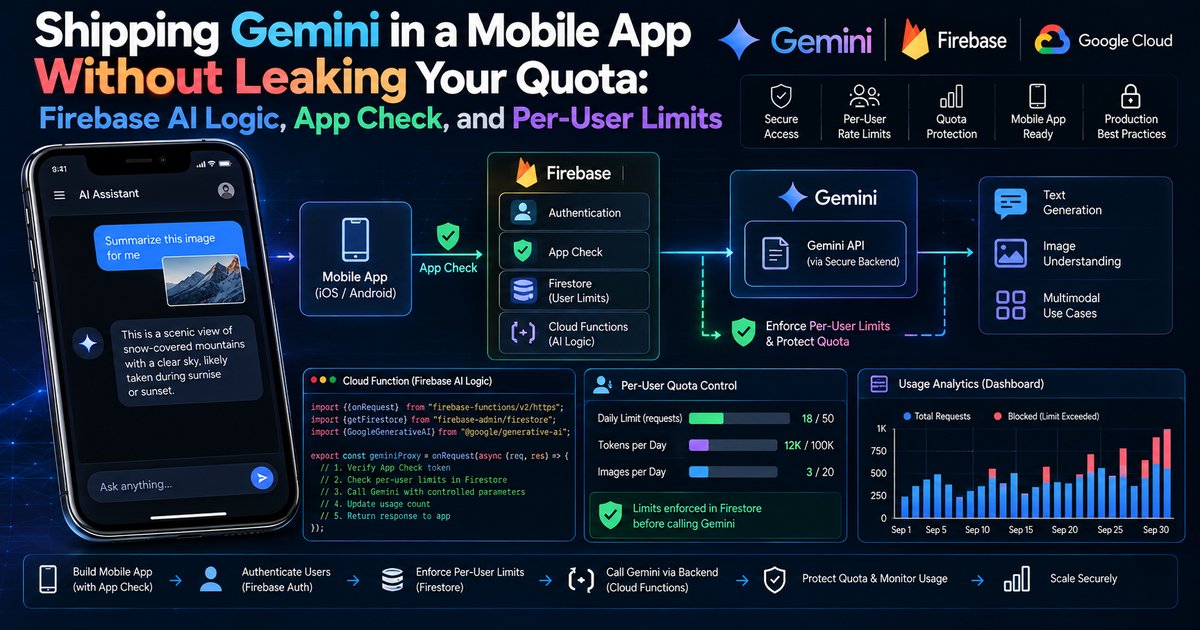
An API key compiled into a mobile app is a published API key. Google's Gemini API key documentation says it in one line: "Keys compiled in client-side code can be extracted by users."
Firebase closed a large part of that hole from its own side this year. The Firebase AI Logic FAQ states that since mid-2026 the product no longer uses standard Gemini API keys at all and authorizes requests with a Google-managed service account instead, and the Firebase App Check page for AI Logic states that App Check enforcement becomes required on November 2, 2026.
Those two changes stop the anonymous script running with a stolen key. They do not stop a real, signed-in user on a genuine phone from spending your money, and the one per-user control that Firebase AI Logic ships, a requests-per-minute quota described at firebase.google.com/docs/ai-logic/quotas, applies one number to every user and has no daily dimension.
Closing that last gap takes a small piece of server code, and most of the engineering below goes into it.
# What this article covers
- Why This Matters: A Key in Your APK Is a Key in Everyone's Hands
- Concepts You Need Before We Lock Anything Down
- How a Request Travels: The Leaky Path Versus the Proxied Path
- What Each Layer Stops, and What It Does Not
- Putting Real Prices Next to the Design
- Locking It Down Step by Step: Larder Lane's Migration
- Pitfalls and Troubleshooting
- What Larder Lane Shipped, and What I Would Check in Your App
# Why This Matters: A Key in Your APK Is a Key in Everyone's Hands
Every mobile app that calls a paid API directly has the same shape of problem. The app has to prove to the API that it is allowed to make the call, so it carries some credential. The app also has to run on hardware you do not own, in the hands of people you have never met, so anything it carries can be read. An APK, which is the Android package file that the Play Store installs on a phone, is a zip archive. Pull it off a device, unzip it, and the strings inside are there for anyone patient enough to look.
For most Firebase services this is fine, because the thing you ship (the Firebase configuration file with its project ID and Firebase API key) only identifies your project. Firebase's security checklist for AI Logic is explicit that "Firebase-related APIs use API keys only to identify the Firebase project or app, not for authorization to call the API." Authorization comes from somewhere else: Security Rules, Firebase Authentication, App Check.
A raw Gemini API key is different. It is the authorization. Whoever holds it can call the model, and the bill lands on the project the key belongs to. That is the trap a lot of early Gemini mobile prototypes fell into, including the one we will follow.
# The case we will follow: Larder Lane (fictional)
Who: Larder Lane is a fictional recipe app for Android and iOS, run by a small team. Its two AI features are "Ask Larder", a text chat that answers cooking questions, and "Pantry Snap", where a user photographs the inside of their cupboard and gets recipe suggestions built from what is visible.
The situation: The first version shipped on the older Google AI client SDK for Android, with a Gemini API key injected intoBuildConfigat build time from a local properties file. The key was never in the Git repository, which made the team feel safe. It was in every APK on every phone.
What broke: Someone extracted the key from a public build and started calling Gemini from their own scripts for workloads that had nothing to do with recipes. Larder Lane's usage graphs climbed while its daily active users stayed flat.
What it cost: A billing alert that arrived after the damage was done, a weekend spent rotating the key, and a second outage caused by the rotation itself: every installed copy of the app still carried the old key, so Ask Larder and Pantry Snap broke for all users until an update shipped and people installed it.
Where we end up: Ask Larder runs through Firebase AI Logic with App Check (Play Integrity on Android, App Attest on iOS) using limited-use tokens, authenticated-users mode, and a lowered per-user rate limit. Pantry Snap, the expensive multimodal feature, runs through a callable Cloud Function that enforces App Check, checks the signed-in user, and charges each call against a per-user daily budget stored in Firestore. A spend cap sits underneath both.
The detail that hurt Larder Lane most is the rotation outage, and it generalizes. When the credential lives in the client, you cannot revoke it without breaking every client that has it. The fix is structural: the credential that actually authorizes Gemini has to live somewhere you control, and the client has to prove something else about itself instead.
# Concepts You Need Before We Lock Anything Down
A handful of terms carry the rest of the article. Skim them if you already ship Firebase apps.
API Keys, Quota, and Billing
Hover to expand Tap to expandAn API key is a string your code sends with each request so the service knows which project it belongs to. Quota caps how much of a resource a project may use in a time window, and a rate limit is a quota measured per unit of time.
Analogy: The key is a membership card, quota is the venue's capacity, billing is the tab you run up once inside.
Why it matters: A standard key only identifies a project for billing and quota purposes, while an auth key is bound to a service account and actually authorizes the call, and neither belongs in a mobile app.
Firebase AI Logic and the Proxy
Hover to expand Tap to expandFirebase AI Logic is the Firebase product that lets mobile and web apps call Gemini models through Firebase client SDKs, previously called Vertex AI in Firebase. Requests do not go to Gemini directly; they go through a proxy gateway where App Check verification happens first.
Analogy: It is a locked lobby between your app and the model, where a Google-managed service account, not your app, holds the real key to the elevator.
Why it matters: The credential that pays for Gemini never leaves Google's side of the wire, so there is nothing in the client worth stealing anymore.
Attestation and App Check
Hover to expand Tap to expandAttestation is a trusted party vouching for a fact about a device or an app. Firebase App Check collects that vouching, through Play Integrity on Android or App Attest on iOS, and turns it into a short-lived token your requests carry.
Analogy: It is a bouncer checking that you are who your ID says you are, not just that you are holding an ID.
Why it matters: Enforcement is the switch that turns App Check from only recording whether tokens were valid into rejecting requests without one, and until a product is enforced it gives you metrics, not protection.
Session Tokens and Limited-Use Tokens
Hover to expand Tap to expandSession tokens are the App Check default: the SDK caches and reuses them until a configurable time to live, 30 minutes to 7 days, runs out. Limited-use tokens are minted fresh per request, never cached, and expire in a fixed 5 minutes.
Analogy: A session token is a day pass you flash all day, a limited-use token is a one-ride ticket that gets punched once.
Why it matters: Replay protection accepts a limited-use token exactly once and rejects session tokens outright, so a token copied off the wire cannot be reused.
Authenticated-Users Mode
Hover to expand Tap to expandFirebase Authentication signs users in and gives each one a stable user ID, called a UID. Authenticated-users mode is a project-wide Firebase AI Logic setting that rejects every request lacking Firebase Authentication credentials, returning a 401 otherwise.
Analogy: It is a guest list at the door, applied to the whole building rather than one room.
Why it matters: The setting cannot be applied per user, per API, or per template, so it only answers "is someone signed in", not "is this person allowed to spend this much."
Rate Limits Versus Budgets
Hover to expand Tap to expandA rate limit bounds how fast one user can go, such as requests per minute, and it stops a burst. A budget bounds how much one user can consume over a longer window, such as a day, and it stops a user who stays under the burst limit but never stops.
Analogy: A rate limit is a turnstile that only lets one person through per second, a budget is the daily visitor cap on the whole park.
Why it matters: Firebase AI Logic ships the first out of the box. Larder Lane needed both, so the second one had to be written by hand.
Cloud Functions and Firestore
Hover to expand Tap to expandCloud Functions for Firebase runs backend code in response to events or calls without managing servers, and a callable function is one your app invokes through the Firebase SDK, which automatically attaches the user's credentials and App Check token. Firestore is Firebase's document database, and a transaction is a group of reads and writes that succeed together or get retried.
Analogy: The function is a locked back office, and the Firestore transaction is the one ledger clerk everyone has to queue behind.
Why it matters: A transaction is what makes a per-user counter safe when many requests race to update it at once.
# How a Request Travels: The Leaky Path Versus the Proxied Path
Larder Lane's first version and its current version both end at the same Gemini model. Everything between the phone and the model is different, and the sequence below shows where each check sits.
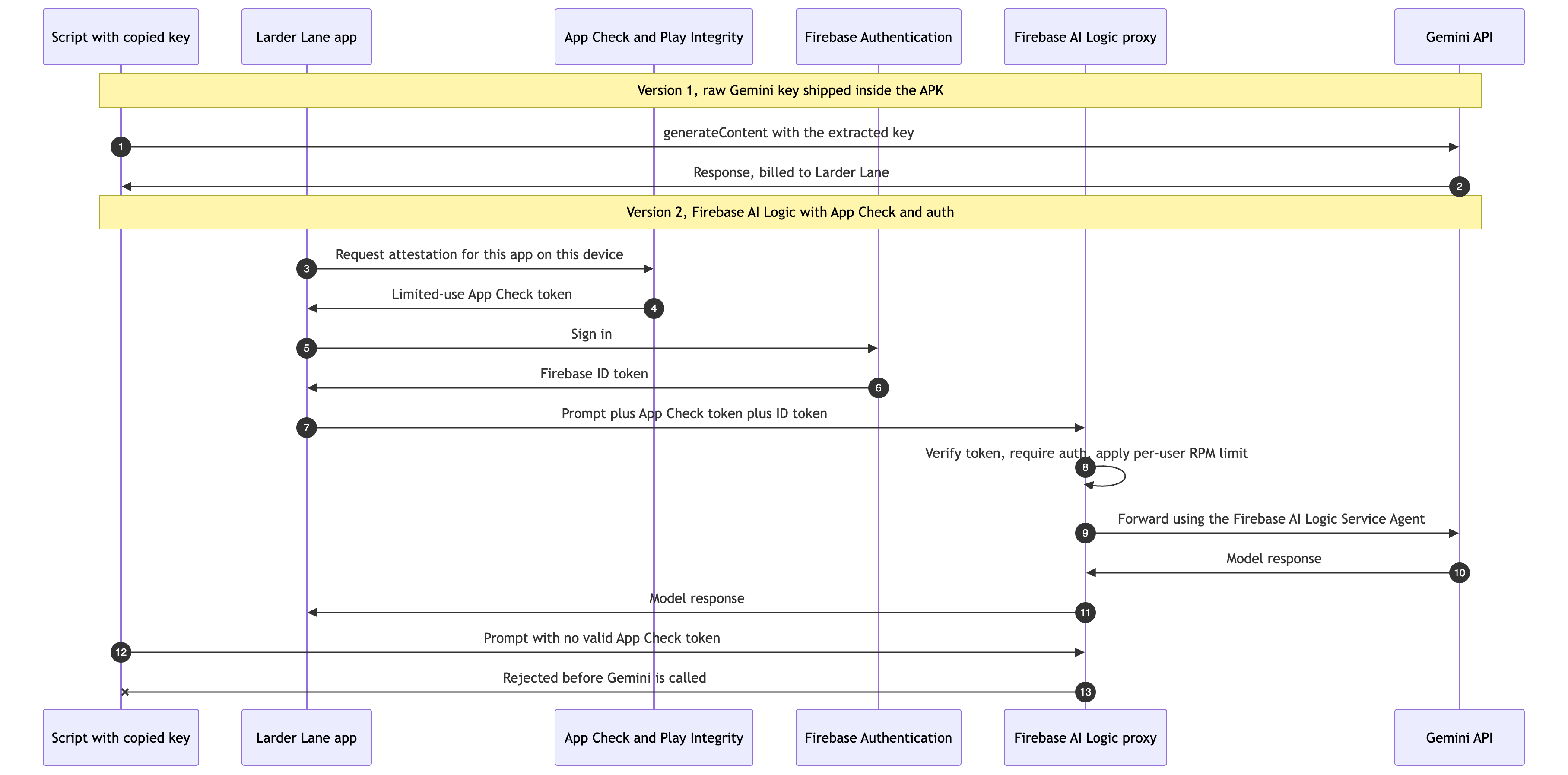
Version 1 has one check, does this request carry the key, and a copied key passes it as easily as the app does. Version 2 adds attestation and sign-in checks at the proxy, so the script fails before Gemini is ever billed.
Two things changed between the halves of the diagram. In version 1, the only check was "does this request carry the key", and the attacker's script passed it as easily as the app did. In version 2, the request has to carry a token that a platform attestation service minted for a recognized copy of the app, plus credentials for a signed-in user, and the proxy checks both before Gemini sees anything. The script in the last two steps has no way to produce a valid App Check token for Larder Lane, so it fails at the gateway and nothing is billed for model usage.
The diagram also shows what version 2 does not change. A genuine user, on a genuine phone, running the genuine app, passes every check in the middle block. If that user, or a bot driving the real app's screens, sends requests all day, the proxy will forward them as long as each one stays under the per-minute limit. That is the gap the rest of the design has to close.
# What Each Layer Stops, and What It Does Not
Layering security controls only helps if you know which threat each layer answers, so I write it down as a table before writing code. Every cell below comes from the documented behavior of the product named in its column header (sources are linked in the walkthrough); the right-hand column is the code Larder Lane writes itself.
| Threat | App Check (enforced) | Authenticated-users mode | Built-in per-user RPM limit | Spend cap on Firebase AI Logic | Server-side daily budget |
|---|---|---|---|---|---|
| Script calling with values copied from the APK | Blocks: no valid attestation | Partial: blocks it unless the script can create an account through your open sign-in methods | Not relevant | Limits damage after the fact | Not relevant |
| Repackaged or modified APK | Blocks by default: Play Integrity requires the PLAY_RECOGNIZED label |
Does not help: the fake app can sign in | Not relevant | Limits damage | Not relevant |
| Captured App Check token replayed by a script | Blocks only with replay protection enforced | Blocks if no credentials | Not relevant | Limits damage | Not relevant |
| Signed-in user sending a burst | Does not help | Does not help | Blocks above the configured RPM | Limits damage | Blocks once the day's budget is used |
| Signed-in user staying just under the RPM limit all day | Does not help | Does not help | Does not help | Pauses the whole service for everyone | Blocks once the day's budget is used |
| Your own bug looping on generateContent | Does not help | Does not help | Slows it | Pauses the service | Blocks the affected users |
The spend cap column deserves a word. Firebase's spend cap documentation says that when a service reaches its cap, Cloud Billing "pauses that service for the rest of the month", and it warns that spend caps "are not 'hard caps'" because usage reporting lags. A spend cap is a circuit breaker for the project, not a per-user control: when it trips, every Larder Lane user loses the feature, including the ones who did nothing wrong.
Reading down the last two rows is what convinced Larder Lane to write a server-side budget. Everything Firebase provides out of the box either does not apply to a well-behaved-looking heavy user, or applies to everyone at once.
# Putting Real Prices Next to the Design
Cost is the reason any of this matters, so it helps to look at the real price list rather than guess. The figures below come from Google's Gemini Developer API pricing page (ai.google.dev/gemini-api/docs/pricing), read on October 13, 2026, for gemini-3.8-flash, the stable model that Firebase's production checklist uses as its example. They are per one million tokens, in US dollars, for the paid tier. Check the page before relying on them; Google's own table already shows a scheduled change.
| Gemini 3.8 Flash, paid tier, per 1M tokens | Through December 31, 2026 | Starting January 1, 2027 |
|---|---|---|
| Standard input price | $0.75 | $1.50 |
| Standard output price (including thinking tokens) | $3.75 | $7.50 |
| Batch input price | $0.375 | $0.75 |
The same pricing page lists the free tier for this model as "Free of charge" for input and output. Firebase's own pricing page for AI Logic adds that "using Firebase AI Logic is free-of-charge" as a product, and that the Gemini usage behind it is billed according to the API provider you choose.
I am deliberately not turning this table into a "cost per abusive user" number. That figure depends on prompt length, image size, how many thinking tokens the model spends, and how long the abuse runs, and any single number I printed here would be invented. The useful takeaway is the shape: output tokens cost several times what input tokens cost on this price list, and thinking tokens are billed as output. A feature like Pantry Snap that sends a photo and asks for several full recipes back is on the expensive end of whatever your own prompts turn out to be, which is why it gets the strictest budget.
# Locking It Down Step by Step: Larder Lane's Migration
The order of the steps matters. Larder Lane's first attempt at a fix rotated the key before an app update was ready, which is how the second outage happened. The sequence below gets the replacement path working and released before anything old is turned off.
# Step 1: Move to the Firebase AI Logic SDK and stop shipping a Gemini key
Larder Lane's version 1 used the Google AI client SDK for Android, for which Firebase publishes a dedicated migration guide (firebase.google.com/docs/ai-logic/migrate-from-google-ai-client-sdks). The Gradle side of the migration swaps that dependency for the Firebase libraries. The versions below come from Firebase's Android get-started page, which shows the Firebase BoM (the bill of materials, a single version number that pins compatible versions of every Firebase library) at 35.0.0.
// app/build.gradle.kts
dependencies {
    implementation(platform("com.google.firebase:firebase-bom:35.0.0"))

    // Firebase AI Logic client SDK
    implementation("com.google.firebase:firebase-ai")

    // Sign-in and the callable function used by Pantry Snap
    implementation("com.google.firebase:firebase-auth")
    implementation("com.google.firebase:firebase-functions")

    // App Check: Play Integrity everywhere, debug provider only in debug builds
    implementation("com.google.firebase:firebase-appcheck-playintegrity")
    debugImplementation("com.google.firebase:firebase-appcheck-debug")

    // For Task.await() in coroutines (version managed in the version catalog)
    implementation(libs.kotlinx.coroutines.play.services)
}
The line that gets deleted matters as much as the lines that get added: the buildConfigField that injected the Gemini key goes away, and so does the key in the local properties file. Larder Lane's Pantry Snap function will need a Gemini credential on the server in Step 7, and that one will live in Secret Manager.
# Step 2: Install App Check per build type
Firebase's docs say to use the debug provider only in debug builds and never to ship a debug token. The tidy way to enforce that in Android is to give the debug and release source sets their own copy of one small object, so the release build cannot even compile a reference to the debug provider. Because the debug artifact is declared with debugImplementation, a release build that referenced it would fail to compile, which is exactly the failure you want.
// app/src/release/kotlin/com/larderlane/app/AppCheckSetup.kt
package com.larderlane.app

import com.google.firebase.Firebase
import com.google.firebase.appcheck.appCheck
import com.google.firebase.appcheck.playintegrity.PlayIntegrityAppCheckProviderFactory

object AppCheckSetup {
    fun install() {
        Firebase.appCheck.installAppCheckProviderFactory(
            PlayIntegrityAppCheckProviderFactory.getInstance(),
        )
    }
}
// app/src/debug/kotlin/com/larderlane/app/AppCheckSetup.kt
package com.larderlane.app

import com.google.firebase.Firebase
import com.google.firebase.appcheck.appCheck
import com.google.firebase.appcheck.debug.DebugAppCheckProviderFactory

object AppCheckSetup {
    fun install() {
        // Prints a debug token to Logcat. Register it under
        // Security > App Check > Apps > Manage debug tokens. Never commit it.
        Firebase.appCheck.installAppCheckProviderFactory(
            DebugAppCheckProviderFactory.getInstance(),
        )
    }
}
// app/src/main/kotlin/com/larderlane/app/LarderLaneApp.kt
package com.larderlane.app

import android.app.Application
import com.google.firebase.Firebase
import com.google.firebase.initialize

class LarderLaneApp : Application() {
    override fun onCreate() {
        super.onCreate()
        Firebase.initialize(context = this)
        // Must run before any other Firebase SDK makes a request.
        AppCheckSetup.install()
    }
}
The Play Integrity setup page lists one console prerequisite that is easy to miss: register the app for Play Integrity in the Firebase console with its SHA-256 certificate fingerprint, which is the hash of the key your release builds are signed with. If you use Play App Signing, the fingerprint you need is the one Google Play signs with, not the one on your laptop.
On iOS, Larder Lane follows the App Attest provider page, which shows a provider factory that returns AppAttestProvider on iOS 14 and later and falls back to DeviceCheckProvider before that:
import FirebaseCore
import FirebaseAppCheck

class LarderAppCheckProviderFactory: NSObject, AppCheckProviderFactory {
  func createProvider(with app: FirebaseApp) -> AppCheckProvider? {
    if #available(iOS 14.0, *) {
      return AppAttestProvider(app: app)
    } else {
      return DeviceCheckProvider(app: app)
    }
  }
}

// Before FirebaseApp.configure():
// AppCheck.setAppCheckProviderFactory(LarderAppCheckProviderFactory())
# Step 3: Initialize Firebase AI Logic with limited-use tokens
This is the whole client-side change for Ask Larder. The Kotlin reference for com.google.firebase.ai documents Firebase.ai(app, backend, useLimitedUseAppCheckTokens), and Firebase's App Check page for AI Logic shows the same call with the flag set to true. Turning it on now, before replay protection is enforced, means every installed copy of this release can satisfy replay protection later.
// app/src/main/kotlin/com/larderlane/app/ask/AskLarderRepository.kt
package com.larderlane.app.ask

import com.google.firebase.Firebase
import com.google.firebase.ai.ai
import com.google.firebase.ai.type.FirebaseAIException
import com.google.firebase.ai.type.GenerativeBackend
import com.google.firebase.ai.type.QuotaExceededException

sealed interface AskResult {
    data class Answer(val text: String) : AskResult
    data object SlowDown : AskResult
    data class Failed(val cause: FirebaseAIException) : AskResult
}

class AskLarderRepository {

    private val model = Firebase.ai(
        backend = GenerativeBackend.googleAI(),   // Gemini Developer API
        useLimitedUseAppCheckTokens = true,       // fresh token per request
    ).generativeModel("gemini-3.8-flash")         // stable model, not a -latest alias

    suspend fun ask(question: String): AskResult = try {
        val response = model.generateContent(question)
        AskResult.Answer(response.text.orEmpty())
    } catch (e: QuotaExceededException) {
        // Raised when a quota is hit, which includes the per-user RPM limit.
        AskResult.SlowDown
    } catch (e: FirebaseAIException) {
        AskResult.Failed(e)
    }
}
A few choices in that snippet are deliberate. GenerativeBackend.googleAI() selects the Gemini Developer API; the same class also has agentPlatform(location) for the Agent Platform Gemini API, according to the Kotlin reference. The model name is a stable version, because Firebase's production checklist says not to use preview, experimental, or -latest models in production. Larder Lane also moved the model name into Firebase Remote Config shortly after, which the same checklist recommends so you can change models without shipping an app update. I left that out of the snippet to keep it readable.
Notice what is absent: no key, no secret, no endpoint URL. The Firebase configuration file identifies the project, App Check proves the app, and the proxy does the rest.
# Step 4: Enforce App Check for Firebase AI Logic, in the right order
For a brand-new project, the Firebase App Check page says the console's setup workflow has enforced App Check for AI Logic automatically since early July 2026. Larder Lane's project predates that, so it had to check the Security > App Check > APIs tab, where Firebase AI Logic showed as Unenforced.
The order Larder Lane followed matches the FAQ on that page for apps that are already released:
- Ship the release that contains Steps 1 to 3, so new installs and updated installs send valid tokens.
- Watch the App Check metrics for Firebase AI Logic in the console. Requests from version 1 show up as unverified, because version 1 has no App Check at all (it also never talked to Firebase AI Logic, so in Larder Lane's case the unverified traffic was close to nothing).
- Enforce baseline protection once the verified share is where you need it.
- Turn on replay protection later, after enough users are on a build with limited-use tokens. The page recommends monitoring the "Unverified: Reused token" metric first, because enforcing replay protection blocks every request that arrives with a session token.
There is a hard date on this, so it is worth being precise about it. Firebase's App Check page for AI Logic states that starting November 2, 2026, "we'll automatically enforce App Check for Firebase AI Logic, and it can't be unenforced," and that requests from app versions without App Check will then be blocked. If your app calls Firebase AI Logic today without App Check, that date is your real deadline for getting a build with a production provider into users' hands.
# Step 5: Require signed-in users
Larder Lane already had Firebase Authentication for saved recipes, so turning on authenticated-users mode was a console change: AI Services > AI Logic > Settings tab, then the "Enforce authenticated-users mode" toggle, per the auth-mode guide. The SDK sends the signed-in user's credentials automatically, so the Kotlin code from Step 3 did not change.
Two caveats from that guide shaped how Larder Lane signs people in. First, anonymous accounts and default email-and-password accounts "are considered authenticated users" by this mode, and the guide says plainly that they "are not robust forms of authentication (especially for protecting a paid resource)". Larder Lane already required Google or Apple sign-in before AI features, so it kept that. Second, the setting is project-wide and blocks any app version that does not send Firebase Authentication credentials, so it has to wait until every active client signs users in.
# Step 6: Lower the built-in per-user rate limit
The Firebase AI Logic quotas page states that the per-user limit defaults to 100 requests per minute, that it counts generate-content requests per user, per region, per minute, and that "there isn't a way to set the rate limit for a specific user or specific group of users." The same page recommends adjusting it to your app's real needs. The edit happens in the Google Cloud console on the Firebase AI Logic API's Quotas & System Limits tab, and requires the serviceusage.quotas.update permission. The page also notes that the row labeled "(default)" does not apply to Firebase AI Logic, so filter for the generate-content rows and their regions.
In this walkthrough we set Larder Lane's per-user limit to 6 requests per minute. That figure is a design choice for a fictional cooking chat, not a recommendation: it reflects how fast a person can plausibly read an answer and type a follow-up, and you should pick yours by looking at your own AI monitoring data.
One uncertainty I want to flag honestly. The quotas page says "per user" but does not spell out how a user is identified for this quota, and the production checklist phrases the same control as preventing "individual client instances from consuming excessive quota." I would not build per-user business logic, such as paid tiers, on assumptions about that key. That is part of why Pantry Snap's budget lives in Larder Lane's own code.
# Step 7: Give the expensive feature a per-user daily budget
Here is the gap from the threat table, closed. Pantry Snap does not call Firebase AI Logic from the client. It calls a callable Cloud Function, and the function is the only thing holding a Gemini credential for this feature. Before calling Gemini, the function verifies App Check, requires a signed-in user, and charges the call against that user's budget for the day in a Firestore transaction.
Why not keep Pantry Snap on the client SDK and keep a counter alongside it? Because a counter the client checks is a counter the client can skip. App Check makes a modified client much harder to build, but a budget is a business rule, and I want business rules enforced in code that runs on machines I control. The cost is that Pantry Snap gives up the client SDK's conveniences for this one feature.
In this walkthrough we give free accounts 5 Pantry Snap calls per day and Larder Plus subscribers 40 per day. Both numbers are design choices for the fictional app, picked to make the code concrete; they are not measured or recommended values.
// functions/index.js  (Cloud Functions for Firebase, 2nd gen, Node.js)
const { onCall, HttpsError } = require("firebase-functions/v2/https");
const { defineSecret } = require("firebase-functions/params");
const { initializeApp } = require("firebase-admin/app");
const { getFirestore, FieldValue } = require("firebase-admin/firestore");
const { GoogleGenAI } = require("@google/genai");

initializeApp();
const db = getFirestore();

// An auth key from Google AI Studio, stored in Cloud Secret Manager.
// Set it once with the Firebase CLI: firebase functions:secrets:set GEMINI_API_KEY
const geminiKey = defineSecret("GEMINI_API_KEY");

// Design choice for the fictional Larder Lane app, not a benchmark.
const DAILY_LIMIT = { free: 5, plus: 40 };
const MAX_IMAGE_BASE64_CHARS = 4_000_000; // reject oversized uploads before paying for them
const ALLOWED_MIME = new Set(["image/jpeg", "image/png", "image/webp"]);

const PROMPT =
  "List the ingredients you can identify in this photo of a pantry, " +
  "then suggest up to three recipes that use mostly those ingredients.";

exports.suggestFromPantryPhoto = onCall(
  {
    enforceAppCheck: true,        // reject missing or invalid App Check tokens
    consumeAppCheckToken: true,   // replay protection: each token works once
    secrets: [geminiKey],
  },
  async (request) => {
    if (!request.auth) {
      throw new HttpsError("unauthenticated", "Sign in to use Pantry Snap.");
    }

    const { imageBase64, mimeType } = request.data ?? {};
    if (typeof imageBase64 !== "string" || !ALLOWED_MIME.has(mimeType)) {
      throw new HttpsError("invalid-argument", "Send one JPEG, PNG, or WebP image.");
    }
    if (imageBase64.length > MAX_IMAGE_BASE64_CHARS) {
      throw new HttpsError("invalid-argument", "That photo is too large.");
    }

    const uid = request.auth.uid;
    // "plan" is a custom claim set server-side with the Admin SDK when a
    // subscription starts, so the client cannot grant itself a bigger budget.
    const plan = request.auth.token.plan === "plus" ? "plus" : "free";
    const limit = DAILY_LIMIT[plan];
    const day = new Date().toISOString().slice(0, 10); // UTC calendar day
    const usageRef = db.doc(`aiUsage/${uid}/days/${day}`);

    // Reserve one unit of budget atomically, before spending anything on Gemini.
    const used = await db.runTransaction(async (tx) => {
      const snap = await tx.get(usageRef);
      const count = snap.exists ? snap.get("count") : 0;
      if (count >= limit) {
        throw new HttpsError("resource-exhausted", "Daily Pantry Snap limit reached.", {
          limit,
          plan,
        });
      }
      tx.set(
        usageRef,
        { count: count + 1, plan, updatedAt: FieldValue.serverTimestamp() },
        { merge: true },
      );
      return count + 1;
    });

    const ai = new GoogleGenAI({ apiKey: geminiKey.value() });
    try {
      const response = await ai.models.generateContent({
        model: "gemini-3.8-flash",
        contents: [
          {
            role: "user",
            parts: [
              { inlineData: { mimeType, data: imageBase64 } },
              { text: PROMPT },
            ],
          },
        ],
      });
      return { suggestion: response.text ?? "", used, limit };
    } catch (err) {
      // Give the unit back: users should not pay budget for our failures.
      await usageRef.update({ count: FieldValue.increment(-1) });
      throw new HttpsError("unavailable", "Pantry Snap failed. This try was not counted.");
    }
  },
);
The structure matters more than any one line. The budget is reserved before the expensive call, so two requests racing each other cannot both slip under the limit; Firestore retries the transaction if the document changed underneath it. The refund on failure keeps the budget fair without opening a hole, because a refund only happens after Gemini itself failed. The image checks run before the transaction, so malformed requests do not burn budget at all.
The enforceAppCheck and consumeAppCheckToken options are taken from Firebase's "Enable App Check enforcement for Cloud Functions" page. That page lists two requirements for consumeAppCheckToken: it is a beta feature supported only in the Node.js SDK, and the function's service account needs the "Firebase App Check Token Verifier" role (for 2nd gen functions with the default Admin SDK setup, that is the default compute service account). It also notes that consuming tokens adds a network round trip, which is why most apps reserve it for sensitive endpoints. A function that spends money on every call is about as sensitive as Larder Lane's endpoints get.
About the server-side Gemini credential: Google's API key page says that since May 28, 2026, every new key created in Google AI Studio is an auth key, and that the Gemini API rejects unrestricted standard keys. A fresh auth key in Secret Manager satisfies both. The Google Gen AI SDK's README also shows an enterprise: true initialization for the Agent Platform, which authenticates with the function's own service account instead of a key, and is worth considering if your project is already on that provider.
Firestore Security Rules close the last door. The function writes the usage documents through the Admin SDK, which is not subject to Security Rules, so clients only need to read their own usage for a "3 of 5 left today" label and should never write it:
rules_version = '2';
service cloud.firestore {
  match /databases/{database}/documents {
    match /aiUsage/{uid}/days/{day} {
      allow read: if request.auth != null && request.auth.uid == uid;
      allow write: if false;
    }
  }
}
On the Android side, the Kotlin call uses the getHttpsCallable builder overload from the Functions reference and requests limited-use tokens, matching the Cloud Functions App Check docs:
// app/src/main/kotlin/com/larderlane/app/snap/PantrySnapRepository.kt
package com.larderlane.app.snap

import com.google.firebase.Firebase
import com.google.firebase.functions.FirebaseFunctionsException
import com.google.firebase.functions.functions
import kotlinx.coroutines.tasks.await

sealed interface SnapResult {
    data class Suggestion(val text: String, val used: Int, val limit: Int) : SnapResult
    data object DailyLimitReached : SnapResult
}

class PantrySnapRepository {

    private val suggest = Firebase.functions.getHttpsCallable("suggestFromPantryPhoto") {
        limitedUseAppCheckTokens = true   // required because the function consumes tokens
    }

    suspend fun suggest(imageBase64: String, mimeType: String): SnapResult = try {
        val result = suggest
            .call(mapOf("imageBase64" to imageBase64, "mimeType" to mimeType))
            .await()
        @Suppress("UNCHECKED_CAST")
        val data = result.data as Map<String, Any?>
        SnapResult.Suggestion(
            text = data["suggestion"] as? String ?: "",
            used = (data["used"] as Number).toInt(),
            limit = (data["limit"] as Number).toInt(),
        )
    } catch (e: FirebaseFunctionsException) {
        if (e.code == FirebaseFunctionsException.Code.RESOURCE_EXHAUSTED) {
            SnapResult.DailyLimitReached
        } else {
            throw e
        }
    }
}
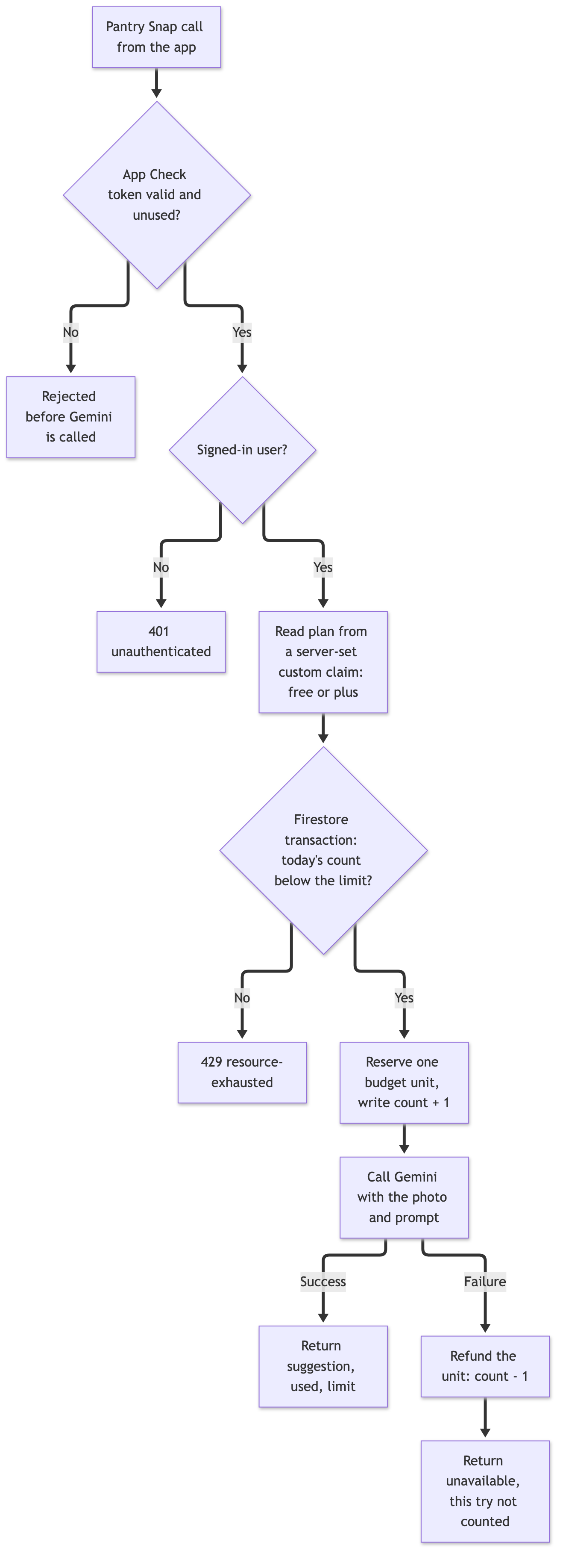
Every rejection in the Pantry Snap function happens before Gemini is ever called, except one: a failed Gemini call refunds the budget unit it already reserved.
# Step 8: Put a spend cap and alerts underneath everything
The last layer does not protect any single user; it protects the company. Firebase's spend cap page says spend cap budgets are available for Firebase AI Logic, Cloud Functions for Firebase, App Hosting, and Extensions, and that reaching the cap pauses that service for the rest of the month. Larder Lane set one on Firebase AI Logic and another on Cloud Functions, plus an alerts-only budget for the project as a whole. Because the docs warn that enforcement lags usage reporting "by several minutes", the caps are set below the number that would actually hurt, not at it.
Larder Lane also turned on AI monitoring in the Firebase console, which the production checklist describes as showing request counts, latency, token usage, and error rates. That dashboard is where the team checks whether the per-minute limit this walkthrough picked in Step 6 is blocking real users, since that choice was a guess until real traffic says otherwise.
# Pitfalls and Troubleshooting
Most of the failures Larder Lane hit during the migration were configuration mismatches rather than bugs, and the Firebase docs name most of them directly.
403 PERMISSION_DENIEDsaying Firebase AI Logic "has been deactivated in this project": The App Check page explains that Firebase deactivates AI Logic in inactive projects without App Check enforcement. Enforce App Check, set up the debug provider if you are developing locally, and resend. If App Check is already enforced and the error persists, check whether replay protection is on, even in monitor-only mode: with replay protection on, "only limited-use tokens count as verified", so an app still sending session tokens will keep failing.401: unauthenticatedafter enforcing authenticated-users mode: Either the user is not signed in, or the app uses a non-Firebase sign-in system, which the auth-mode guide says this mode will block. Flutter apps onfirebase_aiv3.11.0 or lower also need to passauth: FirebaseAuth.instanceexplicitly during instantiation, per the same guide; the App Check page has the equivalentappCheck: FirebaseAppCheck.instancenote for those plugin versions.- The debug token ends up somewhere it should not: A registered debug token lets any build that presents it pass App Check. Firebase says not to commit it to a public repository and not to ship it in a production build. The split source sets from Step 2 handle the second half; a secret scanner in CI handles the first.
- Play Integrity failing for testers: By default App Check requires the
PLAY_RECOGNIZEDlabel, and the Play Integrity setup page notes that apps not published on Google Play are not eligible for it. Sideloaded internal builds should use the debug provider, and internal testing tracks on Play are the cleaner path for real-device testing with the production provider. - Enforcing too early for an app already in users' hands: Any app version without App Check sends unverified requests, and enforcement blocks them. This is the same trap as Larder Lane's key rotation in a new form: you cannot change what old builds send, so ship first, measure, and enforce second.
- Treating API key restrictions as attestation: Restricting your Firebase API key to your package name and signing certificate fingerprint is recommended in the security checklist, and Larder Lane did it. It is still not a substitute for App Check: the package name and the certificate fingerprint are not secrets, since both can be read from any copy of the APK.
# What Larder Lane Shipped, and What I Would Check in Your App
Larder Lane's final setup has no Gemini credential in either mobile app. Ask Larder calls Firebase AI Logic, which only forwards a request after App Check has verified a limited-use token from Play Integrity or App Attest and Firebase Authentication has identified a signed-in user, and the per-user rate limit caps how fast any one account can go. Pantry Snap calls a function that enforces App Check, consumes the token, checks the user's plan from a server-set custom claim, and charges a Firestore budget before a single image token is billed. Spend caps sit underneath both, and if every other layer fails they stop the damage at a known ceiling, at the price of pausing the feature for everyone.
None of that required anything exotic. It required noticing that each layer answers a different question. App Check asks "is this my app on a real device?" Authenticated-users mode asks "is there a signed-in person behind this?" The built-in quota asks "is this going too fast right now?" Only your own code can ask "has this person had their share today?", because only your code knows what a share is.
If you ship Gemini in a mobile app today, these are the checks I would run this week, in order:
- Search your release builds, not just your repository, for any Gemini API key. If you find one, plan the replacement path before you rotate, or you will repeat Larder Lane's second outage.
- Open Security > App Check > APIs in the Firebase console and confirm Firebase AI Logic says Enforced. If it does not, the November 2, 2026 enforcement date on Firebase's App Check page will make that decision for you.
- Make sure your next release passes
useLimitedUseAppCheckTokens = true, so replay protection becomes an option rather than a migration. - Lower the per-user rate limit from its default to something your AI monitoring data supports.
- For any feature where one user can cost real money, write the budget down as a number per user per day, and enforce it on the server.
Firebase AI Logic made the first four of those mostly console work. The fifth is a few dozen lines of Node.js and a Firestore rule, and it is the one that would have saved Larder Lane its weekend.
# Sources
If you want to contact me, feel free to drop an e-mail at [email protected] or check out my website at adityaseth.in :)
Also, here's my LinkedIn.
Thank you everyone for reading,

Over and out,
Aditya Seth.
Frequently asked
- Why is a Gemini API key unsafe to ship inside a mobile app?
- An APK is a zip archive that anyone can unzip, so any string compiled into it, including a key, can be extracted. A raw Gemini API key authorizes requests and bills the project it belongs to, so whoever extracts it can run paid requests on your account.
- Does Firebase App Check alone stop one signed-in user from overusing Gemini?
- No. App Check verifies that a request comes from a genuine copy of your app on a genuine device, and authenticated-users mode confirms someone is signed in, but neither one limits how much a real, well-behaved-looking user can consume over a day.
- What is the difference between a rate limit and a per-user budget for an AI feature?
- A rate limit bounds how fast one user can go, such as requests per minute, and stops a sudden burst. A budget bounds how much one user can consume over a longer window, such as a day, and stops a user who stays under the burst limit but never stops.
- Why does a project-wide spend cap not replace a per-user limit?
- A spend cap pauses the entire service for every user once the project hits its monthly limit, so it protects the company's bill but not an individual feature from one heavy user, and reaching it breaks the feature for everyone, including users who did nothing wrong.
Comments