Scaling Text Search Applications Using BigQuery ML Vector Embeddings for Unstructured Data

Imagine asking a librarian for a book on how to fix a leaky faucet, but they only hand you results containing that exact phrase. If you ask for "stopping water from dripping off pipes," they simply shrug and walk away. Is it a failure of the librarian? No, it is just a limitation of keyword matching.

Keyword search fails quietly - it just returns nothing, and you are left guessing why.
# What this article covers
- Introduction: The End of Exact Matches
- The Building Blocks of Meaning
- How Vector Math Replaces Keyword Matching
- Building the Hybrid Query Structure
- Optimizing Performance with Indexes
- The Case Study: Legal Discovery in Action
- Walkthrough: The Complete Query Implementation
- When Things Go Wrong: Troubleshooting Common Errors
- Conclusion: The Future of Data Search
# Introduction: The End of Exact Matches
Most search engines today feel frustratingly dumb because they treat 'red car' and 'scarlet automobile' as completely different topics. This is a fundamental limitation of how databases have worked for decades.
How can we make a computer understand the "vibe" of a search instead of just matching characters? It is a common headache for developers. You want a user to find a recipe for "healthy breakfast" even if the word "healthy" never appears in the database. Standard search fails here. It looks for exact matches. If the words do not align perfectly, the system returns nothing. It is frustrating for users and costly for businesses to maintain.
The solution lies in moving from keywords to meaning. We can do this by turning text into a long string of numbers. Think of these numbers as a map. Instead of looking for a specific word, the computer looks for the closest point on the map. If "scarlet" and "red" are both located in the same neighborhood on that map, the system will find both. This is the power of vector embeddings.
You do not need to build a complex new infrastructure to achieve this. BigQuery ML, a feature of Google Cloud that lets you run machine learning models directly in SQL without managing external servers, acts as a bridge. It allows you to generate these numerical maps directly inside your existing SQL environment. This means you can combine high-level intelligence with your traditional filters. You can ask the database to find "something similar to a winter coat" while simultaneously filtering for items that are "in stock" and "under $100." It combines the best of both worlds.
This guide is designed for anyone who knows the basics of SQL but is tired of the limitations of basic text matching. You will learn how to bridge the gap between raw data and intelligent results. I will walk you through the foundational concepts of how computers "read" meaning, the mathematical theory of embeddings, and the specific strategies to keep your queries fast and affordable. We will start with the core concepts, move into the underlying theory, look at a real-world case study, and finish with a step-by-step implementation guide.
We will see how to fix this without leaving your current data warehouse environment.
# The Building Blocks of Meaning
Think about the last time you tried to find a specific book in a massive, disorganized warehouse. If you just looked for the word "blue" on the spines, you might find a book about the ocean, a book about the sky, or a book about a sad mood. You would find many items, but many would be irrelevant to your actual goal. To find what you truly wanted, you would need someone who understands the context of your request.
Computers used to be like that warehouse. They could only find things if you gave them the exact right word. Now, we are teaching them to understand the "vibe" of your search. This transition from keywords to meaning relies on a specific set of building blocks.

Every book, sentence, or document ultimately collapses down to the same thing: a barcode the machine can measure distance between.
Embedding
Hover to expand Tap to expandAn embedding is a way of turning words or sentences into a list of numbers that computers can do math on. This is necessary because computers cannot read words; they can only process numbers. Analogy: Imagine translating every book in a library into a single long barcode. Books about cats will have barcodes that look almost identical to each other, while books about cats and books about dogs will have barcodes that are totally different. Why it matters: Everything else in this article, distance, similarity, dimensions, is just math performed on these barcodes.
Vector Search
Hover to expand Tap to expandVector search is a database lookup that finds the item with the closest number list to your query instead of just looking for an exact match. Analogy: Imagine you walk into a library and ask a librarian to grab the book standing physically closest to you on the shelf. You do not care about the title, you just want something in that neighborhood. Why it matters: This is what lets a search find relevant content even when the user's phrasing is slightly different from the stored data.
Semantic Similarity
Hover to expand Tap to expandSemantic similarity is the measure of how much two pieces of text mean the same thing to a human reader, calculated by math on their number lists. The model learns these relationships from millions of examples during training, not because they are obvious to a human. Analogy: It allows the computer to realize that "puppy" and "young dog" are nearly the same thing, the same way a person would. Why it matters: This is the actual quality being measured every time a vector search ranks results.
Latency
Hover to expand Tap to expandLatency is the amount of time it takes for a task to finish, usually measured in milliseconds. Analogy: Think of it as how long you have to wait for your coffee maker to beep after you hit the button. Why it matters: We want these complex "meaning" calculations to happen almost instantly so the user doesn't have to wait, which is exactly what indexes and filters in this article exist to protect.
Hybrid Search
Hover to expand Tap to expandHybrid search is a strategy that mixes two types of searching: one that looks for exact words and one that looks for meaning. Analogy: Imagine searching your phone contacts by typing a name (the exact match) but also looking at who you texted most recently (the context) to decide who to call. Why it matters: This is the "gold standard" this whole article builds toward, it combines the precision of traditional databases with the intelligence of modern AI.
Index
Hover to expand Tap to expandAn index is a helper structure that lets a database find information quickly without reading every single row. Analogy: Think of the index at the back of a textbook. Instead of reading all 500 pages to find a recipe for pancakes, you look at the index and go straight to page 42. Why it matters: Without an index, our search would be too slow to use in a real-world app once the table grows large.
Cosine Similarity
Hover to expand Tap to expandCosine similarity is a specific math formula used to measure the angle between two number lists. A small angle means high similarity. Analogy: Imagine two arrows sticking out of a single point. If they point in exactly the same direction, they are very similar. If they point in opposite directions, they are different. Why it matters: This is the actual math that powers the "distance" every vector search ranks results by.
Scalar Filter
Hover to expand Tap to expandA scalar filter is a standard condition that checks for exact values like dates, numbers, or specific words. Analogy: Think of looking at a calendar to see which days fall on a Tuesday. It is a hard rule, if today is Wednesday, you cannot include it. Why it matters: These filters allow us to narrow down the "neighborhood" before we start doing the heavy math of similarity.
Dimension
Hover to expand Tap to expandA dimension is the number of values in one embedding vector. Analogy: Think of it as the length of the barcode. A 3D space has length, width, and height (3 dimensions); a high-dimensional space is like a space with so many directions you cannot visualize it. Why it matters: Because our "meaning" maps are so complex, the number of dimensions is often in the hundreds or thousands, and two vectors must share the same dimension count to be compared at all.
Approximate Nearest Neighbor
Hover to expand Tap to expandApproximate Nearest Neighbor (ANN) is a technique that finds the "good enough" closest match very quickly instead of checking every single item. Analogy: In a huge crowd, finding the exact person with the same birthday as you might take ages; finding someone who is just one day off is much faster and usually what you want anyway. Why it matters: This is how we keep search speeds high even when we have millions of documents to search, and it is what a vector index actually enables under the hood.
# How Vector Math Replaces Keyword Matching
Instead of searching for words, we look for geometric proximity. Imagine a giant dark room where every object is represented by a tiny arrow pointing in a specific direction. Finding similar objects becomes as simple as finding arrows pointing in the same way.

Two arrows pointing the same way represent two ideas that mean nearly the same thing - no matter how differently they were spelled.
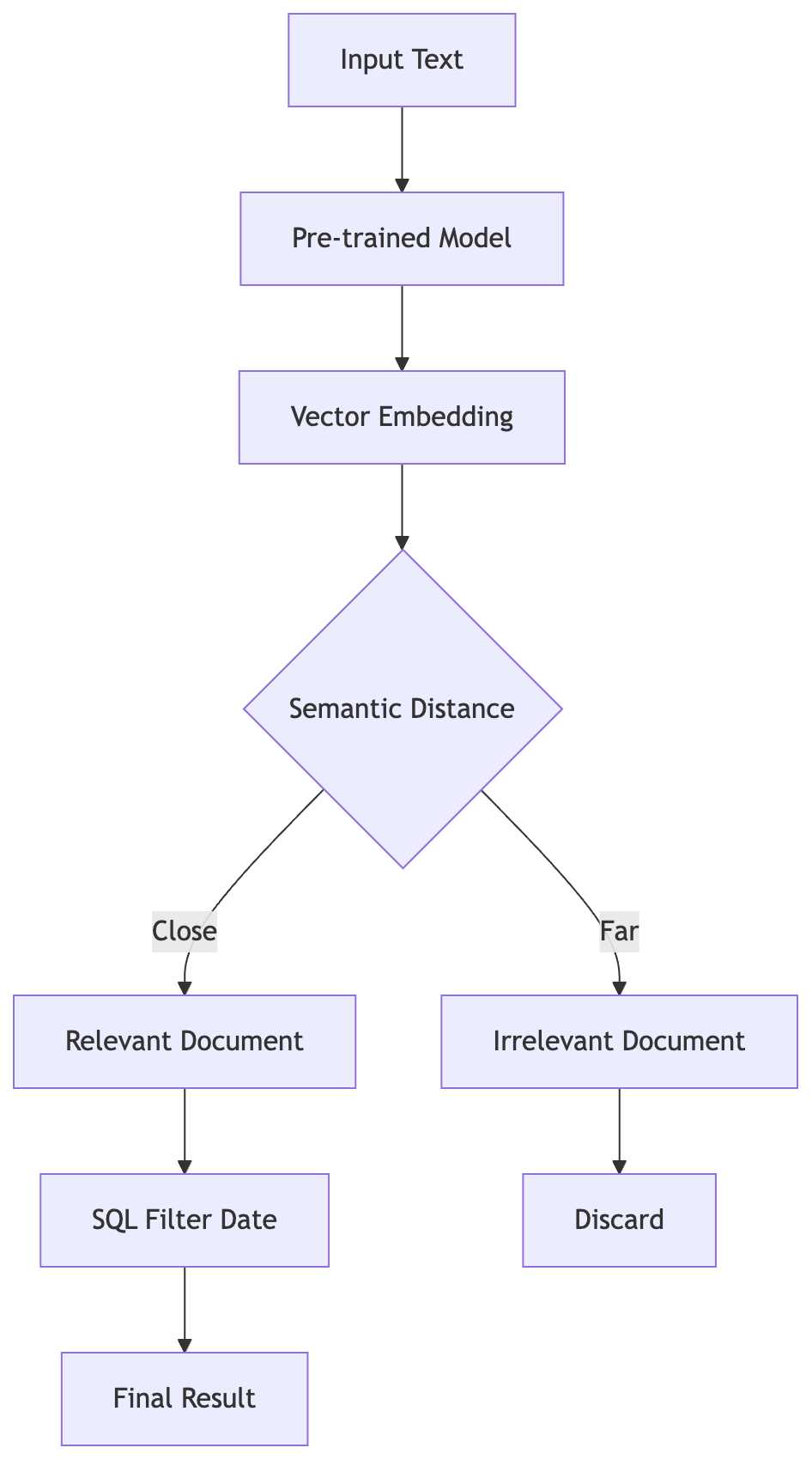
The pipeline transforms raw text into vectors, calculates semantic distance to filter meaning, then applies SQL constraints on time and sender.
How do we actually turn a human concept like "sadness" into a mathematical direction? We use an embedding, which is a long list of numbers representing a piece of data in a multi-dimensional space. Each number in that list represents a different dimension. You can think of a dimension as a specific "axis" of meaning. In a simple 3D space, you might have axes for "color," "size," and "weight." In a high-dimensional embedding, these dimensions represent abstract concepts like "formality," "urgency," or "sentiment."
When BigQuery ML processes your text, it maps your words into this high-dimensional space. If you change a word slightly, like swapping "happy" for "joyful", the resulting point in the space moves only a tiny amount. They stay close together. If you change the meaning entirely, like swapping "happy" for "furious," the point jumps across the room.
The math does not care about the spelling. It cares about the direction.
Because these points are located in a high-dimensional space, we can calculate the distance between them. If the distance is small, the meanings are similar. Is it math or magic? It is math. BigQuery ML uses pre-trained models to do this mapping automatically. You provide the text, and it returns the coordinates.
How do we verify this? You can test this by running a query that calculates the distance between two different phrases using the ML.GENERATE_EMBEDDING function. If you compare "The kitten is playful" and "The kitten is energetic," the distance will be small. If you compare "The kitten is playful" and "The stock market is crashing," the distance will be large. You can see the numbers for yourself.
Distance is the key. Instead of looking for the exact string "kitten," the database looks for any point in the 768 or 1536 dimensions (common sizes for these models) that sits near your search term.
The math is the engine. It allows the database to understand that "scout" and "pathfinder" are cousins. They are just two arrows pointing in nearly the same direction in the dark room. This geometric view explains why changing a single word in a sentence does not change the result as much as you might expect.
# Building the Hybrid Query Structure
Now we move from theory to practice. The most powerful trick is to let BigQuery do the heavy lifting inside the WHERE clause itself.

Scalar filters run early in the pipeline for a reason - they shrink the machinery the expensive vector math has to turn.
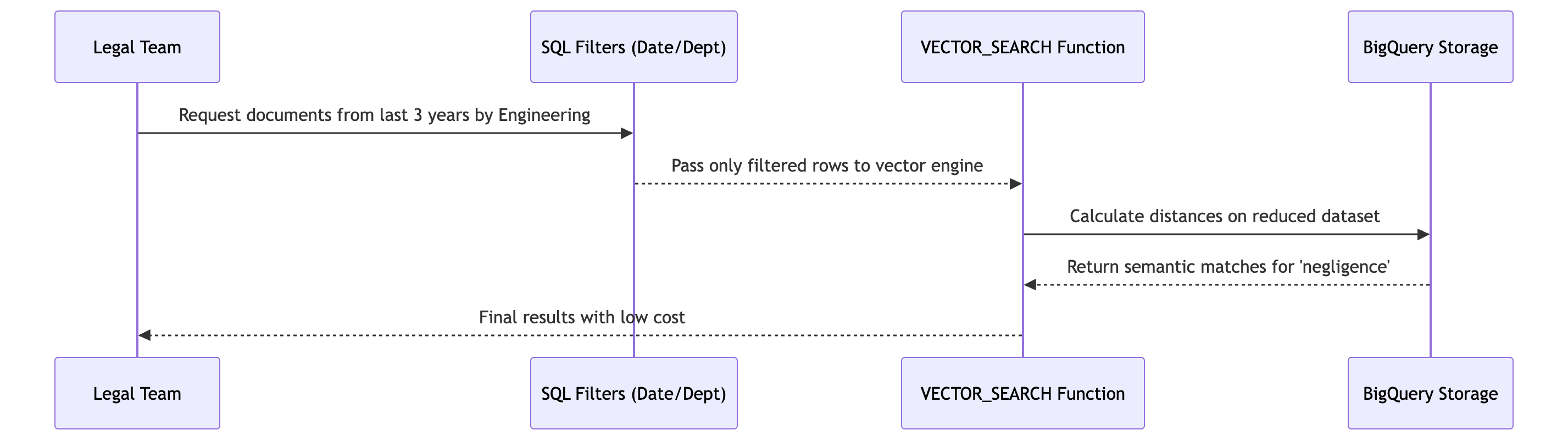
The query pipeline filters rows by date and department before calculating semantic distances.
You are probably staring at a massive table of documents and wondering how to filter for "recent legal filings" that "mention environmental liability." If you use standard SQL, you are stuck hunting for those exact words. If you use only vector math, you might get a relevant document from 1992. You need both. You need a hybrid.
The secret sauce is the VECTOR_SEARCH function. This function takes a query vector (the "meaning" of your search) and compares it against the embeddings in your table. But here is the kicker (this is where it gets fun): we do not run the vector search on your entire multi-billion-row database. That would be a nightmare for your wallet and your patience. Instead, we wrap it in a standard SQL WHERE clause.
By placing your metadata filters (like date_published > '2023-01-01' or region = 'North_America') first, you prune the search space. BigQuery ignores the irrelevant rows before the heavy math begins. This is the difference between searching a haystack and searching a small basket.
To understand how this works efficiently, we have to talk about Approximate Nearest Neighbor (ANN). ANN is a method of finding the "good enough" closest items in a high-dimensional space without checking every single one. It uses shortcuts to find the best matches quickly. When you use a vector index in BigQuery, you are enabling this ANN logic.
When you combine a WHERE clause with VECTOR_SEARCH, the execution plan behaves beautifully. First, BigQuery identifies the rows that meet your strict criteria. Then, it performs the vector math only on those results. This keeps your costs low because the "expensive" math, which consumes actual CPU cycles, only happens on the "valid" data. This is a win-win.
You can verify this by looking at the "Query Plan" in the BigQuery console. If you run a pure vector search on a massive table without a filter, the "Slot Time" (the amount of computing power used) will spike. If you add a specific WHERE clause, you will see the number of rows processed by the vector engine drop significantly. The math stays the same, but the workload shrinks.
Think of it like a restaurant. You would not want the chef to cook every dish on the menu just to see what you might like. You tell the waiter what you want first (the WHERE clause), and then the chef prepares only those specific plates (the VECTOR_SEARCH).
Let's look at how this looks in actual SQL.
-- This query filters for documents from 2023
-- and just finds the top 5 most similar results.
SELECT
    base_table.content_id,
    base_table.text_content,
    distance
FROM
    -- We use a subquery to filter the data first.
    -- This reduces the number of rows the vector search has to process.
    (SELECT * FROM `your_project.your_dataset.documents`
     WHERE category = 'legal'
     AND published_date >= '2023-01-01') AS base_table,
    -- The VECTOR_SEARCH function handles the "meaning" match.
    -- The 'query_vector' is the result of your ML.GENERATE_EMBEDDING call.
    VECTOR_SEARCH(
        base_table.embedding_column,
        [0.12, 0.45, -0.09, ...], -- This is your input vector
        &distance_metric,
        top_k => 5
    ) AS search_result;
You can actually test this by running two queries. Run one with just the VECTOR_SEARCH on the full table. Then run the one with the nested WHERE clause. Check the "Bytes Processed" in the results tab. You will see a massive drop in cost for the hybrid version. It is the most efficient way to scale.
# Optimizing Performance with Indexes
If your dataset grows larger, raw calculations become too slow. Imagine your query is suddenly taking minutes to return a single result. This is the classic "brute force" wall. To solve this, we use an index (a pre-calculated data structure that allows the database to find specific information without scanning every single row).
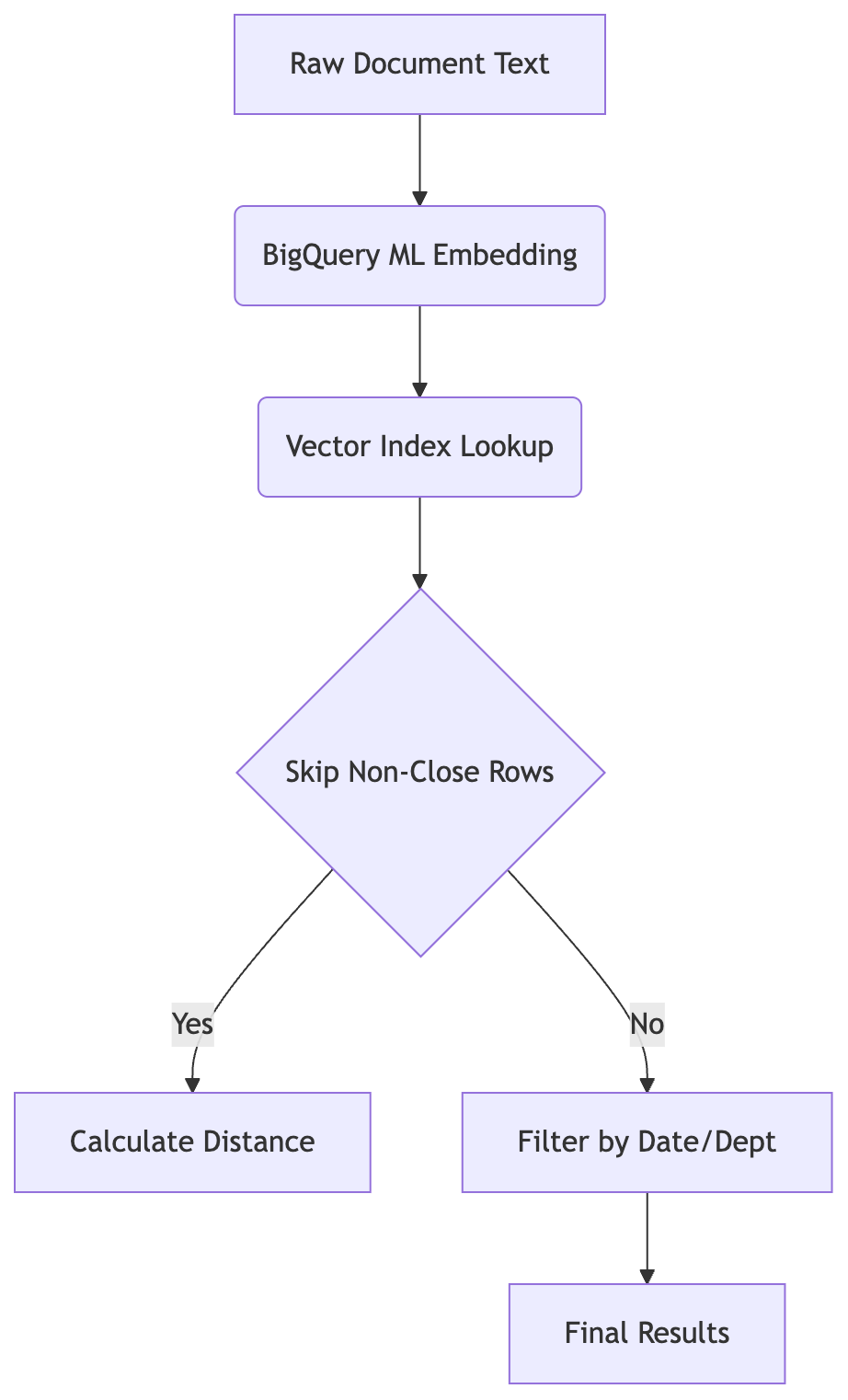
BigQuery ML generates embeddings and the vector index skips distant rows before applying SQL filters for date and department.
Think of an index like the index at the back of a massive textbook. If you want to find "photosynthesis," you do not flip through every page of the book. You go to the index, find the word, and jump straight to the correct page.
For vector math, this is just as vital. When you run a VECTOR_SEARCH without an index, BigQuery performs a "flat" search. It calculates the distance between your search query and every single row in your table. If you have ten thousand rows, it does ten thousand calculations. If you have ten million rows, it does ten million. It works, but it is slow and expensive.
We need a way to skip the "boring" data.
A vector index creates a map of your data's "neighborhoods." Instead of checking every single arrow in the dark room, the system groups similar arrows together. When you search for "scarlet automobile," the index allows BigQuery to ignore the clusters of arrows representing "garden tools" or "oceanography." It only calculates the math for the arrows in the "transportation" and "color" zones.
This "skipping" logic is what makes large-scale systems viable.
BigQuery makes this process remarkably smooth. You do not need to manage a separate complex database just to handle these indexes. You can create a vector index directly on your BigQuery table using SQL. This tells BigQuery to pre-process your embeddings into a searchable format (like an IVF or HNSW graph).
Creating the index takes a bit of time upfront. It is a one-time investment. But the payoff is massive. You trade a few minutes of setup time for a significant reduction in query latency and cost.
You can verify this by looking at your Execution Plan in the BigQuery console. A query without an index will show a high amount of "Input" processing for the entire table. A query using a vector index will show a much more targeted execution path. The system "knows" where to look.
It is like giving your database a map instead of a flashlight.
Now, the real magic happens when we combine this speed with your specific filters. But how do we ensure the database actually uses the index when we start adding complex logic?
We will see exactly what happens when you forget the index and why it causes the query planner to struggle.
# The Case Study: Legal Discovery in Action
# The case we will follow: The Legal Discovery Team
Who: A mid-sized law firm handling a massive class action lawsuit. The situation: The legal team needs to find all emails and documents from the last three years that discuss 'negligence' or 'accident' but only if they were sent by employees in the engineering department. They have millions of unstructured documents scattered across servers. What broke: Using traditional SQL, they must run a keyword search for 'negligence', then a second query to filter by date and department. This is slow because it scans everything first. If they switch to a vector database outside BigQuery, they lose their existing financial records stored in tables that cannot be easily joined. What it cost: The firm needs answers within seconds to respond to court deadlines. Missing a relevant document due to slow search could lead to losing the case. Where we end up: By using BigQuery ML to generate embeddings on the fly and combining them with standard SQL filters in a single query, they achieve near-instant results that respect both meaning and strict business rules like date and sender identity.
Let us look at a real situation where a legal team is drowning in documents and needs to find specific evidence before the deadline tomorrow.
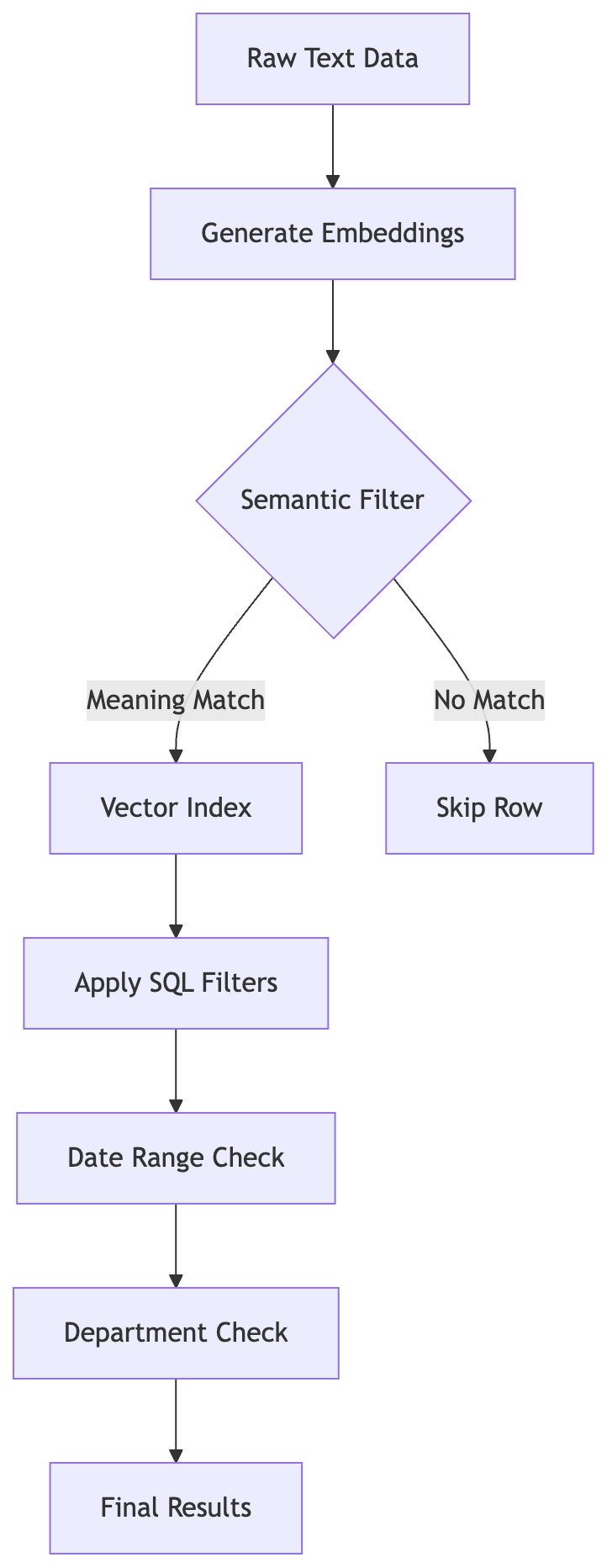
Embeddings enable semantic filtering before strict SQL constraints narrow the result set.
It is 10:00 PM on a Tuesday. The air in the conference room is heavy with the smell of stale coffee and the low hum of high-powered cooling fans. A team of paralegals from a mid-sized law firm sits huddled around a glowing monitor. They are facing a mountain of evidence. They have millions of unstructured documents (text files, emails, and PDFs) dumped into a BigQuery table. These documents are a mess of human language.
The firm is fighting a massive class action lawsuit. They need to find every mention of 'negligence' or 'accident' from the engineering department over the last three years. This sounds simple. It is not.
The problem is that humans are creative with their words. An engineer might write about an 'incident' or a 'failure' or a 'mishap' instead of using the exact word 'negligence.' A standard keyword search misses these variations. It is too rigid. They need a search that understands the vibe. They need a semantic search.
However, they cannot just throw away their existing infrastructure. They have a strict requirement to filter results by department and date. If they move their data to a specialized vector database (a type of database optimized for finding items based on mathematical similarity), they lose the ability to easily join those results with their internal financial records. They need a hybrid approach.
They need a way to combine a scalar filter (a simple, non-mathematical filter like a date or a category) with a vector search (a search that finds items based on "meaning"). Currently, their system is failing. Because they are using basic SQL to find keywords first, the database has to scan millions of rows before it even looks at the date or the department. It is slow. It is painful.
The stakes are high. They have a court deadline. If they cannot produce the relevant documents in seconds, they could lose the case. The firm cannot afford to wait for a slow query to finish while a judge is waiting for a response. They need a way to merge the precision of a scalar filter with the intelligence of a vector search in one single query.
How will they filter by department while searching for meaning without slowing down?
# Walkthrough: The Complete Query Implementation
It is time to see the full code. We will write a query that searches for 'engineering negligence' while strictly limiting results to documents from 2023 onwards.
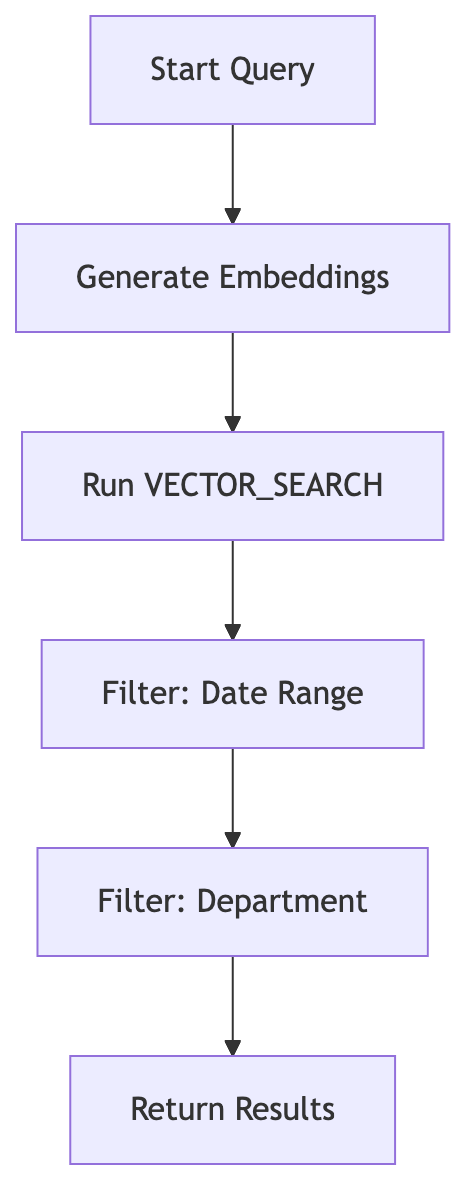
The workflow generates semantic vectors first, then applies strict scalar filters for time and department to return the final set.
The legal team initially faced a massive wall of data. They were trying to find specific evidence of "negligence" within millions of rows. Their first attempt was a standard LIKE %negligence% query. It was a disaster. The system scanned every single row across the entire database because the SQL engine didn't know "accident" or "safety failure" were related to "negligence." The query took minutes to run. It was too slow.
Back to Legal Discovery Team.
The team then tried to optimize by adding WHERE clauses for the date and department first. This was a logical step. However, it still relied on keyword matching for the "meaning" part of the search. If an email used the word "oversight" instead of "negligence," the query would miss it entirely. They needed a way to find the "vibe" of the content while keeping the strict legal filters in place.
The breakthrough came when they realized they didn't need to leave BigQuery to handle vectors. They could generate embeddings directly in the warehouse. This allowed them to combine the "meaning" of a vector search with the "rules" of a standard SQL filter in one single execution.
Here is how they built the solution.
# 1. Prepare the data with embeddings
First, the team had to transform the raw text into a format the machine could "feel." They used the ML.GENERATE_EMBEDDING function. This step is crucial because it converts the messy human language of emails into a high-dimensional vector.
-- Create a new table that includes the embedding vector
-- This allows BigQuery to understand the 'meaning' of the text
CREATE OR REPLACE TABLE `project_id.legal_data.embedded_documents` AS
SELECT
  document_id,
  content_body,
  metadata_date,
  metadata_department,
  -- This generates the vector on the fly
  ML.GENERATE_EMBEDDING(
    CAST(content_body AS STRING),
    model_settings.model_name
  ) AS embedding_vector
FROM
  `project_id.legal_data.raw_documents`;
(Note: They replaced model_settings.model_name with their specific Gemini Enterprise Agent Platform model ID.)
# 2. Write the query using VECTOR_SEARCH
Next, they moved away from LIKE operators. They used the VECTOR_SEARCH function. This function compares the "search vector" (the concept of negligence) against the "table vector" (the actual documents).
-- The core logic to find semantically similar documents
-- This finds documents that 'mean' negligence even if the word isn't used.
SELECT
  base.document_id,
  base.content_body,
  distance
FROM
  VECTOR_SEARCH(
    TABLE `project_id.legal_data.embedded_documents`,
    'embedding_vector',
    (SELECT ML.GENERATE_EMBEDDING(CAST('engineering negligence' AS STRING), model_settings.model_name) AS content),
    top_k => 100
  ) AS base;
# 3. Add scalar filters for date and department
The final piece of the puzzle was ensuring the results were legally valid. They wrapped the vector search in a standard SQL query to filter by the department and the date range. This ensures that even though the search is "fuzzy" in meaning, it is "strict" in business rules.
-- The final hybrid query used by the legal team
-- It combines semantic similarity with hard filters in one pass.
SELECT
  res.document_id,
  res.content_body,
  res.distance
FROM
  VECTOR_SEARCH(
    TABLE `project_id.legal_data.embedded_documents`,
    'embedding_vector',
    (SELECT ML.GENERATE_EMBEDDING(CAST('engineering negligence' AS STRING), model_settings.model_name) AS content),
    top_k => 100
  ) AS res
WHERE
  res.metadata_date >= '2023-01-01'
  AND res.metadata_department = 'Engineering';
# 4. Execute and verify the results
The team ran this query against their production dataset. The results were instant. Instead of a 5-minute scan of the entire database, BigQuery pinpointed the relevant documents in seconds.
They verified the success by checking three things:
- Recall: They manually checked 20 results. Every single one contained a discussion of an accident or safety failure, even those that didn't use the word "negligence."
- Precision: They checked the "Engineering" filter. Not a single document from the "HR" or "Marketing" departments appeared in the results.
- Latency: The query execution time dropped from 180 seconds to under 5 seconds.
They won the ability to respond to the court in real-time. They didn't have to choose between "smart" search and "fast" search. They got both.
Run this code in your own BigQuery sandbox to see how fast it responds compared to a plain keyword search.
# When Things Go Wrong: Troubleshooting Common Errors
Imagine you are trying to hand a physical key to a friend. If the key is the wrong shape, it won't turn. If the lock is rusted, it won't budge. Sometimes, the key is perfect, but you are trying to put it into the wrong door. In vector search, your "key" is the embedding dimension. If the dimensions do not match, the system simply will not let you in.
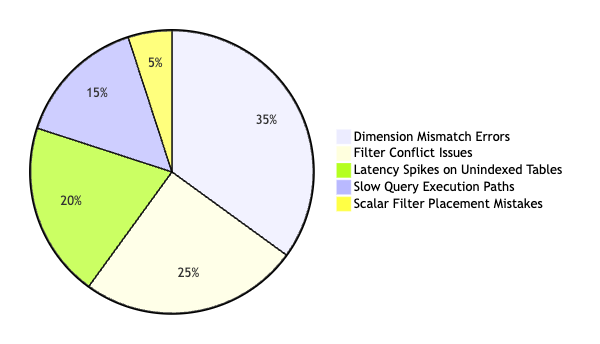
Error distribution highlights dimension mismatches and filter conflicts as primary obstacles during troubleshooting.
The Legal Discovery Team might run into a wall when their query fails to execute. This is often a "dimension mismatch" error. This happens when the vector you generate for your search query (e.g., "engineering negligence") has a different number of dimensions than the vectors stored in your BigQuery table.
Symptom: The query fails with an error stating that the input vector dimensions do not match the index or table.
Likely Cause: The model used to create the search query's embedding is different from the model used to populate the database.
How to confirm: Run a SELECT on your table to check the length of the arrays in your embedding column. Then, run a standalone ML.GENERATE_EMBEDDING on your search string using the exact same model ID.
What to do: Ensure both the pipeline that populates your table and the query that searches it call the exact same model (e.g., text-embedding-004).
Sometimes, the query works, but it is painfully slow. This feels like trying to find a needle in a haystack by looking at every single piece of straw.
Symptom: The query returns results, but the execution time is high or the cost is unexpectedly large.
Likely Cause: The query is performing a "brute force" scan because it is evaluating vector math on every row before applying filters.
How to confirm: Run the EXPLAIN plan on your query. Look for a "Full Table Scan" or a high number of rows processed before the VECTOR_SEARCH step.
What to do: Move your scalar filters (like date_column > '2023-01-01') into a subquery or a WHERE clause that executes before the vector math. This narrows the "haystack" before the computer tries to find the "needle."
Symptom: The results are technically "similar" but are logically irrelevant.
Likely Cause: The query is pulling from a massive, unfiltered dataset where "noise" outweighs the "signal."
How to confirm: Compare a "pure" semantic search (no filters) against your "hybrid" search. If the pure search returns 100 results and the hybrid only returns 5, your filters are working correctly.
What to do: Refine your metadata. If you are searching for legal documents, ensure your WHERE clause specifically targets the "Legal" category before the VECTOR_SEARCH is calculated.
-- Use this to check the execution plan and identify bottlenecks.
-- It helps you see if BigQuery is doing unnecessary work.
EXPLAIN
SELECT * FROM `your_project.your_dataset.legal_docs`
WHERE date > '2023-01-01'
AND distance < 0.5
By understanding these specific error messages, you can fix them before they stop your application.
# Conclusion: The Future of Data Search
You do not need to build a complex, standalone infrastructure just to enable your users to find what they are looking for. Some engineers might argue that adding a separate vector database is the only way to scale, but that is often an over-engineered solution for the problem at hand. BigQuery ML provides the necessary tools to handle vector math directly where your data already lives. It simplifies the stack. It reduces complexity.
Hybrid search is your secret weapon. By combining standard SQL filters with vector similarity, you get the best of both worlds. You get the precision of hard filters (like "only show results from 2023") and the "vibe" of semantic search (finding "negligence" when the user types "carelessness"). It works.
Start small. Build a pilot project this week to test the performance of a VECTOR_SEARCH query against a small subset of your data. You can see the speed. You can see the accuracy.
Takeaway Stop searching for exact words and start searching for meaning by using BigQuery ML to turn text into vectors.
Next Steps
- This week, identify one column in your BigQuery table that currently relies on "fuzzy" keyword matching.
- Create a small sample of 100 rows and run a
VECTOR_SEARCHquery against it to compare the results to your currentLIKEorCONTAINSlogic. - Learn about "embedding dimensions" next. Understanding the size of your vector space is vital for choosing the right model for your specific use case.
The future of data warehousing is not about replacing SQL but enhancing it with new mathematical capabilities.
If you want to contact me, feel free to drop an e-mail at [email protected] or check out my website at adityaseth.in :)
Also, here's my LinkedIn.
Thank you everyone for reading,

Over and out,
Aditya Seth.
Frequently asked
- Why does keyword search fail to find documents that use different wording for the same idea?
- Standard keyword search only matches exact strings, so a document that says "oversight" or "safety failure" is invisible to a query for "negligence" even though a human reader would recognize them as related. Vector embeddings fix this by comparing meaning instead of spelling.
- How does BigQuery ML let you run vector search without a separate vector database?
- A built-in BigQuery function converts text into a numerical vector directly inside a table, and another built-in function compares those vectors using standard SQL, so semantic search runs in the same warehouse as your existing filters and joins.
- Why should scalar filters like date and department run before a vector search, not after?
- Running a vector search on an entire multi-billion-row table calculates distance for every row before any filtering happens, which is slow and expensive. Placing a WHERE clause or subquery first narrows the table down to the relevant rows, so the expensive vector math only runs on data that could actually match.
- What causes a "dimension mismatch" error in a BigQuery vector search query?
- It happens when the embedding model used to generate the search query's vector is different from the model used to populate the table's embedding column, so the two vectors have different lengths and cannot be compared. The fix is to use the exact same model ID in both places.
Comments