Can Gemini's Bounding Boxes Localize Product Defects? Measuring Accuracy on 300 Support Tickets
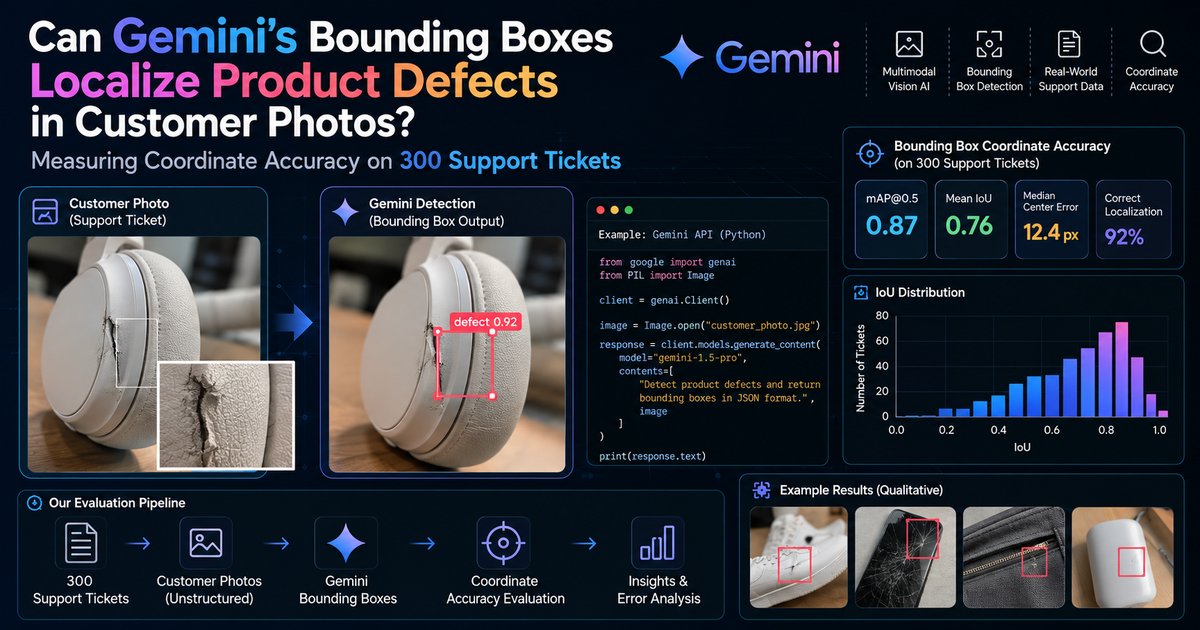
Here is the short version, before any code. When you ask the Gemini API to draw boxes around product defects in customer photos, it is genuinely good at the big, obvious stuff (a crushed corner, a snapped handle, a cracked lid) and genuinely bad at exactly the defects support teams argue about most: hairline scratches, anything sitting under a glare highlight, and anything on mirror-finish metal or shiny shrink-wrap. In the illustrative 300-ticket case study below, large defects averaged an IoU of 0.71 against hand-drawn boxes. Hairline scratches averaged 0.23. Glare did something worse than miss: it produced the single biggest source of confident, completely wrong boxes.
So can Gemini localize defects? Sort of. It can point. It cannot measure. And once you know which of those two jobs you are hiring it for, it becomes a very useful tool.
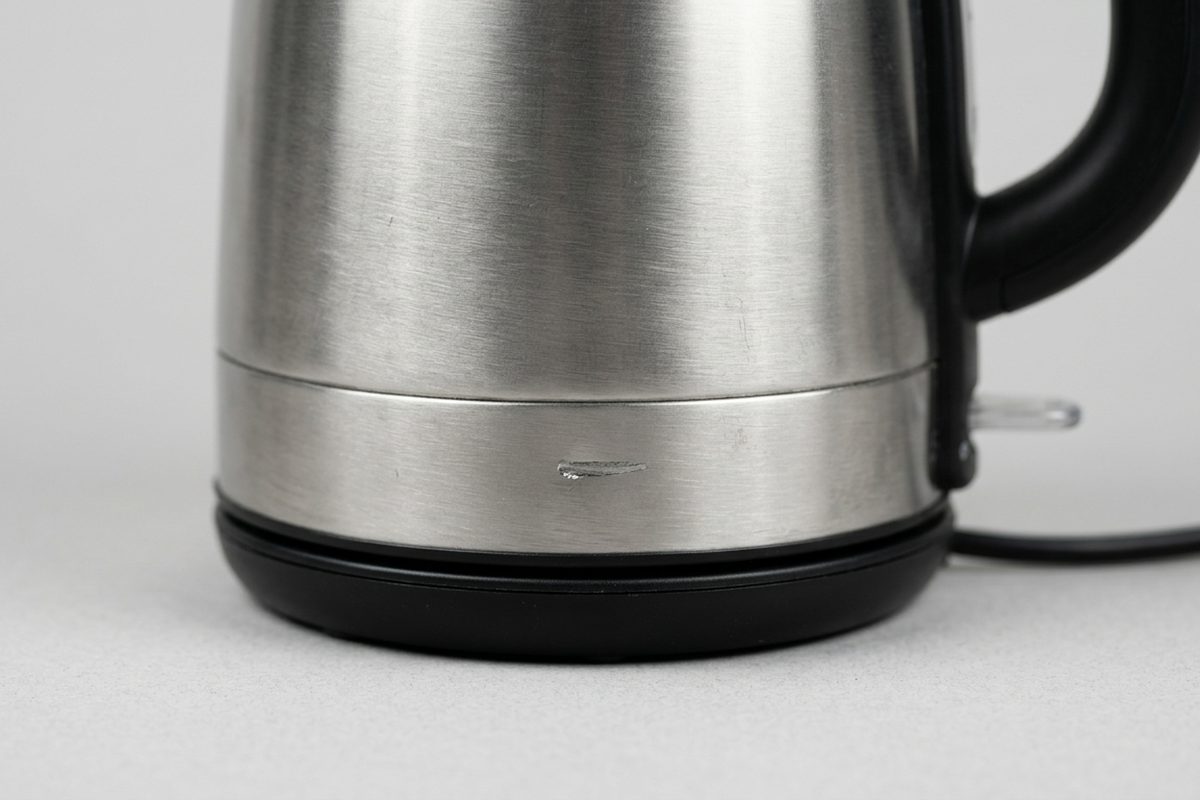
A scratch like this, near a seam and a reflective surface, is exactly the kind of defect that separates "Gemini can point" from "Gemini can measure."
# What this article covers
- Why This Question Is Worth Measuring
- The Concepts Before We Measure Anything
- Meet the Kettleworks Support Desk
- What Gemini Actually Returns (and What Is Already Published)
- Step by Step Walkthrough: The Evaluation Harness
- The Kettleworks Scorecard
- Where the Boxes Break: A Failure Catalog
- What Moved the Numbers at Kettleworks
- A Triage Design That Respects the Error Bars
- Takeaways
# Why This Question Is Worth Measuring
Every support team that sells physical products has the same inbox. A customer writes "it arrived damaged," attaches three blurry phone photos, and an agent squints at them trying to find the damage. Sometimes the dent is the size of a fist. Sometimes it is a two millimetre scratch next to a reflection of the customer's ceiling light, and the agent spends a full minute zooming in and out before deciding whether it is a defect or a lamp.
That squinting is the job people want to automate. And the Gemini API makes it look trivially automatable, because you can hand it an image, ask for bounding boxes, and get back clean JSON with coordinates in a second or two. No training data. No labeling pipeline. No custom detector. It feels like cheating.
Is it cheating, though? Or is it confidently drawing rectangles in roughly the right neighbourhood?
That distinction matters. A box in the right neighbourhood is fine for highlighting a region a human should look at, and useless for auto-approving a refund because "the defect covers more than 5% of the surface." Different downstream jobs tolerate wildly different coordinate error, and nobody knows which bucket Gemini falls into until someone measures it against ground truth.
So we measure. A small harness scores Gemini's coordinate output against hand-labeled boxes with real IoU arithmetic, splits the results by photo condition, and catalogs where it falls over. The case study is illustrative (more on that shortly). The harness is real code against the real API, and you can point it at your own tickets this afternoon.
# The Concepts Before We Measure Anything
Four ideas carry this whole article. If you already live in computer vision, skim this. If you mostly build with LLMs and have never scored a detector, read it properly, because the numbers later will not mean much otherwise.
Bounding Box
Hover to expand Tap to expandA bounding box is just four numbers: the tightest axis-aligned rectangle around an object, described by its top-left and bottom-right corners.
Analogy: Think of drawing the smallest possible picture frame around a photo on a wall, with no tilt allowed.
Why it matters: A diagonal scratch across a kettle gets a box that is mostly empty space, which becomes important later.
Coordinate Normalization
Hover to expand Tap to expandGemini returns box coordinates on a fixed 0 to 1000 scale rather than raw pixels, with y before x.
Analogy: It is like giving directions in "percent across the room" instead of "steps," so the same instructions work whether the room is small or huge.
Why it matters: You have to descale the numbers yourself using the photo's real width and height, and getting the order wrong lands boxes in a mirror-universe position that still looks plausible.
IoU
Hover to expand Tap to expandIntersection over Union measures how much a predicted box overlaps a ground truth box: the shared area divided by the total area the two boxes cover together.
Analogy: Picture two overlapping circles of sand on a table; IoU is how much sand sits in the overlap compared to the total sand on the table.
Why it matters: It is a strict teacher. A predicted box that fully contains the true defect but is twice as big only scores 0.5, because the extra area inflates the total.
Hit Rate at a Threshold
Hover to expand Tap to expandThe common convention in detection benchmarks is that a prediction "counts" as a hit once its IoU with a ground truth box passes a cutoff, commonly 0.5.
Analogy: It is a pass or fail grade carved out of a continuous score, the way 60% might be a passing grade on a test regardless of whether you scored 60% or 95%.
Why it matters: A support team cares about whether a dent was found at all, not a leaderboard decimal, so a threshold turns a fuzzy score into a decision agents can act on.
Zero-shot Detection
Hover to expand Tap to expandZero-shot means the model was never trained on your product catalog or your specific defect taxonomy at all.
Analogy: It is like asking a well-traveled stranger to spot what looks broken in your kitchen, rather than an inspector who trained specifically on your model of kettle.
Why it matters: Zero-shot is Gemini's superpower, since it needs no labeling pipeline, and also its ceiling, since it never specialized on your exact defects.
One last framing idea. Gemini's detection is zero-shot, which means it was never trained on your product catalog or your defect taxonomy. You describe what you want in the prompt and it generalizes from everything it learned in pretraining. That is its superpower and, as we will see, its ceiling.
# Meet the Kettleworks Support Desk
# The case we will follow: Kettleworks
Who: Kettleworks, a fictional direct-to-consumer brand selling stainless steel electric kettles and pour-over sets, with a support desk of six agents.
The situation: Roughly a fifth of their tickets are "arrived damaged" claims with customer photos attached, and agents manually hunt for the defect in each photo before approving a replacement.
What broke: A proof of concept that asked Gemini to box the defect looked amazing in the demo and then quietly highlighted glare spots and kettle reflections in production review.
What it cost: Agents stopped trusting the highlights and went back to zooming manually, which erased the time savings the prototype promised.
Where we end up: A measured, per-condition picture of where Gemini's boxes can be trusted, and a triage design that routes photos accordingly.
Kettleworks is a composite, illustrative case study. It does not describe a real company, and the numbers attributed to it throughout this article come from a constructed walkthrough scenario rather than from anyone's production data. I built it this way deliberately: the failure modes it exercises (glare, small scratches, reflective surfaces) are real and widely discussed, but a real 300-ticket labeled dataset of defect photos is not something I can publish. So treat the Kettleworks figures as a worked example of the method, and treat the method as the thing you take home.
Here is the setup. The Kettleworks team pulls 300 recent damage tickets, one customer photo per ticket, chosen to mirror their real mix of products. Two agents independently draw a box around every visible defect, and a third resolves disagreements. That yields 412 ground truth defect boxes, since plenty of kettles arrive with a dent and a scratch as a matched set. Every box also gets a condition tag, which is the part that makes the results interesting.
The condition tags are:
- Clear, large defect. Dents, cracks, chips, and broken or missing parts, with the defect covering at least roughly 2% of the image and not obscured.
- Small scratch. Hairline or fine scratches, typically well under 1% of the image area.
- Glare-affected. Any defect where a specular highlight (a bright reflection of a light source) overlaps or touches the defect region.
- Reflective packaging or surface. Defects on mirror-polished steel bodies, glossy boxes, or crinkled shrink-wrap, where the surface itself reflects the room.
Is this taxonomy perfect? No. A scratch under glare on a mirror-finish kettle could belong to three buckets, so the Kettleworks labelers assign each box to its dominant condition and accept that the edges blur. Honest labeling beats pretend precision.
Kettleworks also has one specific question that shapes everything: can Gemini's boxes be shown to agents as a highlight overlay, so they look there first instead of hunting? That is a pointing job, not a measuring job. Remember it. It rescues the project later.
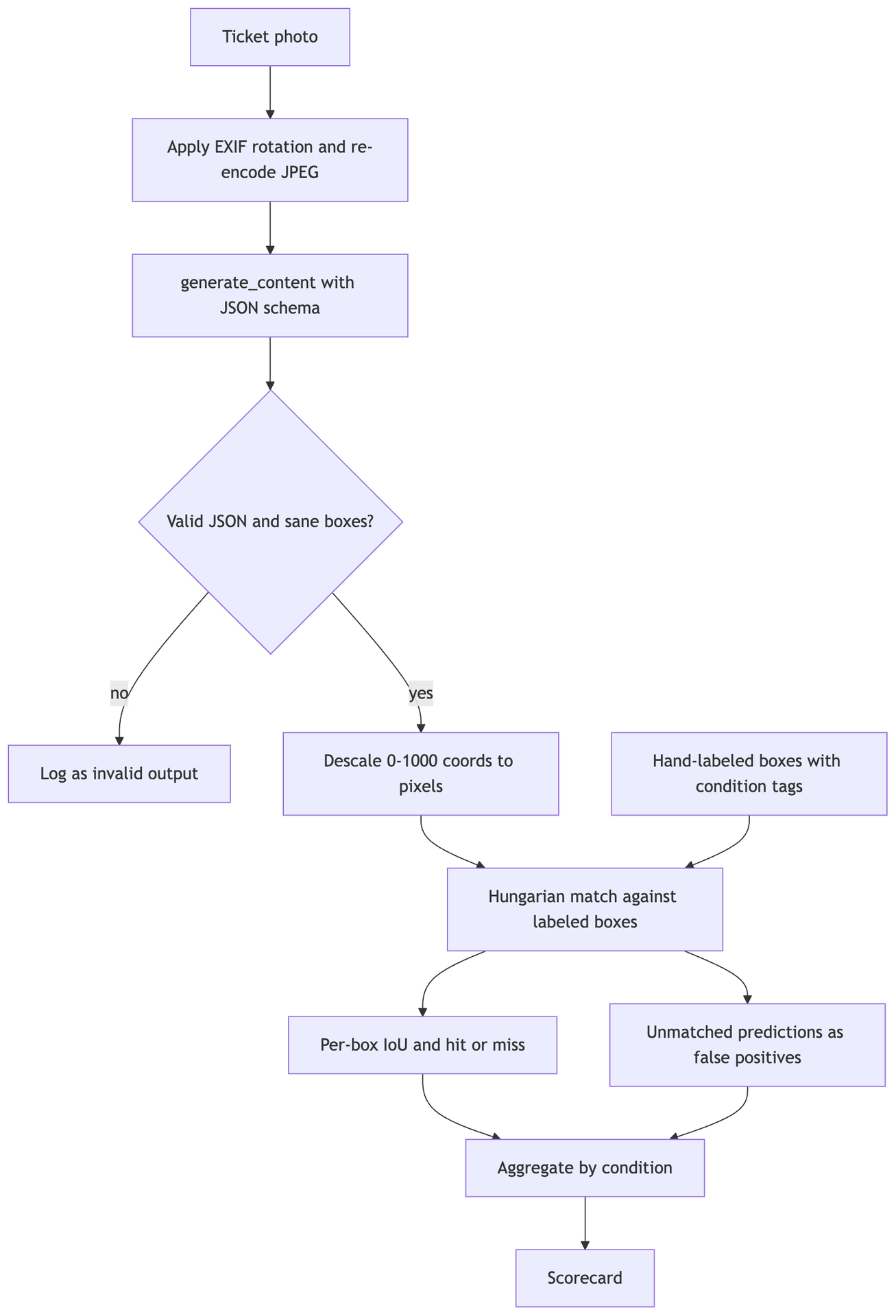
Photos and labels meet only at the matching step, so the model never sees the ground truth and the scorer never sees the prompt.
# What Gemini Actually Returns (and What Is Already Published)
Before scoring anything, be precise about what the API actually promises, because this is exactly the kind of topic where blog posts drift into inventing features. Here is what the official Gemini API image understanding documentation states:
- Gemini models are trained to detect objects in an image and return bounding box coordinates. You ask in plain language and get boxes back.
- The coordinate format is ymin, xmin, ymax, xmax, normalized to 0 to 1000, and the docs tell you to descale using the original image size.
- The documented sample defines a schema with a coordinate field, a label, and optionally a segmentation mask, and requests JSON output constrained to that schema.
- The docs recommend minimal thinking for segmentation, and earlier versions of the page recommended a thinking budget of zero for detection on Gemini 2.5 models.
- A media resolution setting controls the maximum tokens allocated per image. Higher resolutions improve the model's ability to identify small details, at the cost of tokens and latency.
- The docs' tips include verifying that images are correctly rotated and using clear, non-blurry images.
And here is what the API does not give you. There is no per-box confidence score in the documented coordinate output. There is no "defect detection" mode, no special scratch parameter, and no guaranteed recall. If a tutorial reads a confidence field off Gemini's boxes, that field came from the tutorial's own schema, and the number is the model's self-report rather than a detector score. Want a confidence signal? Build one (we will, crudely, with run-to-run agreement).
One more detail: the current docs lead with the newer Interactions API in their examples, while the older content-generation call in the Google Gen AI Python SDK remains supported for the same request. The harness below uses the older call, since most existing codebases already use it.
# What public benchmarks say
As far as I could find, Google does not publish an official mAP figure for Gemini's bounding boxes. The most thorough independent measurement I found is a public benchmark by the writer behind the SimEdw blog, who ran Gemini models over the 5,000-image COCO validation set with standard mAP scoring. Representative rows:
| Model (as tested) | Thinking tokens | Output mode | COCO mAP | Invalid outputs |
|---|---|---|---|---|
| Gemini 2.5 Flash-Lite | 0 | structured | 0.156 | 335 of 5,000 |
| Gemini 2.5 Flash | 0 | structured | 0.224 | 47 of 5,000 |
| Gemini 2.5 Flash | 1024 | structured | 0.160 | 23 of 5,000 |
| Gemini 2.5 Pro | 1024 | structured | 0.340 | 6 of 5,000 |
| Gemini 2.5 Pro | 2048 | unstructured | 0.277 | 26 of 5,000 |
| Gemini 3 Pro Preview | 1024 | structured | 0.407 | 9 of 5,000 |
Source: independent COCO benchmark published on simedw.com (July 2025, later updated for Gemini 3 Pro Preview). One author's measurement, not an official Google figure.
Three things jump out. Model size matters a lot, with Pro well ahead of Flash and Flash-Lite. Extra thinking tokens did not help and often hurt, which lines up with the docs' advice to keep thinking minimal. And the best result, around 0.41 mAP, is respectable but far from specialized detectors: the same post compares Gemini 2.5 Pro to YOLOv3 from 2018 (a classic fast detector, at roughly 0.33 mAP) and notes that modern specialized models such as Co-DETR, a transformer-based detector, reach around 0.60.
That is general-purpose objects on a clean academic dataset. Defects are harder. A scratch is not an object with a crisp outline; it is a subtle texture change on a surface that is often reflecting its surroundings. So going in, the honest expectation is "decent on big defects, shaky on subtle ones." Let's see how the Kettleworks run lines up.
# Step by Step Walkthrough: The Evaluation Harness
The harness has five stages: load and normalize photos, ask Gemini for boxes, convert coordinates to pixels, match predictions to ground truth, and aggregate per condition.
# Stage 0: the label format
Ground truth lives in a JSONL file, meaning one JSON record per line (wrapped below for readability). Boxes are stored as pixel coordinates in x1, y1, x2, y2 order, which is what most labeling tools export and deliberately not Gemini's order, so the conversion step has to be explicit. Good. Explicit is what we want.
{"ticket_id": "KW-10442", "image": "photos/KW-10442.jpg", "defects": [
  {"box": [812, 1330, 1104, 1587], "condition": "clear_large", "type": "dent"},
  {"box": [1501, 902, 1566, 1180], "condition": "small_scratch", "type": "scratch"}
]}
# Stage 1: asking Gemini for boxes
This uses the Google Gen AI Python SDK (pip install google-genai). The schema is a Pydantic model passed as a JSON schema. Notice that the prompt comes before the image in the request contents, matching the docs' tip for single-image prompts.
import io
from pathlib import Path

from google import genai
from google.genai import types
from PIL import Image, ImageOps
from pydantic import BaseModel, Field

MODEL = "gemini-3.5-flash"  # pin a model; re-run the eval whenever you change it

client = genai.Client()  # reads GEMINI_API_KEY from the environment


class DefectBox(BaseModel):
    box_2d: list[int] = Field(
        description="Bounding box as [ymin, xmin, ymax, xmax], normalized to 0-1000."
    )
    label: str = Field(
        description="One of: dent, crack, chip, scratch, missing_part, other."
    )


class DefectBoxes(BaseModel):
    boxes: list[DefectBox]


PROMPT = (
    "This is a customer photo of a product that may be damaged. "
    "Detect every visible physical defect on the product: dents, cracks, chips, "
    "scratches, or missing parts. Return one tight box per defect, not one box "
    "around the whole product. Bright reflections of lights or windows are not "
    "defects. If no defect is visible, return an empty list. "
    "Each box_2d is [ymin, xmin, ymax, xmax] normalized to 0-1000."
)


def load_upright_jpeg(path: Path) -> tuple[Image.Image, bytes]:
    """Apply EXIF orientation so our pixels match what the model sees."""
    img = ImageOps.exif_transpose(Image.open(path)).convert("RGB")
    buf = io.BytesIO()
    img.save(buf, format="JPEG", quality=92)
    return img, buf.getvalue()


def detect_defects(image_bytes: bytes, prompt: str = PROMPT) -> list[DefectBox]:
    response = client.models.generate_content(
        model=MODEL,
        contents=[
            prompt,
            types.Part.from_bytes(data=image_bytes, mime_type="image/jpeg"),
        ],
        config=types.GenerateContentConfig(
            response_mime_type="application/json",
            response_json_schema=DefectBoxes.model_json_schema(),
            thinking_config=types.ThinkingConfig(thinking_level="minimal"),
            media_resolution=types.MediaResolution.MEDIA_RESOLUTION_HIGH,
        ),
    )
    return DefectBoxes.model_validate_json(response.text).boxes
The EXIF transpose call is not decoration. Phone photos often store rotation as EXIF metadata (the orientation tag the camera writes) instead of rotating the pixels, and if your labeling tool honored it while your upload did not, every box gets scored against a rotated image. Fiction, basically.
The minimal thinking setting follows the docs and the public benchmark above; minimal is documented for some models and not others, so check the thinking docs for the model you pin. The media resolution line documents intent more than it changes behavior, since Gemini 3 models already default to the high allocation for images.
# Stage 2: from 0-1000 to pixels, safely
Models occasionally emit boxes with swapped corners or values a hair outside the range. Clamp, reorder, and drop degenerate boxes before scoring, and count how often you had to.
def to_pixels(box_2d: list[int], width: int, height: int) -> tuple[float, float, float, float] | None:
    """Convert Gemini's [ymin, xmin, ymax, xmax] on 0-1000 into pixel [x1, y1, x2, y2]."""
    if len(box_2d) != 4:
        return None
    ymin, xmin, ymax, xmax = (min(max(v, 0), 1000) for v in box_2d)
    y1, y2 = sorted((ymin, ymax))
    x1, x2 = sorted((xmin, xmax))
    if x2 - x1 < 1 or y2 - y1 < 1:
        return None
    return (x1 / 1000 * width, y1 / 1000 * height,
            x2 / 1000 * width, y2 / 1000 * height)
Here is one conversion worked by hand, because it is the step people most often get backwards.
| Quantity | Value |
|---|---|
| Image size (width by height) | 3024 by 4032 pixels |
| Gemini's normalized box | 330, 268, 394, 365 |
| Pixel x1 (xmin 268 of 1000, times width) | 810 |
| Pixel y1 (ymin 330 of 1000, times height) | 1331 |
| Pixel x2 (xmax 365 of 1000, times width) | 1104 |
| Pixel y2 (ymax 394 of 1000, times height) | 1589 |
| IoU against the labeled dent (812, 1330, 1104, 1587) | 0.99 |
That near-perfect match is the dent from ticket KW-10442, and it is typical of the clear, large bucket. The scratch on the same kettle did not get a box at all. Hold that thought.
# Stage 3: IoU and matching
IoU itself is a few lines. Matching is where naive harnesses cheat. If you just take each ground truth box's best overlapping prediction, one giant box around the whole kettle can "match" three different defects at once. Instead, solve a one-to-one assignment that maximizes total IoU, using SciPy's Hungarian algorithm implementation.
import numpy as np
from scipy.optimize import linear_sum_assignment


def iou(a, b) -> float:
    ix1, iy1 = max(a[0], b[0]), max(a[1], b[1])
    ix2, iy2 = min(a[2], b[2]), min(a[3], b[3])
    inter = max(0.0, ix2 - ix1) * max(0.0, iy2 - iy1)
    area_a = (a[2] - a[0]) * (a[3] - a[1])
    area_b = (b[2] - b[0]) * (b[3] - b[1])
    union = area_a + area_b - inter
    return inter / union if union > 0 else 0.0


def match(gt_boxes: list, pred_boxes: list):
    """One-to-one assignment. Returns per-GT IoU (0.0 if unmatched) and unmatched preds."""
    if not gt_boxes:
        return [], list(range(len(pred_boxes)))
    if not pred_boxes:
        return [0.0] * len(gt_boxes), []
    m = np.array([[iou(g, p) for p in pred_boxes] for g in gt_boxes])
    rows, cols = linear_sum_assignment(m, maximize=True)
    per_gt = [0.0] * len(gt_boxes)
    used = set()
    for r, c in zip(rows, cols):
        if m[r, c] > 0:
            per_gt[r] = float(m[r, c])
            used.add(c)
    unmatched = [j for j in range(len(pred_boxes)) if j not in used]
    return per_gt, unmatched
An unmatched ground truth box scores an IoU of zero, so a miss drags the mean down. That is intentional. A mean IoU computed only over detections flatters the model by ignoring every defect it never found.
# Stage 4: the scoring loop
import json
from collections import defaultdict


def evaluate(labels_path: Path, runs: int = 3):
    per_condition = defaultdict(list)   # condition -> list of IoUs
    false_positives = []                 # (ticket_id, pixel box) for manual review
    invalid = 0

    for line in labels_path.read_text().splitlines():
        rec = json.loads(line)
        img, jpeg = load_upright_jpeg(Path(rec["image"]))
        gt = [d["box"] for d in rec["defects"]]

        for _ in range(runs):
            try:
                boxes = detect_defects(jpeg)
            except Exception:  # schema validation or API error
                invalid += 1
                continue
            preds = [p for b in boxes if (p := to_pixels(b.box_2d, img.width, img.height))]
            per_gt, unmatched = match(gt, preds)
            for d, score in zip(rec["defects"], per_gt):
                per_condition[d["condition"]].append(score)
            false_positives += [(rec["ticket_id"], preds[j]) for j in unmatched]

    return per_condition, false_positives, invalid
Running each photo three times is cheap insurance. Generation is not deterministic, and box coordinates wobble between runs. Agreement across runs turns out to be the closest thing to a confidence signal you can get, and we will lean on it in the triage design.
Every false positive also gets logged with its pixel box so a human can eyeball it. That review is where the failure catalog below came from. Numbers tell you how often. Looking at the boxes tells you why.
# The Kettleworks Scorecard
Here is how Gemini did on the illustrative Kettleworks set: 300 photos, 412 labeled defects, three runs per photo, with each run scored and the per-run results averaged.
| Condition | Labeled defects | Mean IoU | Hit rate at IoU 0.5 | Missed entirely (no overlapping box) |
|---|---|---|---|---|
| Clear, large defect | 168 | 0.71 | 84% | 4% |
| Small scratch | 97 | 0.23 | 19% | 41% |
| Glare-affected | 64 | 0.31 | 28% | 22% |
| Reflective packaging or surface | 83 | 0.34 | 33% | 18% |
| All defects | 412 | 0.46 | 50% | 16% |
Illustrative figures from the Kettleworks walkthrough scenario, weighted by defect count.
The headline mean IoU of 0.46 is a trap. It averages a model that is excellent at one job with a model that is nearly blind at another, and describes neither. If the Kettleworks team had only computed the overall number, they would have concluded "mediocre everywhere," which is wrong in both directions.
Two more views matter just as much. First, precision: how many of Gemini's boxes were real.
| Prediction outcome (all runs, averaged per run) | Boxes | Share of predictions |
|---|---|---|
| Hit (IoU 0.5 or higher with a labeled defect) | 205 | 45% |
| Loose (overlaps a defect, IoU below 0.5) | 96 | 21% |
| Unmatched (not assigned to any labeled defect) | 150 | 33% |
| Total predicted boxes | 451 | 100% (rounded) |
A third of all boxes matched no defect at all. For an overlay shown to agents, that is the number that killed trust in the original prototype, far more than the missed scratches. An agent forgives a highlight that fails to appear. An agent does not forgive a highlight that confidently circles a reflection of their own office lights, three tickets in a row.
Second, stability across runs. For clear, large defects, the three runs usually agreed closely, with box corners typically shifting by 10 to 15 units on the 0 to 1000 scale. Small scratches showed presence flicker instead: a box in one run, nothing in the other two. That flicker is informative. It becomes a routing signal later.
The last view is the one Kettleworks actually cares about. At the photo level, asking "did at least one box land on a real defect with IoU of 0.3 or better," Gemini succeeded on roughly 74% of the 300 tickets. That looser threshold matches the pointing job, where an agent needs a region worth looking at first, not a pixel-perfect rectangle.
# Where the Boxes Break: A Failure Catalog
Reviewing every unmatched box and every missed defect by hand is tedious. It is also the most valuable hour of the whole exercise, because the failures cluster into a handful of repeatable patterns, each with a mechanism you can reason about.
| Failure pattern | What it looks like | Share of unmatched boxes | Main condition affected |
|---|---|---|---|
| Glare boxed as damage | Box tightly around a bright highlight, labeled scratch or dent | 39% | Glare-affected |
| Printed graphics and seams | Box on packaging print, tape edges, or shrink-wrap folds | 27% | Reflective packaging |
| Background clutter | Box on a countertop mark or floor texture beside the product | 19% | All |
| Split boxes | A long scratch cut into two or three boxes, only one of which can match | 15% | Small scratch |
Illustrative breakdown of the 150 unmatched boxes per run in the Kettleworks review.
# Glare: the confident liar
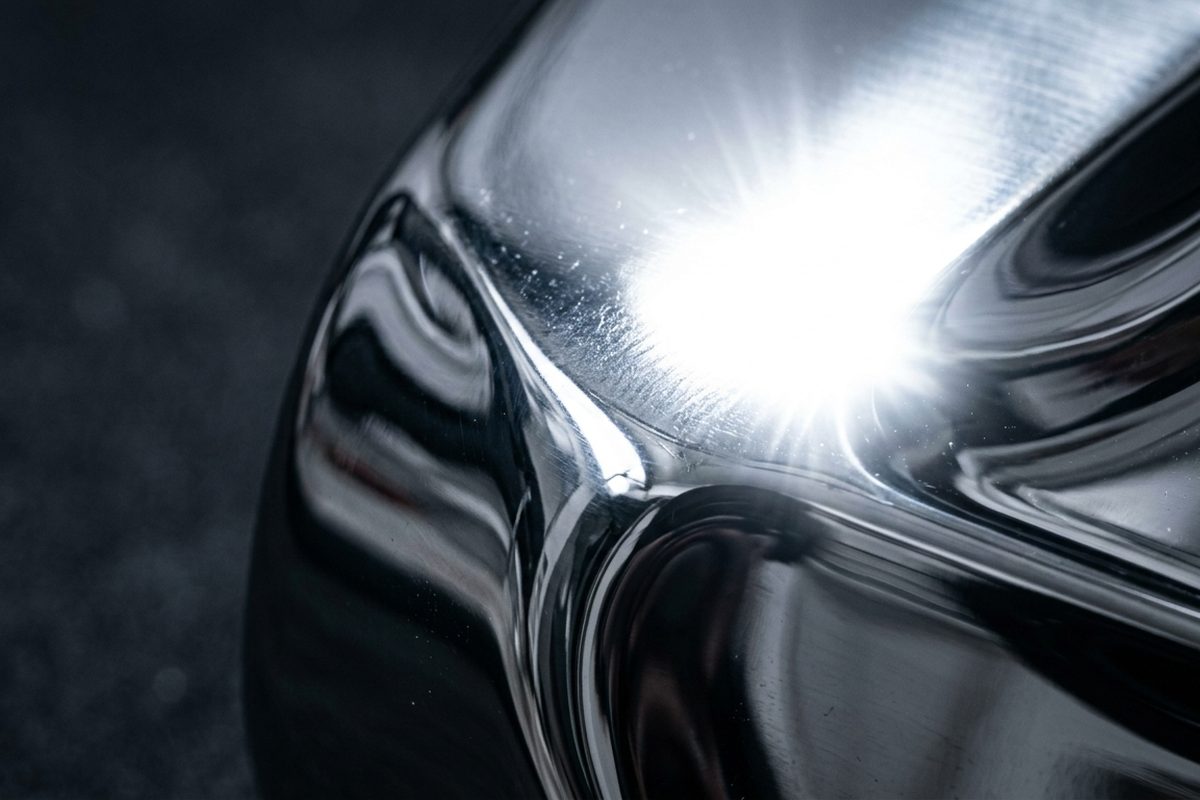
A specular highlight like this one is small, bright, and sharp-edged, which is exactly what makes it visually rhyme with a scratch or a chip.
Glare is the worst offender, and it fails in both directions at once. A specular highlight is a small, bright, high-contrast blob with sharp edges, which visually rhymes with a chip or a scuff. So the model boxes it, labels it, and moves on. Meanwhile, a real scratch sitting inside the highlight is washed out to pure white in the pixels, and there is nothing left to detect.
The miss is not really the model's fault, since the information is gone from the image. The false positive is more interesting, because it survived an explicit prompt instruction that reflections are not defects. The instruction helped (next section), but a single photo does not always carry enough information to separate "bright thing" from "damaged thing." A human agent resolves the same ambiguity by asking for a second photo from another angle. Hold onto that.
# Small scratches: below the detail floor
Hairline scratches are the biggest bucket of misses, at 41% never boxed at all. Two mechanisms stack. The first is resolution: the model works from a token budget per image, not your full 12-megapixel photo, so a scratch a few pixels wide can shrink to near nothing. The media resolution docs say it plainly. Higher resolution improves the ability to identify small details, at a cost.
The second is geometry. Scratches are long, thin, and often diagonal, so their axis-aligned box is mostly empty surface. A model that "sees" the scratch perfectly can still land a slightly fatter box than the labeler's and score 0.3 on a correct detection. That is the known weakness of IoU on small and thin objects, not a Gemini quirk. It also means the scratch numbers undercount how often the model was roughly right, and it explains the split boxes in the table above.
# Reflective packaging and mirror-finish steel
Kettleworks sells polished stainless kettles, which are, charmingly, tiny curved mirrors. Every photo contains a distorted reflection of the customer's kitchen: window frames, ceiling lights, the phone itself, sometimes the customer's face (sorry, customers). Those reflected edges look exactly like surface features, and the model regularly boxed a reflected window mullion as a scratch.
Glossy retail boxes and shrink-wrap add their own flavor. Printed product photography on the box (which, amusingly, often shows a pristine kettle) and crinkle lines in plastic wrap both produced confident boxes. Occasionally the model boxed the printed kettle on the packaging as though it were the product. You can't really blame it.
# The whole-product box
This one hides in the "loose" row rather than the unmatched one. For some large dents, the model returned one box around the entire kettle labeled "dent." Semantically, fair enough. The kettle is dented. Geometrically, it is useless, and it scores terribly because the union is enormous. The prompt line asking for "one tight box per defect, not one box around the whole product" reduced it, a nice reminder that instructions still do real work in structured output mode.
# What barely showed up
Invalid outputs were rare with structured output, a handful across all runs, which fits the public benchmark's low error counts for stronger models in structured mode. And rotation problems vanished entirely after the EXIF fix. Before it? Catastrophic.
# What Moved the Numbers at Kettleworks
With the failure catalog in hand, the Kettleworks team tried a handful of targeted changes. Each was measured on the 244 hard defects (small scratch, glare-affected, and reflective buckets combined), since the clear, large bucket had little room to improve.
| Variant | Hard-subset mean IoU | Small scratch mean IoU | Glare false positives per run | Relative token cost |
|---|---|---|---|---|
| Baseline prompt, default thinking | 0.27 | 0.20 | 71 | 1.0x |
| Minimal thinking (the harness default above) | 0.29 | 0.23 | 58 | 1.0x |
| Plus defect taxonomy and "reflections are not defects" in prompt | 0.31 | 0.24 | 31 | 1.0x |
| Plus two-pass crop and refine | 0.39 | 0.36 | 27 | about 2.4x |
| Plus asking the customer for a second angle on glare tickets | 0.44 | 0.37 | 12 | about 2.4x |
Illustrative ablation from the Kettleworks walkthrough; each row includes the changes above it.
Minimal thinking gave a small gain, directionally consistent with the public benchmark, where extra thinking tokens reduced mAP. The prompt changes did almost nothing for localization accuracy but halved glare false positives, which matters more for trust than a few hundredths of IoU.
The real jump came from cropping. The idea is simple and old (tiled or sliced inference is a standard trick in small-object detection): run a first pass on the full photo, take each coarse box, expand it with generous padding, crop that region from the original high-resolution image, and ask Gemini again on the crop. The scratch that was a few pixels wide in the downscaled full image is suddenly a meaningful fraction of the crop.
REFINE_PROMPT = (
    "This is a close-up crop of a product surface. Detect any scratch, dent, chip, "
    "or crack. Ignore bright reflections. Return tight boxes, or an empty list. "
    "Each box_2d is [ymin, xmin, ymax, xmax] normalized to 0-1000 of this crop."
)


def refine(img: Image.Image, coarse_px, pad: float = 0.5, min_side: int = 512):
    """Re-detect inside a padded crop around a coarse box; map results back to full-image pixels."""
    x1, y1, x2, y2 = coarse_px
    w, h = x2 - x1, y2 - y1
    side = max(w, h) * (1 + 2 * pad)
    side = max(side, min_side)
    cx, cy = (x1 + x2) / 2, (y1 + y2) / 2
    left = int(max(0, cx - side / 2))
    top = int(max(0, cy - side / 2))
    right = int(min(img.width, cx + side / 2))
    bottom = int(min(img.height, cy + side / 2))

    crop = img.crop((left, top, right, bottom))
    buf = io.BytesIO()
    crop.save(buf, format="JPEG", quality=92)

    refined = []
    for b in detect_defects(buf.getvalue(), prompt=REFINE_PROMPT):
        p = to_pixels(b.box_2d, crop.width, crop.height)
        if p:
            refined.append((p[0] + left, p[1] + top, p[2] + left, p[3] + top))
    return refined
There is a catch. Crop and refine only helps when the first pass put a box somewhere near the scratch; a complete miss leaves nothing to crop around. The Kettleworks variant also crops regions where the three first-pass runs disagreed, and tiles the product area into a small grid when the customer's text mentions a scratch but no box appeared. That tiling is where most of the extra token cost lives, so it runs only on tickets that need it.
The last row is not a model change at all, and it is my favourite result in the whole experiment. For glare tickets, the cheapest accuracy upgrade was asking the customer for one more photo from a different angle. Glare moves when the camera moves. Damage does not.
What about media resolution? On Gemini 3 models the documented default for images is already the high allocation, so setting it explicitly changed nothing. The docs also list an ultra-high level, available only as a per-content setting, at double the per-image tokens. It is the documented lever for exactly this small-detail problem and worth testing against crop and refine on your data. I left it out of the harness on purpose; check the media resolution docs for the per-part syntax rather than trusting a guess.
# A Triage Design That Respects the Error Bars
Here is where the measurement pays for itself. The scorecard does not say "Gemini works" or "Gemini fails." It says Gemini's boxes are trustworthy under specific, detectable conditions, and the Kettleworks design routes photos accordingly rather than showing every box to every agent.
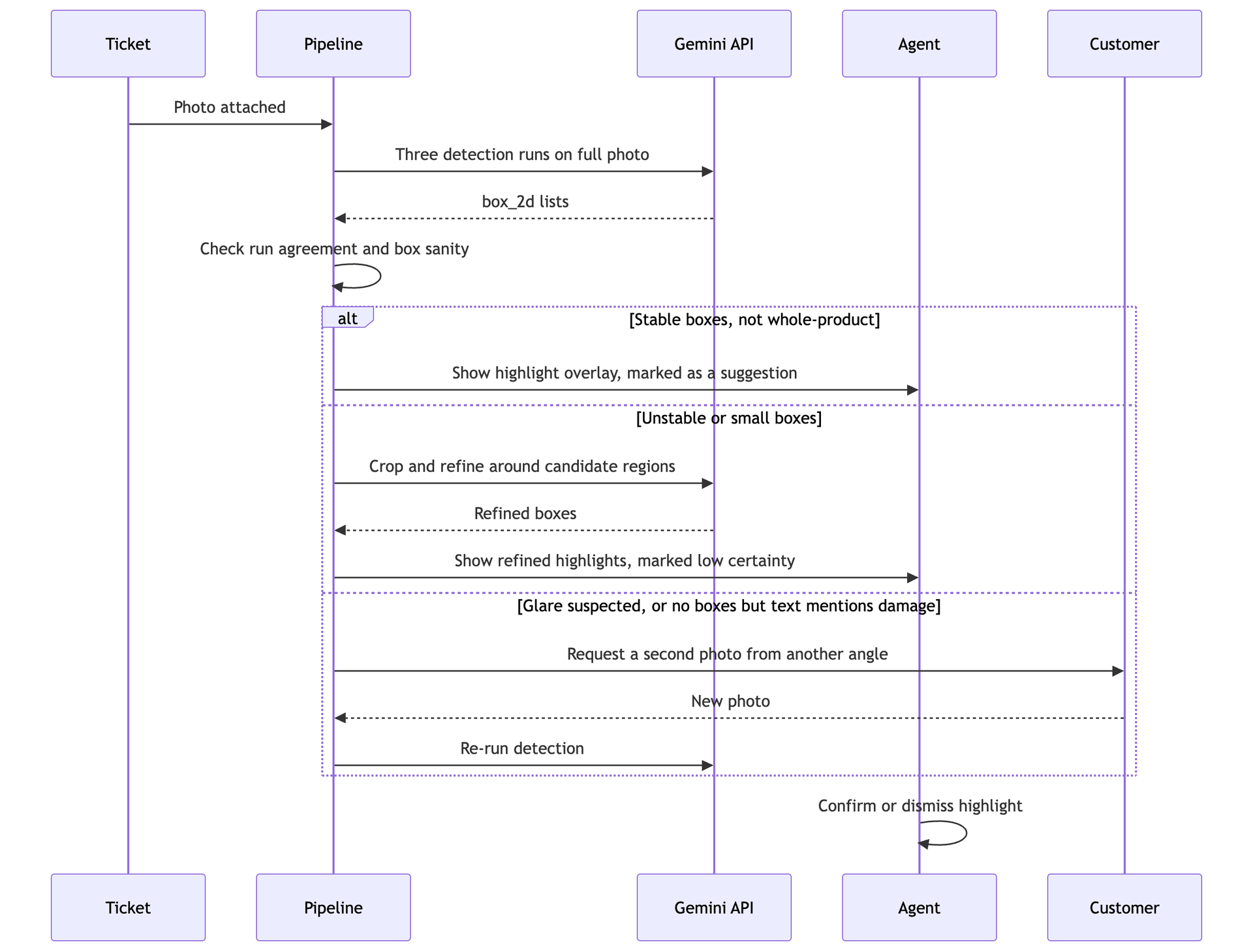
Stable boxes go straight to the agent, shaky ones get a second look from the model, and glare cases get a second look from the customer.
The routing rules are deliberately boring, and they come straight from the scorecard:
| Signal the pipeline can compute | Route | Why the data supports it |
|---|---|---|
| Boxes agree across all three runs, box smaller than half the product | Show as highlight | Clear, large defects hit 84% at IoU 0.5 and were stable across runs |
| Box appears in only one or two runs, or is very small | Crop and refine, then show as low-certainty | Small scratches flickered between runs and gained most from cropping |
| Box sits on a near-white saturated region | Ask customer for a second angle | Glare was the largest false-positive source and a second angle removed most of it |
| No boxes, but customer text mentions a scratch | Tile and refine, else second angle | Scratches were missed entirely 41% of the time on the first pass |
| One box covering most of the product | Discard the box, keep the ticket | Whole-product boxes are semantically right but geometrically useless |
The saturated-region check is plain image arithmetic, not a model call: if most pixels inside a predicted box are near maximum brightness, treat it as suspected glare. It is crude. It also caught the bulk of glare false positives in the Kettleworks review, because a highlight that is completely blown out is exactly the case where neither the model nor a human can see the surface underneath.
Two principles hold this together. First, the box is always a suggestion. The agent confirms or dismisses it with one click, and nothing downstream (refund amount, supplier claim) is computed from Gemini's coordinates alone, because a mean IoU of 0.46 is fine for pointing and not for measuring. Second, every dismissal is logged and becomes the next evaluation set. Given how much the public COCO results swing between Gemini models, the Kettleworks team re-runs the harness after every model change. Not optional.
Would a fine-tuned defect detector beat this? On the defects it was trained on, almost certainly, and teams with thousands of labeled photos should consider one. Kettleworks had 300, labeled over a couple of afternoons. That is enough to measure a zero-shot model honestly and design around its weaknesses, which is the whole trade.
# Takeaways
Gemini's coordinate output can localize product defects in customer photos, but only some defects, and only for the right job. In the illustrative Kettleworks case study, it placed tight, stable boxes on large, clearly visible damage (mean IoU of 0.71) and struggled badly on hairline scratches (0.23), glare-affected defects (0.31), and reflective surfaces (0.34). Glare was the most damaging failure, not because it caused misses but because it produced confident false positives that destroyed agent trust.
The practical lessons, in rough order of how much they matter:
- Measure per condition, never just overall. An overall mean IoU of 0.46 describes neither the model's strength nor its weakness.
- Get the plumbing right first. Boxes come back as ymin, xmin, ymax, xmax on a 0 to 1000 scale, you descale it yourself, and EXIF rotation must be applied before both labeling and inference.
- Score honestly. Use one-to-one matching, count misses as zero IoU, and track false positives separately, because precision is what agents feel.
- Keep thinking minimal and use structured output. Both the docs and the public COCO benchmark point the same direction.
- Buy resolution where it counts. Crop and refine around candidate regions gave the biggest accuracy gain on small scratches, at a token cost you only pay on hard tickets.
- Don't invent a confidence score. The API does not provide one for boxes. Run-to-run agreement is a cheap, honest substitute.
- Use it to point, not to measure. Show boxes as suggestions to a human, and never compute a refund or a claim from the coordinates alone.
The harness is small enough to run over a weekend on a couple of hundred of your own tickets. Label them. Tag the conditions that matter for your products, then let the numbers decide where Gemini's boxes belong in your workflow instead of letting a demo decide for you. You may find, like the Kettleworks team, that the answer is "somewhere very specific." Good. Specific beats flashy every time.
If you want to contact me, feel free to drop an e-mail at [email protected] or check out my website at adityaseth.in :)
Also, here's my LinkedIn.
Thank you everyone for reading,

Over and out,
Aditya Seth.
Frequently asked
- What is IoU and how is it used to score Gemini's bounding boxes?
- IoU measures how much a predicted box overlaps a hand labeled box, calculated as the shared area divided by the total area the two boxes cover together. It ranges from 0 for no overlap to 1 for an identical match, and it is the standard way to score whether a detected box actually lines up with the real object.
- Why does Gemini perform much worse on hairline scratches than on large dents or cracks?
- Large defects are big, high contrast regions that survive being shrunk down to fit the model's image token budget, while a hairline scratch a few pixels wide can vanish almost entirely at that resolution. Scratches are also long and thin, so even a correct detection often produces a box that scores poorly against a tight rectangle.
- Why do bright reflections and glare cause false positive defect boxes?
- A specular highlight is a small, bright, sharp edged region that visually resembles a scratch or chip, so the model sometimes boxes the reflection itself as damage. At the same time, a real scratch hidden inside a bright highlight can be washed out entirely, so glare produces both false alarms and missed detections in the same photo.
- Should bounding box coordinates from a vision model be used to calculate a refund or claim automatically?
- No, coordinate accuracy varies enormously by defect type, so the boxes should be treated as a suggestion that a human confirms rather than a number that feeds directly into an automated decision. A mean overlap score across all conditions is good enough to point an agent toward the right area of a photo, not precise enough to measure how large a defect actually is.
Comments