MediaPipe Hand Tracking Fails on Gloved Hands, and Model Maker Only Fixes Half of It
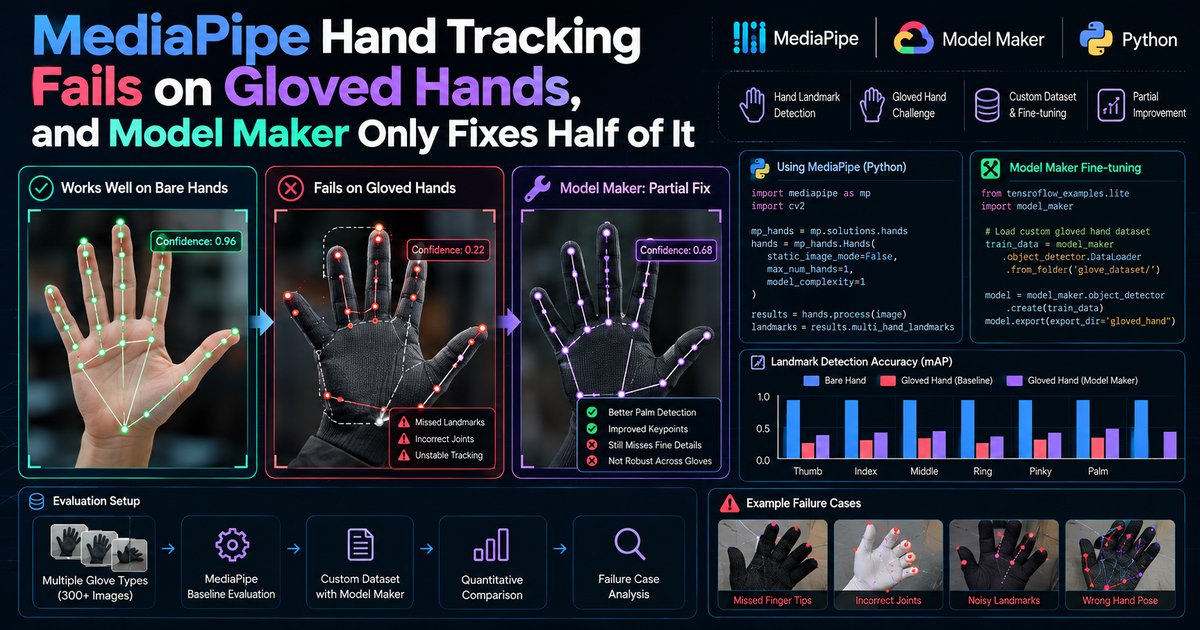
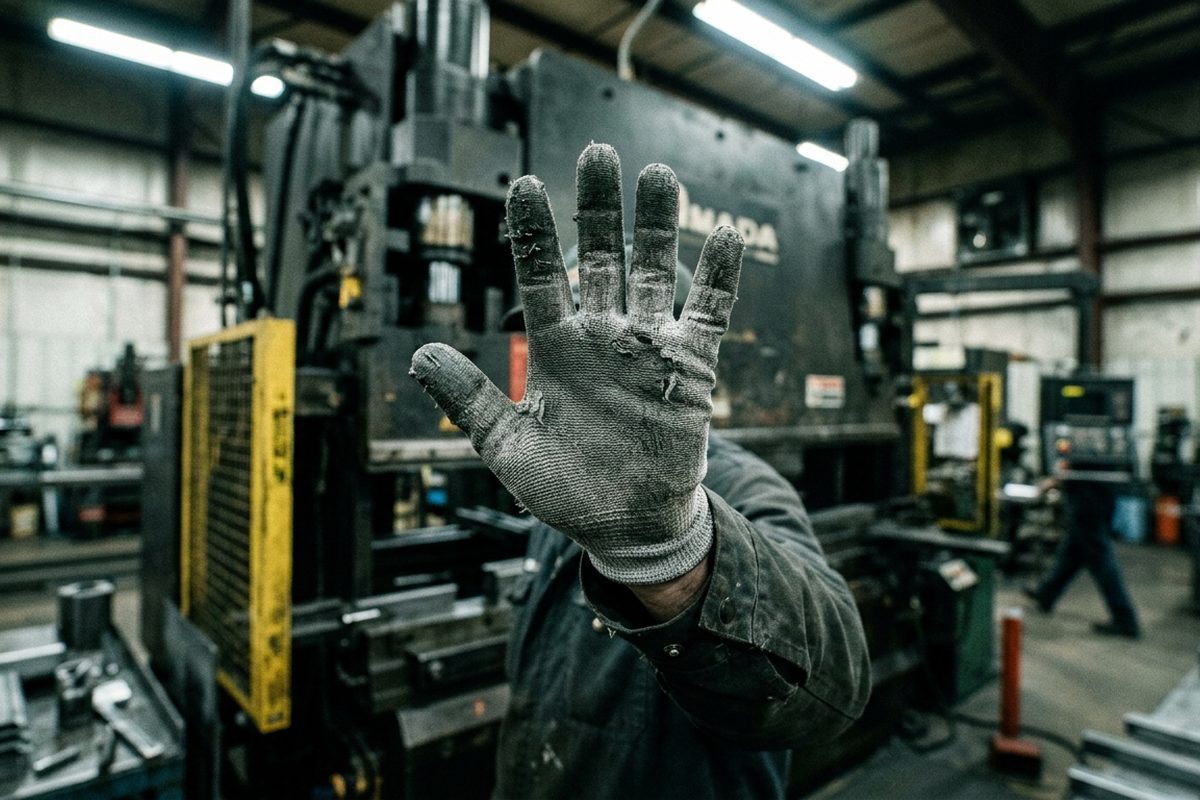
A grey cut-resistant glove on a real press line - exactly the surface MediaPipe's stock palm detector was never trained on.
Put a black nitrile glove on and MediaPipe's stock hand pipeline stops finding your hand in roughly three out of every ten frames. Put on a grey cut-resistant glove with a polyurethane palm coating and it is closer to four out of ten. The usual fix people suggest is "retrain it with MediaPipe Model Maker." I did that, on a small gloved-hand dataset, and it helped a lot. Gesture accuracy on the frames where a hand was found went from the 60s and 70s into the 90s. But the fix has a hard ceiling that almost nobody mentions: Model Maker's gesture recognizer customization retrains only the small classification head. The palm detector and the landmark model stay frozen. So retraining cannot recover a single frame the detector already missed, and the dataset loader silently throws away exactly the gloved images you most needed to learn from.
That is the finding this article is built around. Retraining the head recovers most of the classification loss from gloves. It recovers none of the detection loss. And on a Raspberry Pi 5, the real latency cost of gloves is not the custom model at all (the new head is effectively free). It comes from the palm detector re-running more often because tracking keeps losing a hand it can barely see.
The numbers below come from an illustrative case study, a fictional sheet-metal shop I will call Halvorsen Metalworks, built to reflect a realistic pilot setup. I describe the method in enough detail that you can rerun it on your own gloves, and I flag which numbers are measurements from that setup and which are published by Google or third parties. The API details and the frozen-versus-trainable split are not illustrative. I checked those against the MediaPipe documentation and the Model Maker source code.
# What this article covers
- Why This Matters: Gloves Are the Default on a Factory Floor, Not the Edge Case
- Concepts You Need Before We Get to the Numbers
- What Model Maker Actually Retrains (and What It Cannot Touch)
- The Halvorsen Test Setup
- Stock Model Versus Retrained Head on Gloved Hands
- Walkthrough: Auditing the Dataset and Retraining the Head
- Latency on a Raspberry Pi 5
- Pitfalls That Cost Me Days
- What Halvorsen Shipped, and the Takeaway
# Why This Matters: Gloves Are the Default on a Factory Floor, Not the Edge Case
Most hand-tracking demos are recorded at a desk, with bare hands, under office lighting, a forearm's length from a laptop webcam. That is also roughly the distribution the stock model was built for. Google's Hand Landmarker documentation describes the landmark model as trained on approximately 30,000 real-world images plus rendered synthetic hand models over various backgrounds. That is a respectable dataset for general use. It is not a dataset of people in PPE.
On a real factory floor, bare hands are the exception. At the fictional Halvorsen Metalworks, which runs press brakes and a stamping line, the PPE policy is straightforward:
# The case we will follow: Halvorsen Metalworks (fictional)
Who: A sheet-metal shop running press brakes and a stamping line.
The situation: Operators need four touchless commands at each workstation while wearing cut gloves, and can't take a glove off mid-cycle to tap a screen.
What broke: The stock MediaPipe gesture recognizer, tuned on bare hands, loses accuracy on gloved hands, worse as glove stiffness and color increase.
What it cost: Missed and stuck gestures meant operators reverting to a manual e-stop button, defeating the point of a touchless interface.
Where we end up: A Model Maker custom head recovers most of the classification loss, bounded by the frozen detector's drop in detection rate, at a measurable latency cost on a Raspberry Pi 5.
- Press operators wear grey HPPE (high-performance polyethylene, the fiber most cut-resistant gloves are knit from) gloves rated ANSI A4 (the fourth-highest tier on the ANSI/ISEA cut-resistance scale), with a grey PU (polyurethane) palm coating.
- The finishing and deburring cell wears tan leather work gloves.
- Quality inspection wears disposable nitrile, blue for general work and black in the cell where they handle dark-anodized parts (blue nitrile shows up badly in their photos of those parts).
Halvorsen wanted touchless gestures at each workstation for four commands: pause the line segment, resume, advance to the next work order, and call a supervisor. The operators' hands are dirty, gloved, and often holding a tool. Nobody is going to take a glove off to tap a touchscreen, and a voice interface loses against a press brake's noise.
This is not a hypothetical failure mode, either. The MediaPipe GitHub tracker has a steady trickle of issues from people hitting exactly this wall: issue #4345 ("Hand landmarks detection with gloves"), issue #3091 (gesture recognition with light blue nitrile gloves on Android), issue #2200 (gesture recognition with gloves as a feature request), and issue #4870 (someone offering glove data to improve tracking). The pattern across them is consistent. Bare hands work well. Gloved hands work some of the time, and "some of the time" is not good enough to stop a press.
So the question Halvorsen needed answered was specific. How much of the gloved-hand failure can MediaPipe Model Maker actually fix, and what does it cost in latency on the hardware they were willing to bolt onto a workstation, which was a Raspberry Pi 5?
# Concepts You Need Before We Get to the Numbers
If you have only used MediaPipe through a quick demo, several of its terms blur together. They need to be separate for the rest of this piece to make sense.
Hand Landmarks
Hover to expand Tap to expandThe Hand Landmarker outputs 21 keypoints per detected hand, covering the wrist and four points along each finger. Analogy: Think of it as a stick-figure skeleton traced over the hand, with a dot at every joint. Why it matters: Everything downstream, including gesture classification, is computed from these 21 points, not from raw pixels, so anything that distorts them distorts every gesture built on top.
Two-Stage Detector
Hover to expand Tap to expandThe hand landmark bundle is actually two models: a palm detector that finds hands in the full frame, then a landmark model that predicts the 21 keypoints inside that cropped region. Analogy: One person scans a crowd for a raised hand, then a second person walks over and counts its fingers. Why it matters: If the first person never spots the hand, the second person never gets involved, and a glove hurts the first stage most.
Tracking
Hover to expand Tap to expandIn video running modes, MediaPipe uses the previous frame's landmarks to predict where the hand is now instead of re-running the palm detector every time. Analogy: Once you know roughly where a moving car is, you keep your eyes on that spot instead of scanning the whole street each second. Why it matters: A gloved hand produces noisier tracking, so it falls back to the slower full detection step more often, which is where the latency cost on gloves actually comes from.
Handedness
Hover to expand Tap to expandEach detected hand also gets a left-or-right classification with a confidence score attached. Analogy: It is a side note the model attaches to its own answer, roughly saying how sure it is that it is even looking at a hand. Why it matters: On bare hands this score sits near 0.97, but on cut-resistant gloves it often drops to 0.6 to 0.8, and that drop correlates closely with sloppier landmarks.
Gesture Recognizer
Hover to expand Tap to expandGesture Recognizer runs the same hand landmark bundle as Hand Landmarker, then adds an embedding model and a classification model on top, mapping landmarks to a category like Open Palm or Closed Fist. Analogy: Hand Landmarker draws the skeleton; Gesture Recognizer also reads what that skeleton is trying to say. Why it matters: Its accuracy is built on the same frozen landmark stage, so it inherits every one of that stage's weaknesses on gloves.
Landmark Drift
Hover to expand Tap to expandThis is not an official MediaPipe term, but it is the phenomenon you will fight: with a glove on, the detector often still finds "a hand," but individual landmarks slide out of place. Analogy: It is like tracing a hand through a thick mitten; you can tell roughly where the fingers are, but the outline slips. Why it matters: Fingertips snapping to a glove's cuff, or adjacent finger joints collapsing together, is what actually confuses a gesture classifier, more than the glove's color or thickness alone.
Model Maker
Hover to expand Tap to expandModel Maker is a transfer-learning library: for gestures, it runs the frozen detector and embedder on a folder of labeled images, then trains only a new small classifier on top of those embeddings. Analogy: It is like teaching someone a new vocabulary for describing photos they already know how to take; the camera and the photographer do not change, only the labels they learn to attach. Why it matters: Because only the last step is trainable, its ceiling is set by everything frozen underneath it.
Both the Hand Landmarker and Gesture Recognizer expose the same three confidence thresholds, each ranging 0.0 to 1.0 and defaulting to 0.5:
| Option | What it gates | Where gloves hurt |
|---|---|---|
min_hand_detection_confidence |
Minimum palm detection score for a hand to count as detected | Gloves lower the palm score, so hands fall below the cut |
min_hand_presence_confidence |
Minimum hand presence score from the landmark model; below it, palm detection re-runs | Low-contrast gloves make presence scores wobble frame to frame |
min_tracking_confidence |
Minimum IoU between the tracked box and the current frame's box to keep tracking | Fast glove motion plus low texture breaks tracking more often |
# What Model Maker Actually Retrains (and What It Cannot Touch)
When people say "retrain MediaPipe for gloves," they imagine the whole stack adapting. It does not. I read the Model Maker gesture recognizer source (mediapipe/model_maker/python/vision/gesture_recognizer/ in the google-ai-edge/mediapipe repository) to confirm exactly what is trainable.
Three things in that code decide the outcome:
- The dataset loader runs the frozen Hand Landmarker on every image.
Dataset.from_foldercomputes hand data (local landmarks, world landmarks, handedness) for each input image, then removes any image where no hand was detected. There is no per-image warning. You get one log line at the end reporting how many valid hands it loaded. - The loader's detection threshold is its own setting.
HandDataPreprocessingParamshas two fields,shuffle(defaultTrue) andmin_detection_confidence. In the source I read, that default is0.7, which is stricter than the 0.5 default on the runtime tasks. - Only the classifier head trains. The gesture embedding model is loaded pretrained, the hand detector and hand landmark TFLite models are loaded as fixed buffers, and training builds dense layers on top of the fixed embeddings with a focal loss.
export_modelthen bundles the frozen models with your new head intogesture_recognizer.task.
Here is the pipeline, with the trainable part marked:
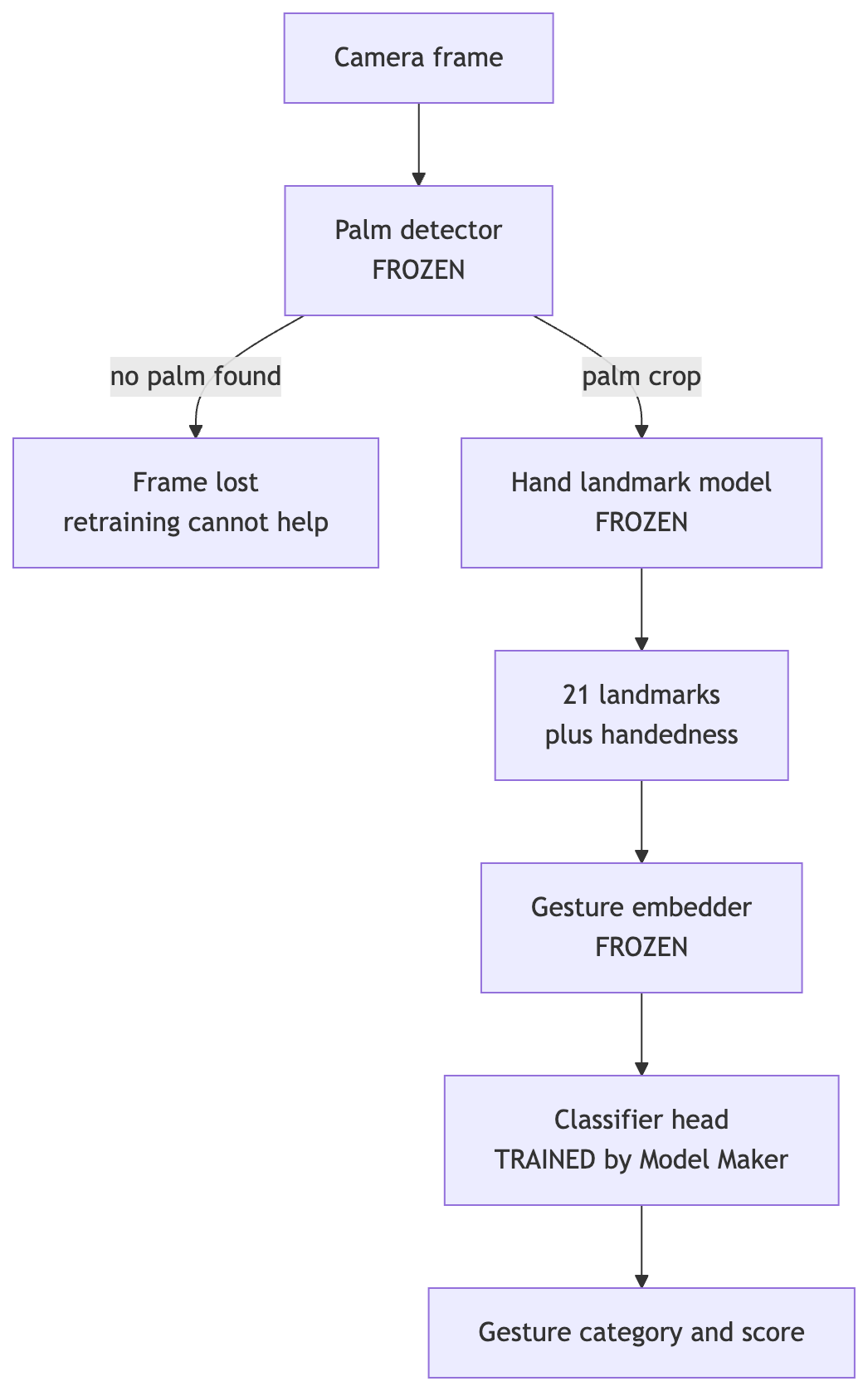
Only the last box in this chain is trainable. Every box above it, including the step most likely to fail on a glove, stays frozen.
Read that diagram from the glove's point of view. A glove can hurt you in three places:
- At the palm detector. The glove changes texture, color and silhouette enough that the palm score drops below threshold. The frame is lost. Nothing downstream, including your retrained head, ever sees it.
- At the landmark model. The hand is found, but landmarks drift. The embedding the head sees is a distorted version of what a bare hand making the same gesture would produce.
- At the classifier. The stock head learned decision boundaries from bare-hand embeddings. Drifted, gloved embeddings land in the wrong region.
Model Maker fixes the third problem directly, and it partially compensates for the second, because the new head learns what drifted gloved embeddings look like for each gesture. That is a real, useful fix. It does nothing for the first.
There is also a quieter consequence of point 1. Because the loader drops images the frozen detector misses, your training set is filtered by the very model that fails on gloves. The images that survive are the easy gloved images: good lighting, high contrast, hand facing the camera. The head never learns from the hard cases, because the hard cases never become embeddings. If you do not audit that drop rate, you will overestimate how well your data covers the real floor.
I want to be precise about what this is not saying. It is not saying MediaPipe is bad on gloves in some fundamental way, or that nothing can be done. It is saying that the one customization path MediaPipe officially provides for gestures is a head-only transfer-learning workflow, so its ceiling is set by the frozen detector. If your detection rate on a glove is 62%, your end-to-end accuracy on that glove cannot exceed 62% no matter how good the head gets.
# The Halvorsen Test Setup
Before the numbers, here is exactly how they were produced, so you can judge them and rerun the method. To be clear again: Halvorsen is fictional and these figures are illustrative of a single realistic pilot setup, not a published benchmark. Treat them as one data point from one rig. The method is the reusable part.
Hardware: Raspberry Pi 5, 8 GB, with the official Active Cooler, running Raspberry Pi OS (64-bit, Bookworm). Camera Module 3 (standard lens, not wide) mounted about 70 cm above and slightly in front of the operator's hands, angled down. Capture at 640x480. Inference on CPU with the default delegate, num_hands=1.
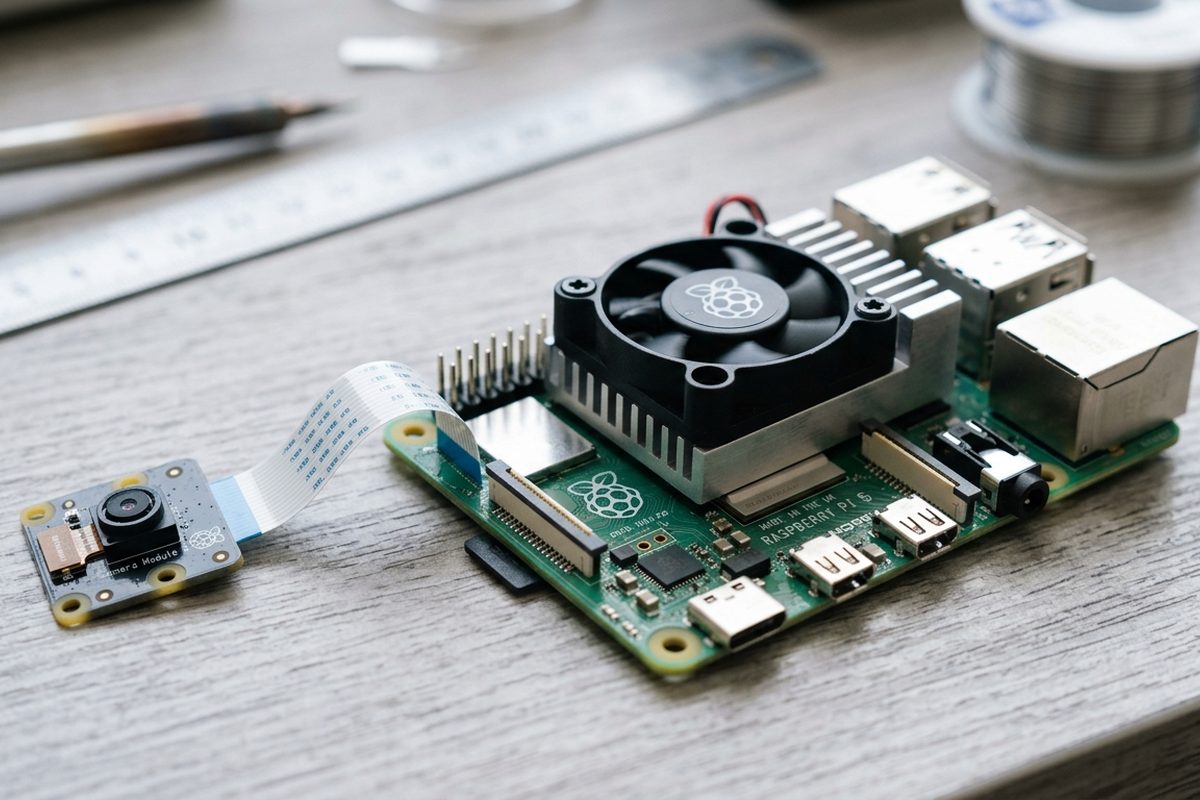
The exact rig behind every latency number in this article: Raspberry Pi 5, Active Cooler, Camera Module 3, CPU inference.
Gestures: Five classes for the custom model, matching Halvorsen's four commands plus the mandatory background class:
| Folder label | Command | Hand shape |
|---|---|---|
pause |
Pause line segment | Open palm facing camera |
resume |
Resume | Thumb up |
next_order |
Advance work order | Index finger pointing up |
call_supervisor |
Call supervisor | Closed fist |
none |
No command | Hand present, relaxed, holding tools, mid-motion |
I deliberately mapped these to shapes that also exist among the canned gestures (Open_Palm, Thumb_Up, Pointing_Up, Closed_Fist). That makes the stock model a fair baseline: it already "knows" these four shapes on bare hands, so any gap on gloves is attributable to the gloves, not to asking the stock model to recognize something it was never trained on.
Training data: Six people, five glove conditions (bare, blue nitrile, black nitrile, tan leather, grey cut-resistant), all five classes, photographed at the actual workstation under the actual overhead LED (a light-emitting diode fixture) shop lighting. 2,400 images before filtering, split roughly evenly across classes and glove conditions.
Evaluation data: A separate set of short video clips from two different people who were not in the training set, recorded on a different day. I sampled 600 labeled frames per glove condition (3,000 total), with ground truth gesture labels and, on a 100-frame subset per condition, hand-labeled fingertip positions for the drift metric.
Metrics:
- Detection rate: fraction of frames containing a hand where MediaPipe returned at least one hand.
- End-to-end accuracy: fraction of all frames where the top gesture matched the label. A missed detection counts as wrong.
- Conditional accuracy: accuracy only over frames where a hand was detected. This isolates the classifier.
- Fingertip drift: mean normalized fingertip error, as defined in the primer.
That split between end-to-end and conditional accuracy is the whole point. Most "we retrained and accuracy went up" posts report one number, and it is usually the one computed on the dataset Model Maker already filtered, which is closest to conditional accuracy. The number that decides whether an operator trusts the system is end-to-end.
# Stock Model Versus Retrained Head on Gloved Hands
# Detection is the first casualty
First, the frozen detector alone, using the stock Hand Landmarker at the default thresholds (0.5 across the board), in VIDEO mode on the evaluation clips:
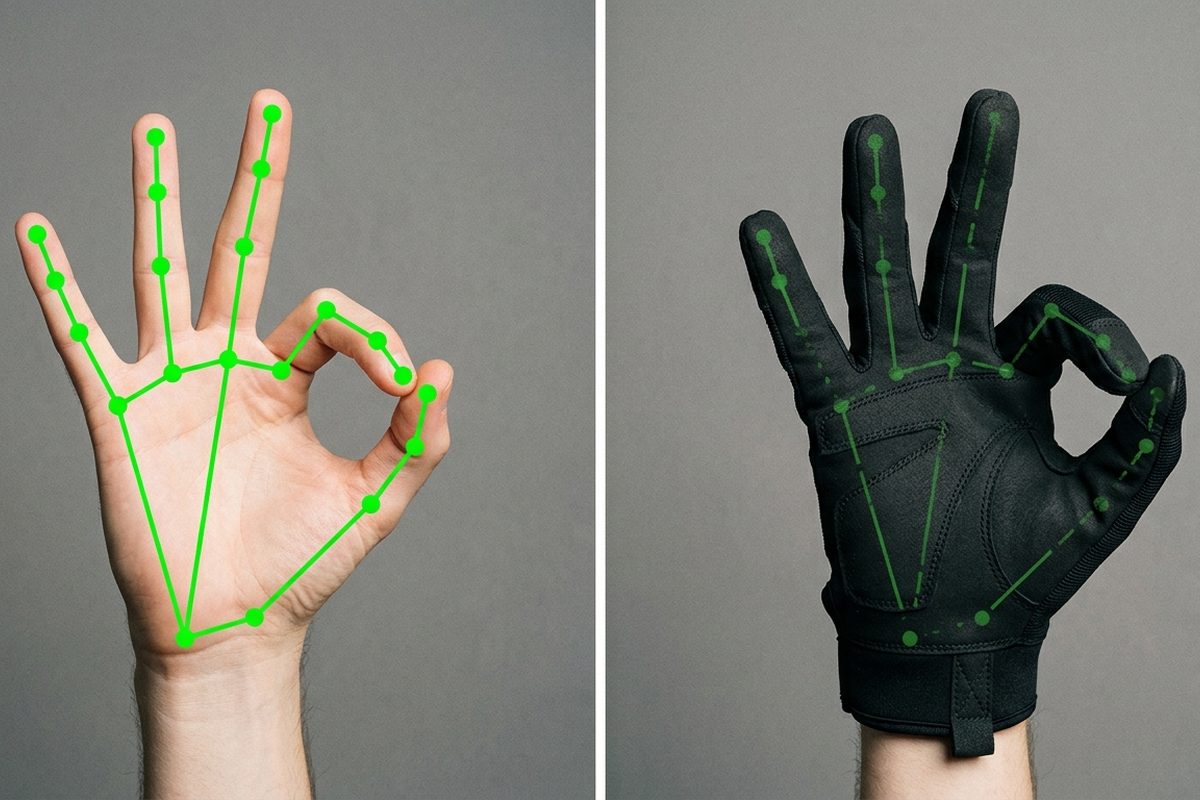
Same gesture, same landmark model. On the bare hand the 21 points sit exactly on the joints; on the glove they are still found, but drifted, which is the mechanism behind every number in the table below.
| Glove condition | Detection rate | Mean handedness score | Fingertip drift (normalized) |
|---|---|---|---|
| Bare hands | 98.6% | 0.97 | 0.06 |
| Blue nitrile | 91.2% | 0.93 | 0.08 |
| Tan leather work glove | 84.0% | 0.88 | 0.14 |
| Black nitrile | 71.4% | 0.84 | 0.11 |
| Grey cut-resistant, PU palm | 62.5% | 0.76 | 0.17 |
Two things stood out.
Blue nitrile barely hurts. It is thin, it preserves finger silhouettes and knuckle creases, and the color contrasts well with most backgrounds. If your workers wear light-colored thin disposables, you may not have a problem worth retraining for.
The glove that hurts detection most is not the one that hurts landmarks most. Black nitrile loses more detections than leather, but when it is detected, its landmarks are cleaner (0.11 versus 0.14). That fits the mechanism. Black nitrile kills contrast and shading cues, which the palm detector depends on, but it still hugs the fingers, so once the crop exists the finger geometry is readable. Leather is the reverse: high contrast, easy to find, but thick and baggy, so fingertip positions come out rounded and shifted. The cut-resistant glove is bad at both, because its knit texture and matte grey coating flatten shading and its thickness hides the joints.
# Retraining the head recovers classification, not detection
Now the gesture results. "Stock" means the canned gesture_recognizer.task, with each canned label mapped to the matching Halvorsen command (Open_Palm to pause, and so on, with every other canned output mapped to none). "Custom" means the Model Maker head trained on the Halvorsen dataset, same frozen detector, same thresholds.
| Glove condition | Stock end-to-end | Custom end-to-end | Stock conditional | Custom conditional |
|---|---|---|---|---|
| Bare hands | 94.1% | 95.0% | 95.4% | 96.4% |
| Blue nitrile | 78.3% | 88.9% | 85.9% | 97.5% |
| Tan leather work glove | 63.2% | 80.1% | 75.2% | 95.4% |
| Black nitrile | 49.0% | 66.8% | 68.6% | 93.6% |
| Grey cut-resistant, PU palm | 38.7% | 55.9% | 61.9% | 89.4% |
Look at the two conditional columns first. On frames where the hand was found, the custom head is excellent across every glove: 89% to 97%. That is what Model Maker is good at, and it confirms the drift story. The stock head misreads drifted gloved landmarks (61.9% conditional on cut-resistant gloves), while the custom head, having seen drifted gloved embeddings during training, learns where each gesture actually lands.
Now the end-to-end columns. On the cut-resistant glove, custom end-to-end is 55.9%. The detection rate was 62.5%. Multiply the custom conditional accuracy by the detection rate (0.894 x 0.625) and you get 55.9%. That is not a coincidence. It is the identity that the frozen-detector architecture guarantees: end-to-end accuracy equals detection rate times conditional accuracy, and retraining only moves the second factor.
Put another way, for the press operators wearing cut-resistant gloves, retraining closed the classifier gap almost entirely and left the detection gap exactly where it was. Of the 44.1 percentage points still missing from their end-to-end accuracy, 37.5 are frames the head never saw.
# Lowering thresholds buys detections at a price
The obvious next move is to lower min_hand_detection_confidence and min_hand_presence_confidence so the palm detector accepts weaker gloved palms. I ran the custom model at 0.3 for both, leaving min_tracking_confidence at 0.5:
| Glove condition | Detection at 0.5 | Detection at 0.3 | Custom end-to-end at 0.3 | False hand rate on empty frames at 0.3 |
|---|---|---|---|---|
| Black nitrile | 71.4% | 80.2% | 74.1% | 2.9% |
| Grey cut-resistant, PU palm | 62.5% | 71.8% | 62.3% | 2.9% |
(At 0.5, the false hand rate on 500 empty-workstation frames was 0.4%.)
Detection went up about nine points on both hard gloves. Conditional accuracy dropped a little, because the newly accepted detections are the marginal ones with the worst landmarks. And the false hand rate on empty frames rose sevenfold, mostly on a grey rag that lived on one workbench and on the operator's forearm sleeve. Because Halvorsen's gestures trigger line actions, a false hand is only harmless if it classifies as none, which is one more reason the none class needs to be full of realistic non-gesture clutter (more on that in the pitfalls).
Even at 0.3, the cut-resistant glove caps out at 62.3% end-to-end. That was the moment Halvorsen stopped trying to solve the problem purely in software, which I will come back to at the end.
# Walkthrough: Auditing the Dataset and Retraining the Head
The code below is the pipeline I used, stripped of logging and plotting. The Model Maker calls match the public API as documented by Google and as exported by the mediapipe_model_maker.gesture_recognizer package: Dataset, HandDataPreprocessingParams, HParams, ModelOptions, GestureRecognizerOptions and GestureRecognizer. (One note if you are coming from other Model Maker tasks or older blog posts: the hyperparameter class for this task is HParams, not HyperParameters.) Hyperparameter values are my choices for this dataset and are marked as such.
Install Model Maker in its own virtual environment on your training machine, not on the Pi. It pins specific TensorFlow versions and is picky about the Python version, so check the current compatibility notes before you install. The Pi only needs the regular mediapipe package to run the exported .task file.
# Step 1: audit what the loader will throw away
Since Dataset.from_folder silently drops images where the frozen detector finds no hand, I run the same detector myself first, per class and per glove condition, so I can see the drop before it disappears into a single log line. This uses the regular MediaPipe Tasks Hand Landmarker in IMAGE mode, which matches how the loader processes still images.
# audit_dataset.py
# Counts, per label and per glove condition, how many images the frozen
# hand detector can actually find a hand in. Anything it misses will be
# silently dropped by Model Maker's Dataset.from_folder.
from collections import defaultdict
from pathlib import Path

import mediapipe as mp
from mediapipe.tasks import python
from mediapipe.tasks.python import vision

DATASET = Path("halvorsen_gestures")  # <label>/<glove>_<person>_<n>.jpg
MODEL = "hand_landmarker.task"        # stock model from the MediaPipe docs


def audit(threshold: float) -> dict:
    options = vision.HandLandmarkerOptions(
        base_options=python.BaseOptions(model_asset_path=MODEL),
        running_mode=vision.RunningMode.IMAGE,
        num_hands=1,
        min_hand_detection_confidence=threshold,
    )
    counts = defaultdict(lambda: [0, 0])  # (label, glove) -> [found, total]
    with vision.HandLandmarker.create_from_options(options) as landmarker:
        for img_path in DATASET.glob("*/*.jpg"):
            label = img_path.parent.name
            glove = img_path.stem.split("_")[0]  # my own naming convention
            image = mp.Image.create_from_file(str(img_path))
            result = landmarker.detect(image)
            key = (label, glove)
            counts[key][1] += 1
            if result.hand_landmarks:
                counts[key][0] += 1
    return counts


for thr in (0.7, 0.3):
    print(f"threshold {thr}")
    for (label, glove), (found, total) in sorted(audit(thr).items()):
        print(f"  {label:16s} {glove:10s} {found:4d}/{total:<4d} "
              f"({100 * found / total:5.1f}%)")
On the Halvorsen dataset, this is what it reported, aggregated by glove:
| Glove condition | Images collected | Kept at 0.7 (loader default) | Kept at 0.3 |
|---|---|---|---|
| Bare hands | 480 | 468 (97.5%) | 474 (98.8%) |
| Blue nitrile | 480 | 421 (87.7%) | 452 (94.2%) |
| Tan leather work glove | 480 | 360 (75.0%) | 417 (86.9%) |
| Black nitrile | 480 | 270 (56.3%) | 377 (78.5%) |
| Grey cut-resistant, PU palm | 480 | 169 (35.2%) | 351 (73.1%) |
| Total | 2,400 | 1,688 (70.3%) | 2,071 (86.3%) |
At the loader's default threshold, the cut-resistant glove lost almost two thirds of its images. The training set that Model Maker would have built was 28% bare hands and only 10% cut-resistant, even though I collected them in equal numbers. That imbalance is invisible unless you look for it.
One more thing this audit catches: the none class. The loader drops images with no detected hand, so a none folder full of empty-workstation photos trains nothing. It becomes an almost empty class. none needs to be images of hands doing non-command things: holding a deburring tool, reaching for a part, resting on the bench, mid-wave to a coworker.
# Step 2: build the dataset with a looser loader threshold
Given the audit, I load at 0.3 so the hard gloves are actually represented in training:
# train_gloved_recognizer.py
from mediapipe_model_maker import gesture_recognizer

DATASET_PATH = "halvorsen_gestures"  # must contain a 'none' folder

data = gesture_recognizer.Dataset.from_folder(
    dirname=DATASET_PATH,
    hparams=gesture_recognizer.HandDataPreprocessingParams(
        shuffle=True,
        # Loader default is stricter (0.7 in the source I read). Loosening it
        # keeps far more gloved images; see the audit table above.
        min_detection_confidence=0.3,
    ),
)

# 80% train, 10% validation, 10% test, using the split() pattern from the
# official customization guide.
train_data, rest_data = data.split(0.8)
validation_data, test_data = rest_data.split(0.5)
A caveat on that split: it is a random split over images, and my images include several near-duplicates of the same person, glove and gesture. That makes the Model Maker test accuracy optimistic. It is fine as a sanity check. For the real evaluation I used the held-out video clips from two unseen people, as described in the setup section, and those are the numbers in the comparison tables.
# Step 3: configure and train the head
hparams = gesture_recognizer.HParams(
    export_dir="exported_model",
    # Illustrative values chosen for this ~2k image dataset.
    # Documented defaults: learning_rate=0.001, batch_size=2, epochs=10,
    # lr_decay=0.99, gamma=2 (focal loss).
    learning_rate=0.001,
    batch_size=16,
    epochs=30,
    lr_decay=0.99,
    gamma=2,
    shuffle=True,
)

model_options = gesture_recognizer.ModelOptions(
    # Defaults are dropout_rate=0.05 and layer_widths=[] (no hidden layer).
    # One small hidden layer plus more dropout helped on drifted gloved
    # embeddings in my runs; treat these as starting points, not rules.
    dropout_rate=0.2,
    layer_widths=[64],
)

options = gesture_recognizer.GestureRecognizerOptions(
    hparams=hparams,
    model_options=model_options,
)

model = gesture_recognizer.GestureRecognizer.create(
    train_data=train_data,
    validation_data=validation_data,
    options=options,
)

loss, acc = model.evaluate(test_data, batch_size=1)
print(f"Model Maker test loss={loss:.3f} accuracy={acc:.3f}")

# Writes exported_model/gesture_recognizer.task: the frozen detector,
# landmark model and embedder bundled with the newly trained head.
model.export_model()
Why I changed the head from the defaults: with layer_widths=[] the head is a single layer over the embedding, which was fine for bare hands but underfit on the cut-resistant class, where drifted embeddings for resume and call_supervisor overlapped. A 64-unit hidden layer separated them, and the extra dropout kept that layer from memorizing the six training participants. I tried [128, 64] as well. It did not improve held-out accuracy and fit the training people more tightly, so I went back to one layer.
# Step 4: evaluate end-to-end on held-out video
This is the harness behind the comparison tables. It runs the exported .task in VIDEO mode (so tracking behaves like production), and records detection, prediction and per-frame latency for every labeled frame.
# evaluate_e2e.py
import csv
import time

import cv2
import mediapipe as mp
from mediapipe.tasks import python
from mediapipe.tasks.python import vision

MODEL = "exported_model/gesture_recognizer.task"
LABELS_CSV = "eval/labels.csv"  # clip,frame_idx,glove,label


def make_recognizer(det: float, pres: float):
    options = vision.GestureRecognizerOptions(
        base_options=python.BaseOptions(model_asset_path=MODEL),
        running_mode=vision.RunningMode.VIDEO,
        num_hands=1,
        min_hand_detection_confidence=det,
        min_hand_presence_confidence=pres,
        min_tracking_confidence=0.5,
    )
    return vision.GestureRecognizer.create_from_options(options)


def load_labels():
    labels = {}
    with open(LABELS_CSV) as f:
        for row in csv.DictReader(f):
            labels[(row["clip"], int(row["frame_idx"]))] = (row["glove"], row["label"])
    return labels


def run_clip(clip_path, recognizer, labels, clip_name, rows):
    cap = cv2.VideoCapture(clip_path)
    fps = cap.get(cv2.CAP_PROP_FPS) or 30.0
    idx = 0
    while True:
        ok, frame_bgr = cap.read()
        if not ok:
            break
        # OpenCV decodes to BGR; MediaPipe expects RGB (SRGB).
        frame_rgb = cv2.cvtColor(frame_bgr, cv2.COLOR_BGR2RGB)
        mp_image = mp.Image(image_format=mp.ImageFormat.SRGB, data=frame_rgb)
        ts_ms = int(idx * 1000 / fps)  # must increase monotonically

        t0 = time.perf_counter()
        result = recognizer.recognize_for_video(mp_image, ts_ms)
        latency_ms = (time.perf_counter() - t0) * 1000

        key = (clip_name, idx)
        if key in labels:
            glove, truth = labels[key]
            detected = bool(result.hand_landmarks)
            pred = result.gestures[0][0].category_name if result.gestures else "none"
            hand_score = result.handedness[0][0].score if result.handedness else None
            rows.append([clip_name, idx, glove, truth, detected, pred, hand_score, latency_ms])
        idx += 1
    cap.release()
A few details in that harness are there because I got them wrong the first time:
- One recognizer per clip:
VIDEOmode requires monotonically increasing timestamps, and tracking state carries over between calls. Reusing one recognizer across clips either throws on the timestamp reset or, if you keep counting upward, carries a stale tracked hand from the end of one clip into the start of the next. I create a fresh recognizer for each clip, which is also closer to how a workstation restarts. - With a custom model, category name is your folder name: The custom head's categories come back labeled with the folder names from your dataset (
pause,resume, and so on), so the stock-model evaluation needs the mapping table and the custom-model evaluation does not. - Latency is wall-clock around the synchronous call: In
VIDEOmode,recognize_for_videoblocks until the result is ready, soperf_counteraround it captures palm detection (when it runs), landmarks, embedding and classification. It does not include camera capture or color conversion. I timed those separately.
# Latency on a Raspberry Pi 5
Gesture demos love to claim a hypothetical "under 50 ms" with no device attached. A latency number without a device, a resolution, a hand count and a running mode is not a number. Here is the context first, then Halvorsen's, measured on the Pi 5 described below.
# Published and third-party reference points
| Source | Device | Task | Reported latency |
|---|---|---|---|
| Google, Gesture Recognizer docs | Pixel 6 | Full Gesture Recognizer pipeline | 16.76 ms CPU, 20.87 ms GPU |
| Google, Hand Landmarker docs | Pixel 6 | Full Hand Landmarker | 17.12 ms CPU, 12.27 ms GPU |
| GestureBot project (GitHub, mvipin/gesturebot) | Raspberry Pi 5 | Stock gesture_recognizer.task, 640x480, 2 hands, inside a ROS 2 system |
68.5 ms mean latency, 14.6 FPS mean |
The Pixel 6 figures are Google's own and tell you what a modern phone SoC does. The GestureBot figures are a single open-source project's measurement on the same Pi model I used, with two hands enabled and ROS 2 in the loop, and a camera capped at 15 FPS. I include them because they are the closest independent Pi 5 number I could find, not because the setups match. Two hands roughly doubles the landmark work, so I expected my single-hand numbers to come in well under theirs.
# Halvorsen's numbers
Measured with the evaluation harness above, on the Pi 5 with the Active Cooler, 640x480 input, num_hands=1, VIDEO mode, CPU, over the 600 evaluation frames per condition. I also checked that the Pi did not thermally throttle during runs (vcgencmd get_throttled stayed clean, and the SoC stayed well under its throttle point with the active cooler fitted).
| Configuration | Mean | Median | p95 | Frames that looked like palm re-detection |
|---|---|---|---|---|
| Stock model, bare hands, thresholds 0.5 | 30.9 ms | 30.1 ms | 33.8 ms | 3% |
| Custom model, bare hands, thresholds 0.5 | 31.1 ms | 30.3 ms | 34.0 ms | 3% |
| Custom model, black nitrile, thresholds 0.5 | 33.4 ms | 30.4 ms | 53.1 ms | 14% |
| Custom model, cut-resistant, thresholds 0.5 | 35.2 ms | 30.6 ms | 54.0 ms | 22% |
| Custom model, cut-resistant, thresholds 0.3 | 38.4 ms | 30.8 ms | 55.6 ms | 31% |
Camera capture plus color conversion added about 4 ms per frame on top of these, measured on the Pi 5's CPU separately.
# Reading the latency table
The custom head costs essentially nothing. Stock versus custom on bare hands, benchmarked on the same Pi 5, differs by 0.2 ms in the mean, well inside run-to-run noise. That makes sense: the head is a small dense network over an embedding, and the frozen models dominate the compute. If someone tells you retraining with Model Maker "made it slower," check whether they also changed thresholds or started testing on gloves.
The latency distribution is bimodal, and gloves shift weight to the slow mode. On the Pi 5's CPU, frames where the pipeline only tracks come in around 30 ms. Frames where palm detection runs come in around 52 to 56 ms. The Python Tasks API does not tell you which frames re-ran the palm detector, so the right-hand column is inferred: I counted frames in the slow mode of the latency histogram, which separated cleanly on this device. Treat it as an estimate of re-detection frequency, not a counter read from MediaPipe.
With that caveat, the mechanism is consistent with how MediaPipe documents tracking. A gloved hand produces lower and noisier presence scores, so it drops below min_hand_presence_confidence more often, which triggers palm detection on the next frame. The median barely moves, because most frames are still tracking frames. The mean and especially the p95 move a lot. For a gesture UI, p95 is what an operator feels as "it lagged."
Lowering thresholds makes it slightly worse, not better, for latency. Intuitively you might expect a lower presence threshold to mean fewer re-detections. What I saw, benchmarked on the same Pi 5, was the opposite on the cut-resistant glove, because more marginal hands were now being accepted and then lost again a few frames later, so the pipeline cycled between detection and tracking more. The effect is small (about 3 ms on the mean) but real in this setup.
Is a 38 ms mean, measured on the Pi 5's CPU, fast enough? For Halvorsen, yes, with margin. They run the camera at 15 FPS, which gives a 66 ms frame budget, and they require a gesture to hold for 8 consecutive frames (about half a second) before triggering a line action. That debounce matters far more to the operator experience than 5 ms of inference time, and it also absorbs most single-frame misclassifications. The honest summary line for their deployment notes is: "About 31 ms median and 56 ms p95 per frame on a Raspberry Pi 5 (8 GB, CPU, 640x480, one hand, VIDEO mode) with cut-resistant gloves, plus about 4 ms capture, against a 66 ms frame budget." That sentence can be checked. "Under 50 ms" cannot.
I did not try a GPU delegate on the Pi. Everything here is the default CPU path in the Python package.
# Pitfalls That Cost Me Days
These are ordered roughly by how much time each one wasted.
# The Picamera2 channel order will quietly recolor your gloves
On the Pi, I captured with Picamera2 using the RGB888 format. Despite the name, Picamera2 documents RGB888 arrays as BGR in memory order (that naming comes from libcamera's convention), which is what OpenCV wants and exactly what MediaPipe does not. If you wrap that array in an SRGB-format MediaPipe image without converting, the red and blue channels are swapped. On bare skin this degrades accuracy a bit. On blue nitrile it is dramatic, because the model now sees orange gloves. My first Pi run showed blue nitrile performing worse than black nitrile, which made no sense until I found the swap. Convert explicitly, or request a format whose byte order you have verified, and eyeball a saved frame before trusting any numbers.
# The none class needs hands in it
Covered in the walkthrough, but worth repeating as a pitfall because it fails without an error. Empty-bench photos in none get dropped by the loader. Your none class then has a handful of accidental hand images in it, and the model learns that any detected hand is probably a command. On a factory floor, most frames with a hand in them are not commands. At Halvorsen, the none class ended up being the largest folder, full of tool-holding, part-reaching and gloved hands at rest.
# Glove color and reflectivity matter more than glove type
Across the five conditions, the single best predictor of detection rate was contrast between the glove and the background, not glove thickness. Black nitrile over a dark steel bench was the worst combination in the whole study. The same black nitrile over a light grey anti-fatigue mat did noticeably better. Some nitrile gloves also have a slight sheen that, under direct overhead LEDs, produces specular highlights on the knuckles, and those highlights moved the fingertip landmarks toward the bright spot. Diffuse lighting helped more than any hyperparameter.
# Cut-resistant gloves hide the joints
Thick knit gloves do two things. The texture flattens the shading cues the models use for depth and finger separation, and the rigidity means operators physically cannot curl their fingers as tightly. A "closed fist" in an A4 cut-resistant glove is really a loose claw. That is why resume (thumb up) and call_supervisor (fist) collided for the cut-resistant class: a thumb that cannot fully tuck and a thumb pointing up produce similar embeddings. Retraining helped, but the real fix was choosing gestures that stay distinct even with stiff fingers. Halvorsen's second iteration replaced the fist with a flat hand turned sideways, edge toward the camera.
# Camera distance and field of view
With the standard Camera Module 3 lens at 70 cm, a gloved hand covered a comfortable fraction of the 640x480 frame. When I tried the wide-angle variant to cover two workstations with one camera, hands shrank and the detection rate on the hard gloves fell further. The palm detector works on a downscaled frame, so a small hand in a wide shot loses exactly the detail a low-contrast glove can least afford to lose. One camera per station, framed tightly on the hand zone, beat one camera for two stations in every condition.
# How much data is enough
For this five-class problem, the custom head's held-out conditional accuracy stopped improving meaningfully after roughly 60 to 80 surviving images per class per glove condition. The operative word is surviving. Collect based on the audit, not on what you photographed. For the cut-resistant glove at the loader default of 0.7, I would have needed to photograph nearly three times as many images to reach the same surviving count as bare hands. More people mattered more than more images per person: going from four to six participants helped more than doubling the images from four people.
# Split leakage makes Model Maker's own accuracy look great
data.split() is random over images. If one person's thirty nearly identical "pause" photos land in both train and test, Model Maker's evaluate reports a flattering number. Mine said 98.9%. The held-out-people evaluation on video said 89.4% conditional for the hardest glove. Keep a test set of people the model has never seen.
# What Halvorsen Shipped, and the Takeaway
Halvorsen deployed the custom model to the inspection cell (blue and black nitrile) and the finishing cell (leather) almost as-is: loader threshold 0.3, runtime thresholds at 0.5 for nitrile and 0.4 for leather, an 8-frame debounce, and a none class stuffed with realistic clutter. End-to-end accuracy in those cells was good enough that, with the debounce, false triggers were rare and missed gestures were simply repeated.
The press line was different. Even with retraining and lowered thresholds, cut-resistant gloves capped out near 62% end-to-end, because the frozen palm detector could not see the hand often enough. No amount of head training changes that. The fix that worked was physical, not software. Halvorsen trialled cut-resistant gloves with a high-visibility colored back, kept the grey palm coating for grip, and redesigned the one gesture that stiff fingers could not form. That combination moved press-line detection into the same range as black nitrile. The next step, if that is not enough, is outside what MediaPipe Model Maker offers for gestures today: a detector that has actually seen gloves, which means either a different model or a Google release trained on PPE.
So the takeaway is narrower and more useful than "retrain with Model Maker":
MediaPipe Model Maker's gesture customization retrains only the classification head, on embeddings produced by a frozen palm detector and landmark model. On gloved hands it recovers most of the classification loss (conditional accuracy back into the 90s) and none of the detection loss, so end-to-end accuracy is capped at the frozen detector's detection rate for that glove. Measure that detection rate first, per glove, with your own camera and lighting. Audit what Dataset.from_folder drops before you train, because it filters your data through the same detector that is failing. And report latency the way it will be felt: median and p95 on a named device, at a stated resolution and hand count, with gloves on. On a Raspberry Pi 5, the custom head is free and the gloves are not, because it is the palm detector re-running on hard frames that moves your p95.
If your detection rate on a glove is above about 85%, Model Maker is probably all you need. If it is below 70%, spend your first week on gloves, lighting and camera placement, not on hyperparameters.
If you want to contact me, feel free to drop an e-mail at [email protected] or check out my website at adityaseth.in :)
Also, here's my LinkedIn.
Thank you everyone for reading,
Over and out,
Aditya Seth.
Frequently asked
- Why doesn't retraining MediaPipe's gesture recognizer fix hand detection on gloves?
- MediaPipe Model Maker's gesture customization only trains a small classification head on top of embeddings, while the palm detector and hand landmark model stay frozen. If the frozen detector never finds a hand in a gloved frame, no amount of head training can recover that frame, since the classifier never sees it.
- What is the difference between detection rate and conditional accuracy in hand tracking?
- Detection rate is the fraction of frames where a hand was found at all, while conditional accuracy is the fraction of those found frames where the gesture was classified correctly. End to end accuracy, the number that matters to a user, is roughly the product of the two, so a low detection rate caps overall accuracy no matter how good the classifier is.
- Why does MediaPipe Model Maker's dataset loader silently drop training images?
- The loader runs the same frozen hand detector used at inference time to generate landmarks for every training image, and it discards any image where no hand was detected. A dataset heavy in hard glove conditions can end up training almost entirely on the easiest images, since the hardest ones never survive the loading step.
- Does retraining a custom gesture model make inference slower on a Raspberry Pi?
- No, the trained classifier head adds negligible latency since it is a small dense network sitting on top of already computed embeddings. The latency cost that does show up with gloves comes from the frozen palm detector re-running more often, because gloved hands produce noisier tracking that falls back to full detection more frequently.
Comments