Using Keras 3 Syntax Inside Gemini Enterprise Agent Platform Workbench to Swap Backends Without Code Changes
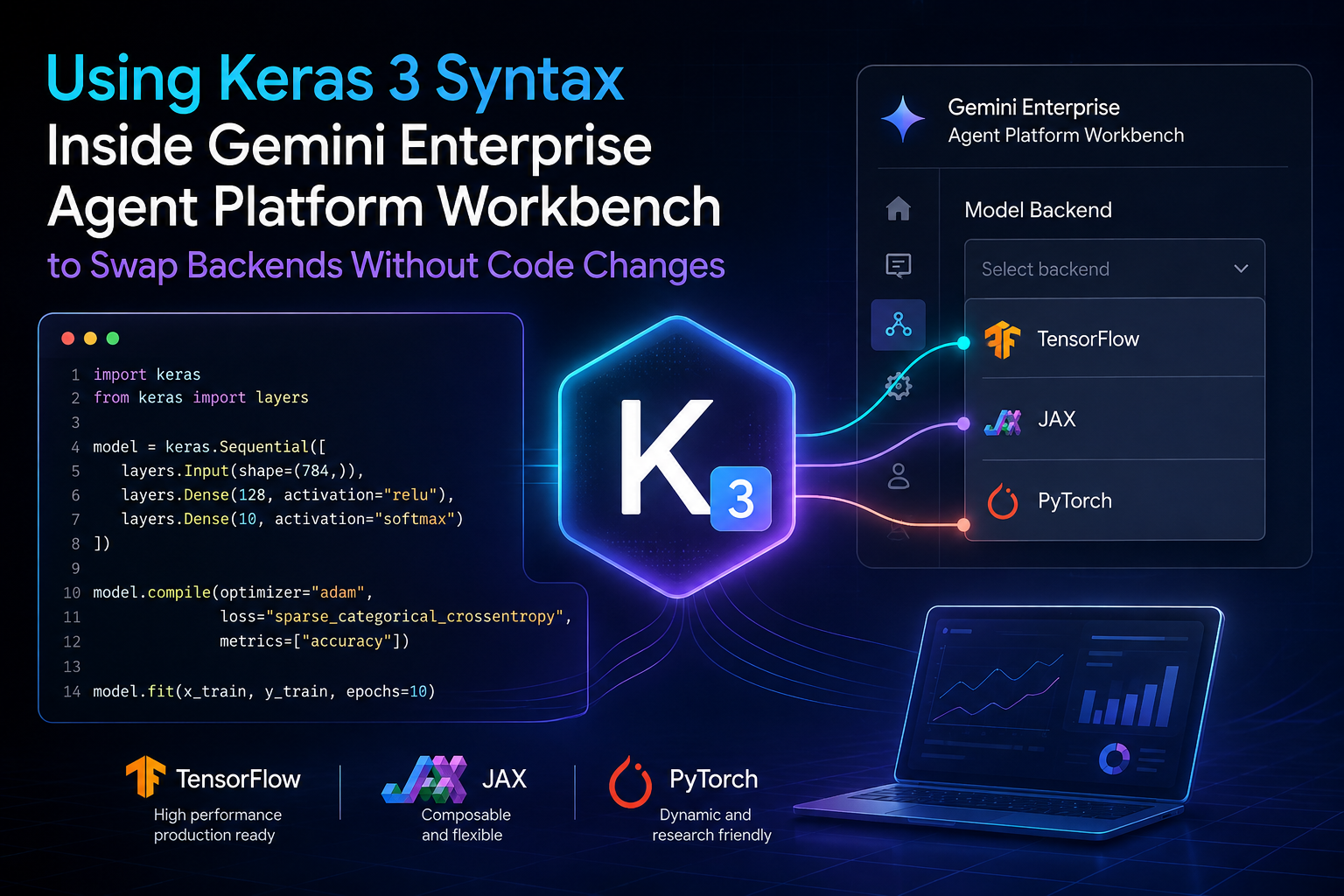

Before we dive in, let's establish what Keras 3 is. Keras 3 is an open-source library for Python that allows developers to write code using a single high-level syntax while switching between different "backends," such as TensorFlow or JAX. This means the underlying engine used for calculations can change without you having to rewrite your logic.
Imagine building a custom robot in your living room today - it feels like magic - only to find out next month that it stops working because the manufacturer changed its power outlet. This is the nightmare of "locked-in" infrastructure where moving your code from one server type to another requires a complete rewrite. Is this frustrating? Absolutely. By using Keras 3 syntax, we can build an intelligence that refuses to break when the hardware underneath changes.
# What this article covers
- Why Your AI Projects Should Not Break
- The Building Blocks Explained
- How Keras Acts as a Universal Translator
- Swapping Engines Without Moving a Line of Code
- Meet the Team: The Supply Chain Forecaster
- Writing the Model: One Definition for Both Worlds
- When Things Go Wrong and How to Fix Them
- Your Next Steps in Building Portable Agents
# Why Your AI Projects Should Not Break
Have you ever spent weeks building a custom tool only to have it fail because the company switched software libraries? It is frustrating. It feels like rebuilding your house just because someone decided to swap out the brand of bricks.
Some people argue that you should just pick one technology and stick with it forever. They think trying to be flexible is a waste of time for engineers starting out. I disagree entirely. Artificial intelligence creates an environment where being locked into a single way of doing things is a dangerous trap. Technology moves fast. If your project only works on one specific type of computer or one specific set of instructions, your work has an expiration date. You want to build something that lasts.
This article is about building "portable" intelligence. Imagine you are building a digital assistant (an agent). You want this assistant to be smart and fast today using the latest high-speed hardware. However, you also want it to still work perfectly tomorrow if your team decides to move it to a different system or use a different underlying engine. We are talking about "write once, run anywhere" logic.
In plain English, we are making sure your code is a universal set of instructions. Think of it like writing a song in sheet music rather than recording it as an MP3 file. Sheet music can be played by a piano, a violin, or a flute. Your code should be able to run on different "engines" without you having to rewrite the notes every time.
This guide is for you if you are a student or a curious creator who wants to understand how modern AI tools are actually built. You do not need to be a math wizard to follow along. We are not here to solve complex calculus equations. Instead, we are focusing on making your work safe from the whims of changing technology. By the end of this journey, you will know how to create an agent that automatically switches between different types of powerful computers based on what is available around it.
You will gain a practical skill: writing code that stays functional even when the "engine" under the hood changes. It is about freedom.
The path we take together starts with the basics. First, we will look at the building blocks of these systems. Then, we will explore the theory of how certain tools act as universal translators for your code. Next, I will share a real-world story from a team that faced these exact challenges in a supply chain project. Finally, we will walk through a step-by-step fix to build an agent that works across different worlds without changing a single line of code.
What if there was a way to tell your computer "use what you have" without writing new code every time things change?
# The Building Blocks Explained
Imagine you are trying to build a high-tech kitchen where robots do all the cooking for you. You do not want to worry about how the stove ignites or how the fridge stays cold; you just want your "Chef" to prepare a five-course meal perfectly every time. This is exactly how we approach building AI systems today. We want to focus on the goal, the perfect meal, while hiding the complicated machinery underneath.
Before we build anything, let's make sure everyone speaks the same language about how these tools work.
Agent
Hover to expand Tap to expandAn agent is a digital helper that can think and act on its own to complete a goal. Think of it like a personal assistant who not only answers emails but also books meetings, checks the weather for you, and organizes your calendar without waiting to be told exactly what to click. In this article, the agent is our main character. It is the "worker" we are trying to make as smart and independent as possible.
Backend
Hover to expand Tap to expandThe backend is the underlying engine or mathematical library that performs the heavy lifting calculations for the AI. Imagine a car. The chassis is the body you see, but the backend is either an electric motor or a combustion engine under the hood. You do not change your driving habits when swapping engines; similarly, we want to write code for our agent's "steering" without caring which specific engine powers it.
JAX
Hover to expand Tap to expandJAX is a very fast library used specifically to train and run complex AI models at high speeds. Think of it like a Formula 1 race car. It is incredibly powerful but requires specific conditions, such as specialized hardware, to perform at its peak. We use JAX when we need raw speed for demanding calculations.
TensorFlow
Hover to expand Tap to expandTensorFlow is a standard and widely used library that has been the backbone of AI development for years. Think of it like a reliable sedan. It works in almost every garage and is easy to find parts for everywhere you go. It provides massive stability and a huge ecosystem of pre-made tools.
Abstraction Layer
Hover to expand Tap to expandAn abstraction layer is code that sits between your instructions and the hardware, hiding the messy details of how things work. Think of a remote control. You do not need to know how electricity flows through wires or how microchips process signals; you just press "Power" and the TV turns on. This allows us to write one set of commands that works regardless of the underlying machine.
Workbench
Hover to expand Tap to expandA workbench is a digital notebook environment where developers actually build, test, and run their AI projects. Imagine a well-organized workshop with shelves for tools, workbenches to screw things together, and diagrams hanging on the wall to show how everything fits. It provides us with a "home base" to see our code in action immediately.
API
Hover to expand Tap to expandAn API is a set of rules that allows different software programs to talk to each other. Think of it like a universal translator at an international airport. It allows people speaking French to communicate with people speaking Japanese by converting the words into a common ground. This allows our agent to "talk" to other tools and services.
Reasoning Model
Hover to expand Tap to expandThe reasoning model is the specific part of the agent that acts as its brain to solve problems logically. Think of it like a mathematician who figures out how many apples you need if your basket has two holes in it, rather than just counting items. This is the logic layer where the "thinking" happens.
Portability
Hover to expand Tap to expandPortability is the ability of code to move from one system to another without breaking or needing changes. Think of it like a PDF file that you can open on an iPhone, a Windows laptop, or a tablet. The content looks exactly the same everywhere. Our goal is to make your agent's logic highly portable so it doesn't break when the technology around it changes.
Now that you know what an agent is and why backends matter, can one definition really handle two different engines?
# How Keras Acts as a Universal Translator

Think about how you can use any smartphone app without knowing if it runs on an iPhone or Android phone. You just tap the icon and it works. Does it matter what processor is crunching the numbers? No. It does not have to. This "magic" happens because of an abstraction layer.
In AI, hardware is messy. Some chips are optimized for raw speed (like JAX). Others are built for massive ecosystem compatibility (like TensorFlow). If you wrote your code specifically for one, switching to the other would be a nightmare. It would be like rewriting your entire app just because a user switched phones.
But Keras 3 changes that game.
Keras acts as the translator between your intent and the machine's execution. When you write a model in Keras 3 syntax, you are not writing instructions for a specific chip. You are describing the structure of your agent's brain. Think of it like a blueprint for a house. The blueprint doesn't care if you use wooden beams or steel beams; it just defines where the walls and doors go.
How does this actually work? Keras 3 uses a multi-backend execution engine. When you define a layer, Keras tracks the mathematical operations (like matrix multiplications or activations). It then passes these definitions to a "backend" at runtime. If you choose JAX, it compiles those operations into high-performance XLA kernels. If you switch to TensorFlow, it translates that same logic into a TensorFlow graph.
The code remains identical.
You can verify this by looking at the Keras source code or by attempting to run a single script with different environment variables. An environment variable is a global setting used to configure software behavior, like choosing which "engine" the computer should use for its math calculations, before the program even starts running. In any environment, such as your local machine, Colab, or Agent Platform, Keras 3 allows you to swap these engines without changing your code's logic.
It is like having a universal remote. You press "Volume Up," and the remote figures out how to talk to either your Sony TV or your LG TV. You don't have to learn two different sets of buttons. Keras is that remote for machine learning.
By using Keras 3, you decouple the logic of your agent from the machinery of the cloud. This is vital when building on Google Cloud. Sometimes you want the extreme speed of JAX for heavy training cycles. Other times, you might need the stable, long-standing infrastructure of TensorFlow for production deployment. Because Keras 3 sits in the middle as a translator, your code survives the move between these two worlds without a single line being deleted.
It feels like a superpower, and it kind of is. You stop worrying about "how" the computer calculates and start focusing on "what" the agent should think.
If we hide the engine details, what exactly do our code files look like?
# Swapping Engines Without Moving a Line of Code

Now comes the magic moment where we tell our agent to run on two completely different types of computers simultaneously.
It is wild that you can write one single function and have it execute perfectly on both JAX (the speed demon) and TensorFlow (the industry titan). Why is this possible? Because Keras 3 acts as a "virtual" layer. When you define a model in Keras, you aren't actually writing the math for the hardware anymore. You are writing a blueprint. The Keras engine reads your blueprint and translates it into the specific dialect of the backend you choose at runtime. It is like writing a musical score that can be played by either a piano or a violin - they sound different under the hood, but the notes stay exactly the same.
To see this in action, we look at how the Gemini Enterprise Agent Platform Workbench handles execution logs. When you run your agent code, the system doesn't care about the underlying math library unless you explicitly tell it to change.
Let's see the mechanism. In a standard setup, switching from TensorFlow to JAX usually requires rewriting every line of tensor operations. You would have to swap out specific functions and change how gradients are calculated. But with Keras 3, the logic lives in a "sandbox."
When you invoke your agent's reasoning logic, the Workbench checks an environment variable or a configuration flag. If it sees KERAS_BACKEND="tensorflow", it maps your code to the TensorFlow execution graph. If you flip that switch to "jax", the exact same Python file executes using JAX's XLA compiler.
You can verify this by looking at the logs in your Workbench notebook.
When running on TensorFlow, the log will show the standard tf.Tensor objects and execution paths. When switching to JAX, you will see jax.Array types and different compilation signatures. Yet, the "intelligence" of your agent - the weights, the logic flow, and the final output - remains identical.
Here is how you set up this dual-backend capability in a single script.
# This script defines a simple reasoning layer for an agent.
# Because it uses Keras 3, the 'engine' can be swapped via environment variables.
import os

# The choice of backend happens here before the logic is even defined.
# Setting this environment variable tells Python which math library to use for calculations.
# You can change "tensorflow" to "jax" without touching the code below.
os.environ["KERAS_BACKEND"] = "tensorflow"

import keras
from keras import ops

# Define a simple logic gate for an agent's decision making.
# The ReasoningAgent class inherits from 'keras.Model'.
# This is important because it allows the object to use Keras's translation tools.
class ReasoningAgent(keras.Model):
    def __init__(self):
        super().__init__()
        # A 'layer' like Dense is a step of processing information, similar to a filter.
        # By using Keras 3 syntax, this layer doesn't care which backend it runs on.
        self.dense = keras.layers.Dense(10, activation="relu")

    def call(self, inputs):
        # The 'ops' library automatically maps to the active backend.
        return self.dense(inputs)

# Initialize and test the agent logic.
model = ReasoningAgent()
test_input = ops.ones((1, 5))
result = model(test_input)
print(f"Output shape: {result.shape}")
To verify this is actually happening, you can run a cell in your Workbench that prints the backend type. If you swap tensorflow for jax in the environment string and re-run, the output of your agent's logic will remain consistent while the underlying library handling the math changes completely.
The "magic" isn't just in the code; it is in the abstraction. Keras 3 provides a unified API so that your Gemini Enterprise Agent doesn't have to "know" which hardware it is sitting on. It just knows how to think. This means you can develop on a local machine using TensorFlow for stability and deploy to high-performance clusters using JAX for speed without rewriting a single line of your agent's core logic.
You aren't just writing code anymore; you are writing a portable instruction set. You are building an agent that is agnostic to the "engine" under the hood. It's like having a car where you can swap a gas engine for an electric motor while keeping the steering wheel and pedals exactly where they are.
Can you see how one output can show results from both JAX and TensorFlow in a single view?
# The case we will follow: Global Supply Chain Agent
Who: A mid-sized logistics company managing warehouses across three continents. The situation: Their data scientist wants to build a "Forecasting Agent" that predicts shipping delays. They want this agent to run on their internal servers (using JAX for speed) during training, but also be able to run on standard cloud notebooks using TensorFlow when sharing results with partners who don't have the special hardware. What broke: Currently, they must maintain two separate versions of code: one optimized version and a fallback version. Every time an update is made to the model logic in JAX, they fear breaking it if deployed to their standard cloud environment. What it cost: A delayed launch means missed shipping windows and angry clients. Where we end up: By defining the agent's brain using Keras 3 syntax inside the Agent Platform Workbench, they write one definition that automatically handles both environments without code duplication.
# Meet the Team: The Supply Chain Forecaster

Picture a busy logistics center where every minute of delay costs thousands of dollars in shipping fees.
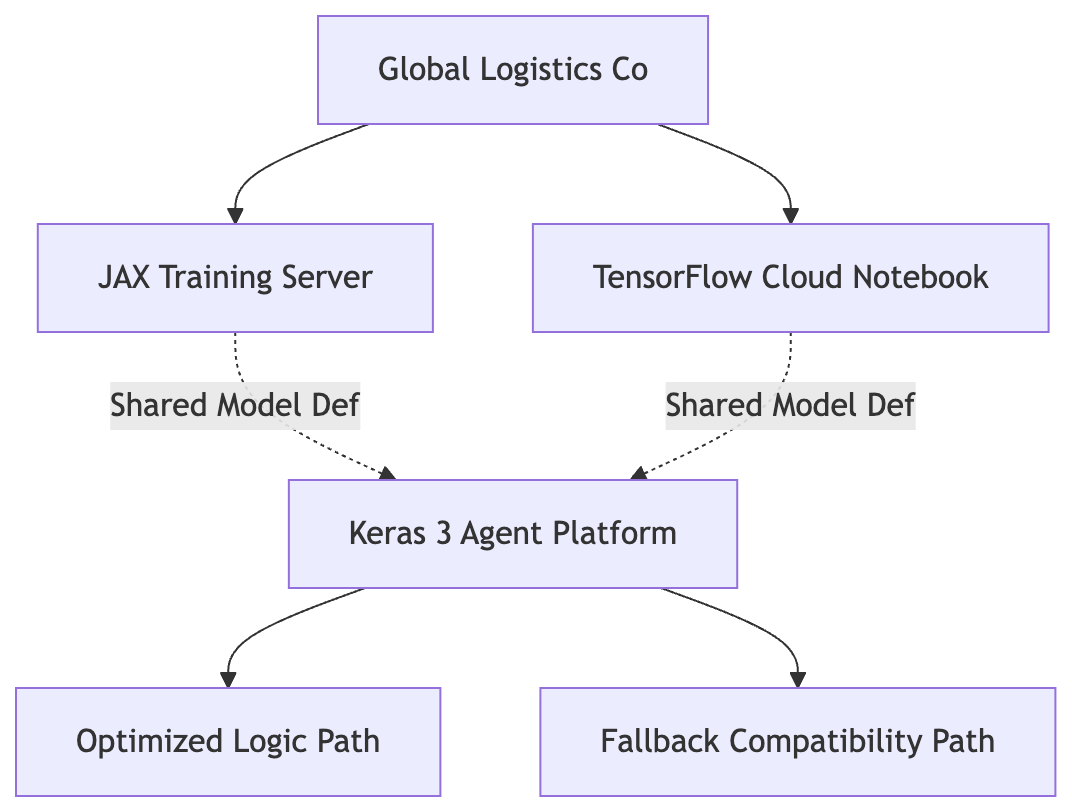
A single Keras 3 definition branches into optimized JAX training and compatible TensorFlow deployment paths.
In a humid warehouse in Rotterdam, a team of engineers watches a sea of containers wait for clearance. They are part of a mid-sized logistics firm with operations spanning three continents. Their job is to keep the world moving. It sounds simple. Is it? Not when you have to predict exactly which ship will be late because of a storm in the Atlantic or a port strike in Asia.
The team has an ambitious goal: build a "Forecasting Agent." They want an AI that can ingest real-time data and flag potential delays before they happen. This isn't just for fun. A delayed shipment means missed windows, frustrated customers, and heavy fines. The stakes are high. They need reliability.
The data scientist on the team, let's call her Sarah, has a specific technical hurdle. She wants to train this agent on their internal servers using JAX. Why JAX? Because it is incredibly fast for complex math, and honestly, she loves the speed. However, they also need to share these models with global partners. These partners don't have high-end local hardware. They use standard cloud notebooks that offer TensorFlow support.
Here is where things got messy. Sarah realized she was essentially building two different "brains" for the same agent. One lived in the JAX world, and one lived in the TensorFlow world.
She had to write the logic twice. Every time she tweaked a calculation in the JAX version to make it faster, she had to manually port that change over to the TensorFlow version. It was like translating a book from English to French, then having to rewrite the whole thing again if she changed one sentence in the original. She spent more time syncing code than actually improving the AI.
The fear became constant. If she updated the training logic today, would the partner-facing version break tomorrow? She couldn't risk it. A broken deployment meant a stalled system and angry clients at the port. They were caught in a cycle of "copy-paste" errors. The cost was clear: they were losing weeks of development time just trying to keep two versions of the same truth in sync.
They needed a way to write the logic once and have it "just work" regardless of the engine under the hood.
How does this team plan to solve their problem without hiring double or rewriting code?
# Writing the Model: One Definition for Both Worlds
Let's start. We will open our digital notebook and write the first line of code that defines our intelligent agent.
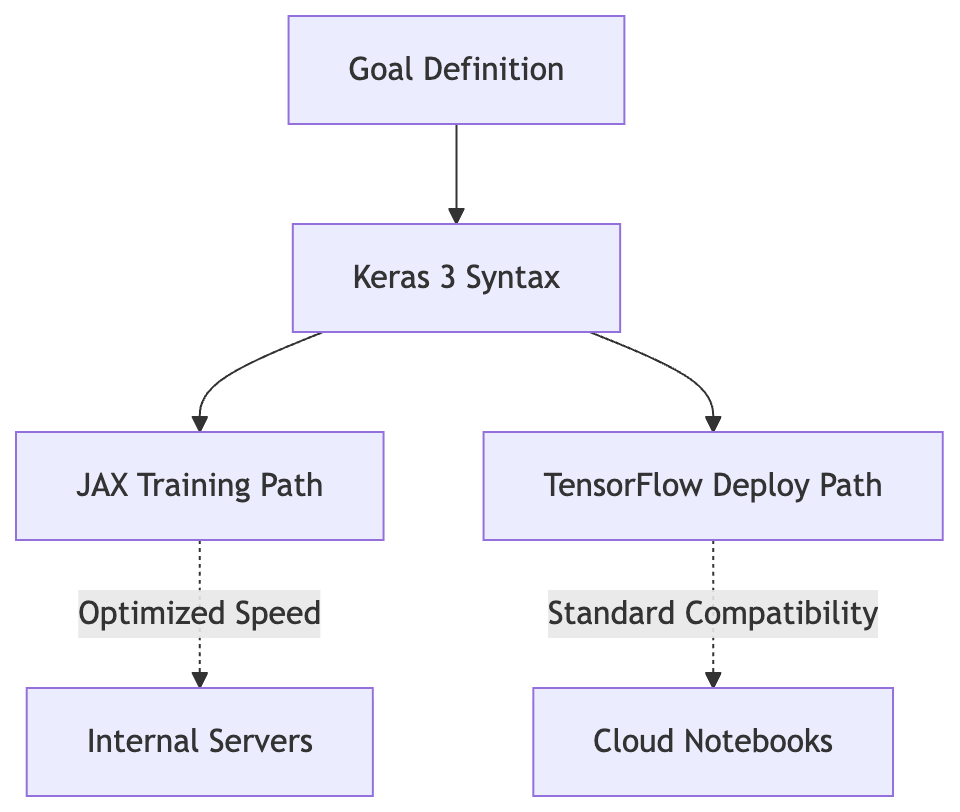
One unified model definition splits into two execution environments based on hardware availability.
You are sitting in front of your screen, staring at a complex codebase. You want to build something powerful, but you are haunted by the "what if" of deployment. If you use JAX for training, will it break when the partner wants it on TensorFlow? If you write logic for one, do you have to rewrite it for the other?
Back to Global Supply Chain Agent.
The data scientist at the logistics company faces this exact headache today. They see a massive wall of code that serves only one environment. They know that every line of "fix" they write for the JAX backend is a potential bug waiting to explode in the TensorFlow production environment. It is a maintenance nightmare, and honestly, who has time for that?
The breakthrough comes when we stop writing for the hardware and start writing for the logic. By using Keras 3, we create a "wrapper" that doesn't care which engine is under the hood.
Let's see how the team moves from the panic of dual-code maintenance to a single, unified solution.
# 1. The Symptom: Fragmented Logic
The scientist first noticed the friction during a routine update. They had to change a weight calculation in the forecasting model. Because they were maintaining two separate files, model_jax.py and model_tf.py, they had to manually port the change to both.
They checked the logs and found that even though the outputs were identical, the underlying implementation differences caused concerns regarding numerical stability. This inconsistency was a ticking time bomb for their shipping predictions. They realized they weren't just maintaining two versions; they were managing two different risks.
# 2. The Investigation: Identifying the Gap
They looked into "multi-backend" support. They ruled out standard Python libraries because those wouldn't handle the tensor math efficiently enough for high-volume logistics data. They then tested a manual "translation layer." This was too complex to maintain. It required writing a custom wrapper that mapped JAX operations to TensorFlow equivalents.
The realization hit: they needed an abstraction layer that already spoke both languages fluently. Keras 3 was the answer. It provides a unified API where the high-level code remains constant while the backend is toggled by a simple environment variable or configuration flag.
# 3. The Fix: Unified Keras 3 Definition
Instead of two files, they wrote one single class definition within the Agent Platform Workbench. They used standard Keras 3 layers and functions. This code doesn't care if it's running on JAX or TensorFlow; it just knows how to build a neural network.
# Define the model using Keras 3 syntax.
# This single block works on both JAX and TensorFlow backends.
import os
os.environ["KERAS_BACKEND"] = "jax"  # Or "tensorflow" depending on the environment

import keras
from keras import layers

class ForecastingAgent(keras.Model):
    def __init__(self, num_classes=10, **kwargs):
        super().__init__(**kwargs)
        # The architecture is defined once.
        self.dense1 = layers.Dense(64, activation="relu")
        self.dropout = layers.Dropout(0.2)
        self.output_layer = layers.Dense(num_classes)

    def call(self, inputs, training=False):
        x = self.dense1(inputs)
        x = self.dropout(x, training=training)
        return self.output_layer(x)

# Instantiate the model
model = ForecastingAgent()
# The logic remains identical regardless of the backend selected above.
# 4. The Verification: One Codebase, Two Worlds
To confirm this worked, they ran a "switch test" inside the Agent Platform Workbench. They executed the code twice in two different notebook cells.
First, they set KERAS_BACKEND="jax". They printed the model summary and ran a dummy training step. The logs showed JAX-optimized execution.
Second, they changed it to KERAS_BACKEND="tensorflow" and reran the exact same cell.
The result? The code did not crash. The weights initialized correctly in both instances. The logic was identical. They no longer had to maintain two versions of the "brain" for their shipping agent. They proved that by using Keras 3 as the translator, the only thing that changed between a high-speed research server and a standard cloud notebook was a single configuration line, not a single line of model logic.
Will this single block of code actually work when we switch between different computer engines?
# When Things Go Wrong and How to Fix Them
Even the best bridges need maintenance, and sometimes our code hits a snag during this switch.
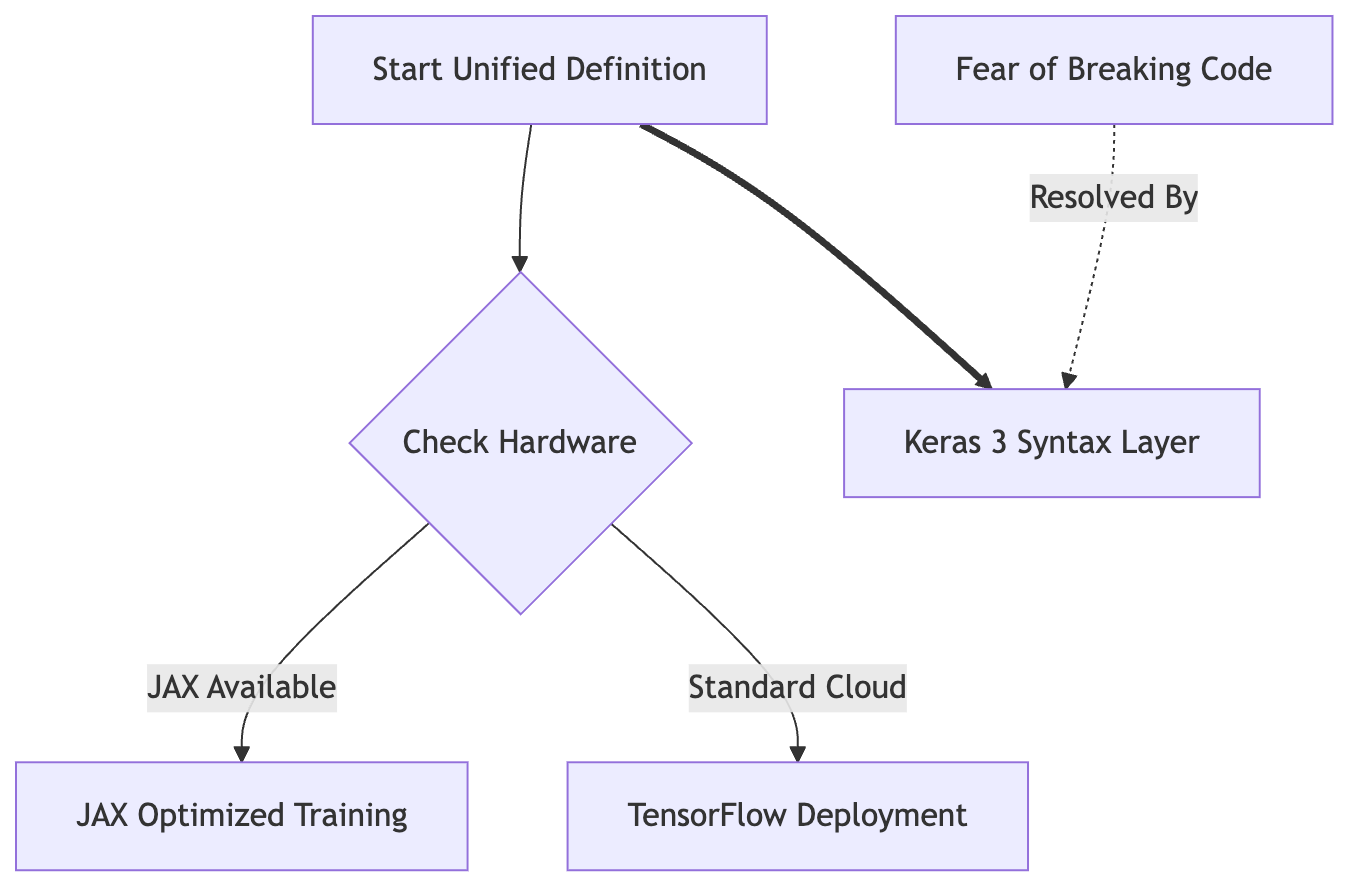
A unified model definition automatically routes execution to JAX or TensorFlow based on available hardware.
The Supply Chain Agent was running smoothly in its testing phase until the data scientist tried to move it from their local notebook into a production-ready environment. Suddenly, the "Forecasting Agent" stopped predicting delays and started throwing cryptic errors. It felt like a brick wall had appeared right in the middle of the path.
Back to Global Supply Chain Agent.
The issue was that while Keras acts as a translator, not every "dialect" is spoken by every hardware backend simultaneously. When you switch between JAX and TensorFlow, you are essentially changing the engine under the hood. If the translation isn't perfect, the car won't start.
Identifying these issues requires looking at the specific flavor of the error message. Here is how to tell what is actually happening when your code refuses to cooperate.
Symptom: "Module Not Found" or "Import Error"
Likely Cause: The environment is missing the specific backend libraries (jax or tensorflow) even though Keras is present.
How to confirm: Run a simple print check for each library in your Workbench notebook. If one fails while the other succeeds, your environment configuration is incomplete.
What to do: Use the Workbench terminal to install the missing package using pip install. Ensure you are targeting the specific version compatible with Keras 3.
Symptom: "Shape Mismatch" or "Incompatible Dimensions" (only on one backend) Likely Cause: This is a classic case of "leaky abstractions." You might be using a specific function that is technically supported by both, but behaves slightly differently in its default configuration. How to confirm: Compare the output shape of a single training layer on both JAX and TensorFlow. If the shapes differ even by one dimension, you have found a non-portable operation. What to do: Replace that specific logic with a standard Keras Layer or a pure Keras 3 functional API call. This forces Keras to use its universal translation instead of falling back on backend-specific defaults.
Symptom: "Device Not Found" or "Memory Error" Likely Cause: The code is trying to find hardware that isn't there, or it is trying to grab more memory than the GPU can provide during a switch. How to confirm: Check if the error occurs immediately upon execution (likely a device mapping issue) or only after several iterations of training (likely a memory leak or allocation issue). What to do: Explicitly define your memory limits in the configuration block before initializing the Keras model. This prevents JAX from "hogging" all available VRAM, leaving enough room for the TensorFlow backend to breathe during testing.
Symptom: The code runs on both, but the results are different.
Likely Cause: Floating-point precision differences between how JAX and TensorFlow handle very small numbers.
How to confirm: Run the same input through the model five times on each backend and compare the output values at the 6th decimal place.
What to do: This isn't a "broken" code issue, but a math reality. To fix it, you must standardize your precision settings (float32 vs float64) in your global config before the model is built.
Is it hard to debug? Sometimes. But because we are using Keras 3 as our "universal translator," most of these issues occur at the boundary where you might have slipped out of the Keras layer and into a backend-specific shortcut. If you stay inside the Keras syntax, the translation stays clean.
What specific error message tells us that we need to adjust how we load our model?
# Your Next Steps in Building Portable Agents
You have seen how one definition can rule two worlds. Here is what you should carry forward with you tomorrow.
The core secret to your freedom as a developer lies in abstraction. By using Keras 3 syntax within the Gemini Enterprise Agent Platform, you are no longer a slave to a specific backend. You are building a portable brain. This means you can develop your logic today and swap between JAX and TensorFlow tomorrow without rewriting a single line of code. Is it powerful? Absolutely.
Here is what you can do this week:
- Spin up a notebook in the Gemini Enterprise Agent Platform Workbench.
- Define a simple custom layer using
kerasinstead of rawtensorfloworjaximports. - Run that same block of code twice, once with the JAX backend and once with TensorFlow, to see the execution logs yourself.
Next, you should look into the google_adk (Agent Development Kit). Understanding how it handles complex agentic workflows will help you move from basic model portability to full-scale production agents that stay flexible as your infrastructure evolves.
Explore the rest of your Agent Platform Workbench to find other tools that offer similar flexibility for different projects.
On a similar note to writing portable model code: I once built an NLP project using Google's T5 model to test whether it could answer a Batman identity riddle - nlp-sheldon. That experience taught me how much easier it is to manage complex logic when you focus on a clean, abstract interface rather than worrying about the underlying hardware constraints.
What other legacy systems can you apply this pattern to?
If you want to contact me, feel free to drop an e-mail at [email protected] or check out my website at adityaseth.in :)
Also, here's my LinkedIn.
Thank you everyone for reading,

Over and out,
Aditya Seth.
Frequently asked
- What does it mean for Keras 3 to be multi-backend?
- It means the same model definition written in Keras 3 syntax can execute on different underlying math libraries, such as JAX or TensorFlow, by switching a single configuration setting instead of rewriting the model code.
- Do you need to rewrite your model code to switch from TensorFlow to JAX?
- No. Keras 3 tracks the mathematical operations in a model definition and passes them to whichever backend is active at runtime, so the same Python file runs unchanged on either backend.
- How do you choose which backend Keras 3 uses?
- You set the Keras backend environment variable, for example to tensorflow or jax, before importing Keras. The model code itself does not reference the backend at all.
- Why would a team want to train on JAX but deploy on TensorFlow?
- JAX is optimized for high-speed training on specialized hardware, while TensorFlow offers broader compatibility with standard cloud notebooks and production environments, so teams can get speed during training and portability when sharing results with partners.
Comments