Zero-Shot Classification of Legacy Data Streams Using the Gemini API Without Schema Updates
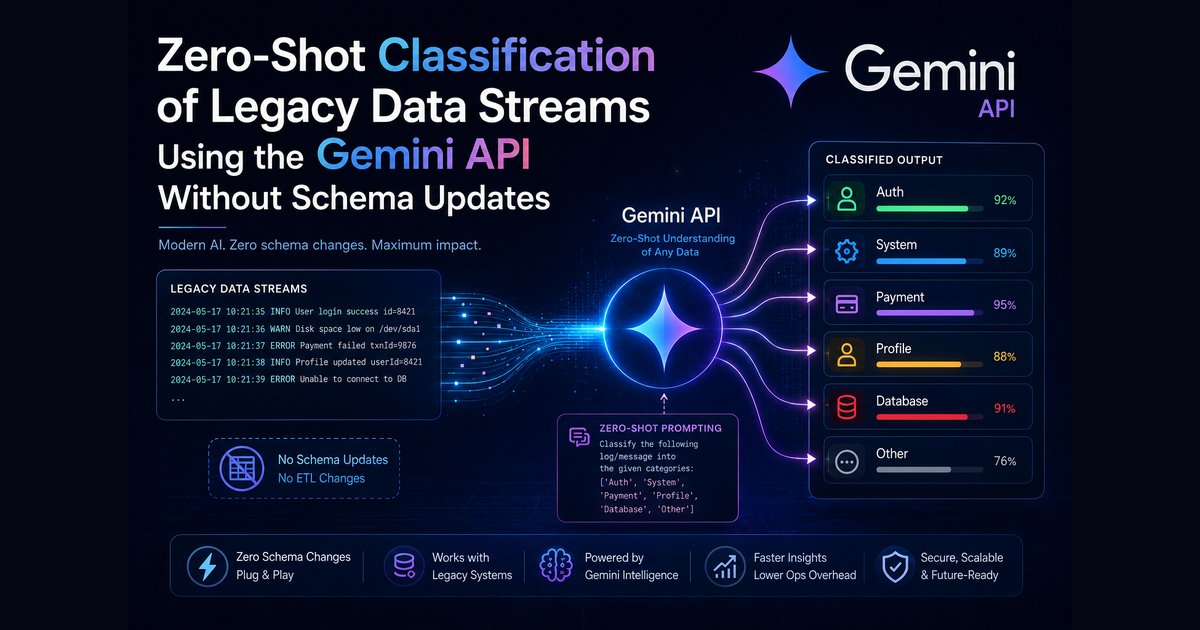
So, you have a massive pile of old data and no way to organize it? Imagine a telecommunications company receiving thousands of daily customer logs where "5G tower outages" are suddenly flooding the system. Their old database only recognizes "Connectivity" or "Billing," meaning these critical new issues get lost in a massive, unorganized pile of data. It is a mess. Is it fixable? Yes. By using the Gemini API, we can build a system that "reads" the text and identifies these new categories on the fly without touching a single line of legacy code.
# What this article covers
- Intro
- The Ideas You Need First
- How Zero-Shot Classification Works Under the Hood
- The Theory of Semantic Matching
- The Dynamic Label Expansion Strategy
- The Legacy Support Ticket Stream
- Building the Dynamic Expansion Pipeline
- Debugging Common Pitfalls in Label Discovery
- Conclusion and Next Steps
# Intro
Imagine you are sorting a pile of emails into folders labeled "Work," "Family," and "Friends." Suddenly, an email about your new job at Google arrives.
You have a problem. Your system is rigid. It only knows the folders you created months ago. To handle this new email, you would typically have to stop everything, open your filing system, and manually create a new "Career" folder. In software, this is a nightmare. When old systems suddenly start spitting out new types of data, engineers often have to manually rewrite database rules or retrain complex models just to keep things organized. It is slow. It is frustrating. It breaks things.
But what if the system could think for itself?

In this article, we will explore how to use an AI model, a computer program trained to understand and generate human-like text, via an API (an interface that allows your software to talk to the AI's "brain") to solve this exact headache. Instead of you manually updating your database every time a new type of data appears, we will teach the system to read the text and "discover" the new categories on its own. In many cases, this approach can be integrated without major changes to the existing database structure or core code.
This guide is for you if you are a student or a curious tinkerer who wants to see how AI can organize messy information without the usual headache of complex setup. By the end, you will be able to write a script that reads old files and automatically identifies new event types that never existed before your rules were written.
We will start by covering the fundamental ideas you need to know. Then, we will look at the theory of how the AI "reads" these categories. After that, I will share a real-world story of a support ticket stream that was a total mess. Finally, we will walk through the step-by-step process to build the automated fix.
How do you handle that email if your folder list does not have a "Google" folder yet?
# The Ideas You Need First

You are staring at a massive pile of old logs and wondering how to make sense of them without spending months rewriting your entire database. It feels overwhelming. Before we build the solution, let's understand the vocabulary of this new field so you are not lost in technical jargon.
Zero-Shot Classification
Hover to expand Tap to expandThis is a method where an AI model completes a task without being specifically trained on examples of that exact task beforehand. It relies on the general knowledge the model gained during its initial training.
Analogy: Think of a human taking a driving test for a car they have never driven before, but who already knows the rules of the road from reading books.
Why it matters: This is our primary tool. It allows us to categorize data into new categories instantly without having to "teach" the AI what those categories are.
Legacy Data Streams
Hover to expand Tap to expandThese are older systems or collections of data that use established methods which might not easily support new types of information.
Analogy: Imagine an old postal service that only has addresses for known neighborhoods. When a new suburb pops up, the mail carriers must figure out where it goes without redrawing the entire map.
Why it matters: These are the "messy" files we are dealing with. We want to process these old logs without breaking the systems that already house them.
Schema Updates
Hover to expand Tap to expandThis is the process of changing the actual structure of a database, such as adding new columns or tables, to accept new types of data.
Analogy: Think of adding a new room key to a hotel's master list. It requires maintenance staff to update the physical ledger and reconfigure the front desk software.
Why it matters: We want to avoid this. Schema updates are time-consuming and risky. Our goal is to find new information without ever touching the underlying database structure.
Emerging Topics
Hover to expand Tap to expandThese are new subjects or themes that appear in data but were not anticipated by the original design of the system.
Analogy: Imagine a sudden trend in fashion magazines that appears out of nowhere. It forces editors to create new categories for articles they didn't plan for.
Why it matters: These are the "hidden" gems in your logs. We want the AI to find these and flag them for you automatically.
Prompt Engineering
Hover to expand Tap to expandThis is the practice of writing specific instructions to guide an AI model toward the best possible output.
Analogy: Think of giving a very detailed recipe to a chef. The better the recipe, the more likely the chef is to make the exact dish you want.
Why it matters: We will use precise prompts to tell the AI exactly how to identify those emerging topics within the old logs.
Text Embeddings
Hover to expand Tap to expandThis is a way of representing words as mathematical vectors (lists of numbers) so that computers can find similarities between them.
Analogy: Imagine a mathematical map of meaning where words with similar meanings are placed close together. If "Cat" and "Dog" are near each other, the computer knows they are related concepts.
Why it matters: This helps the AI understand the "meaning" behind words rather than just looking at the spelling.
Context Window
Hover to expand Tap to expandThis is the amount of text an AI model can read and understand at one time.
Analogy: Think of the size of a window in your house. If the window is small, you only see what is right in front of you. If it is large, you can see more of the landscape.
Why it matters: We need to be mindful of this limit when feeding long logs into the model to ensure it doesn't "forget" the beginning of the text.
Once you know these definitions, how does combining them help us solve the email sorting problem?
# How Zero-Shot Classification Works Under the Hood

You might think an AI needs to see a picture of a cat before it can recognize a cat. That is not how these advanced models work. Some developers might argue that for a machine to "understand" a concept, it must first process a massive training set of specific examples for every possible category. This is technically incorrect for models like Gemini.
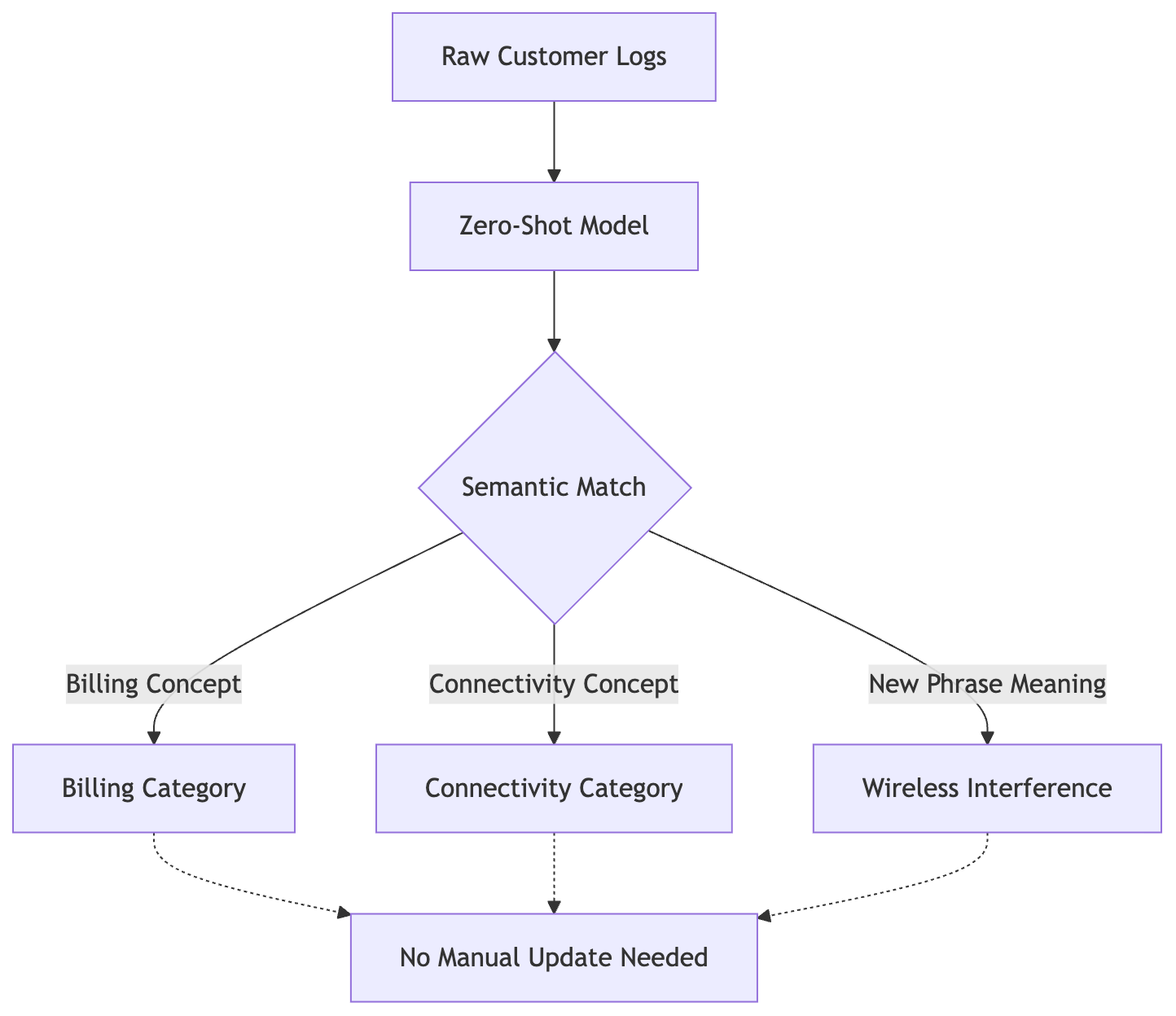
The zero-heart model maps incoming text to existing concepts without requiring pre-defined labels in the database schema.
The Gemini API can be prompted to perform what we call zero-shot classification. In this context, "zero-shot" means the model can attempt to categorize data without being given examples of your specific categories first. It does not need a training set of your past logs to know what a "Database Timeout" looks like. That is plausible because the model was trained on a broad swath of general text, including material about networking, server errors, and customer service, so it can draw on that general knowledge instead of examples specific to your system.
Instead of looking for exact keyword matches, the model draws on the relationships between words that it learned during training, similar in spirit to text embeddings, a technique that represents meaning as points in a mathematical space where related concepts sit close together. You do not compute any of this yourself: when you send a prompt asking Gemini to classify a log entry, the model handles that reasoning internally. A useful mental model is that it treats "Login Failure" as conceptually close to "Authentication Error" and far from "Pizza Delivery," without you ever building or querying an embedding index.
Is it just guessing? Not in a simple pattern-matching sense: the model reasons about which of the labels you provide is the best conceptual fit for the text, drawing on the general language understanding it built during training. If you give it a list of labels like "Billing," "Connectivity," and "Hardware," you can think of the model as asking itself: "Which of these three concepts is this text closest to?"
If a new, weird error appears, something your system has never seen, the model doesn't break. It reasons about the meaning of that new error against the labels you gave it. If the error describes a slow database, it can associate that description with your "Performance" category. You can evaluate this behavior by testing the model with synonymous inputs: prompting it separately with "The site is slow" and "The page load time is lagging" will often return the same category for both, because the model treats them as expressing the same underlying idea, not because of an embedding comparison you are computing yourself.
The model isn't looking for your specific words. It is looking for the "vibe" of the concept. It isn't just a search engine. It is a logic engine.
If the model has never seen your specific problem, how does it know the answer?
# The Theory of Semantic Matching
Before we move to the practical implementation, it is worth being precise about which technique we are actually using, because "semantic classification" can mean two different things, and mixing them up leads to code that does not match the theory.
One approach, which this article does not implement, is embedding-based similarity: you convert each label and each incoming log into a vector using an embedding model, then measure the cosine similarity between them, and the label with the closest vector wins. That is a legitimate, deterministic technique, and it is what you would reach for if you wanted to compute the comparison yourself without an extra generation call per log.
The approach this article actually uses is different: we describe the labels in a prompt and ask Gemini to pick, or propose, the best fit, the same way you would ask a knowledgeable colleague to sort something for you. There is no vector math on our side of the API call. Whatever internal representations the model uses to reason about the request happen inside Gemini, and we do not have visibility into exactly how, or a documented guarantee of the mechanism. What we can rely on, and what this article's walkthrough exploits, is the model's observed behavior: given clear label names and a clear instruction, it tends to group conceptually related text under the same label, and to flag text that does not fit any of them.
If you ever need the comparison to be fully deterministic, inspectable, or run without calling Gemini for every log, embedding-based cosine similarity is the tool to reach for instead of, or alongside, prompting.
# The Dynamic Label Expansion Strategy

We need a strategy that allows our system to grow naturally like a living organism rather than a rigid machine. Imagine a restaurant that only serves three dishes. If a customer asks for a taco, the waiter has to say "no" because it isn't on the menu. A static system is that waiter. It is polite, but it is limited.
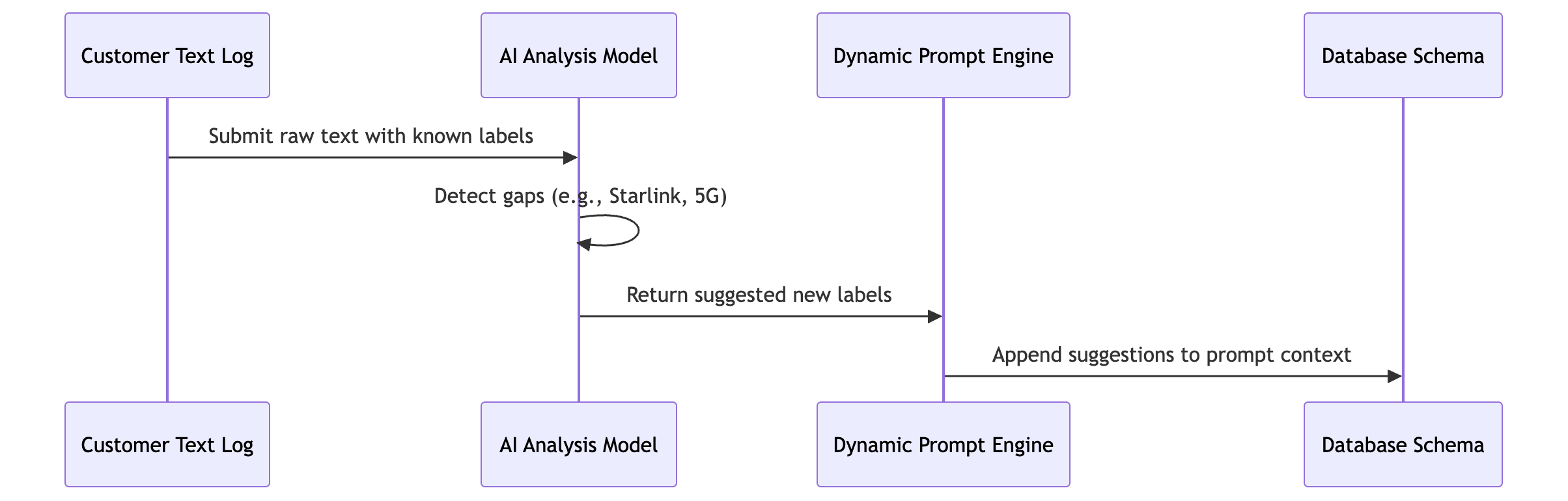
The dynamic loop detects emerging issues in raw logs and injects new categories directly into the active prompt without database updates.
Dynamic expansion changes the menu as people order. If the waiter sees a lot of people asking for tacos, they tell the chef. Soon, tacos are on the menu. It is common sense. Is it hard to automate? No.
The core mechanism relies on a two-step feedback loop. First, we feed a batch of raw logs into the Gemini API along with a list of known labels. We ask the model to categorize the text. However, we don't just ask for the best fit. We explicitly instruct the model to identify "outliers" or "unknown categories." If the model sees a log about a "database connection timeout" but your only labels are "User Error" and "System Error," the model can flag this as a specific new category.
In practice, when the raw text does not fit any of your provided labels well, the model tends to flag it as an outlier rather than force it into the closest existing category, and it is this observed behavior, not a described internal calculation, that the flagging step below relies on.
Second, we programmatically handle these gaps. Instead of ignoring the outlier, your script catches the "new category" flag. You can then append this new string to your local list of valid labels. The next time your script runs, that label is part of the prompt. The system "learns" without you ever touching the database schema.
You can verify this by inspecting the JSON response from the Gemini API. If you provide a list of labels and a prompt that asks for "missing_labels," the model can be prompted to return a structured list of strings. You can then use a simple Python set() to merge these into your existing list.
# This script demonstrates the logic of capturing and appending
# new labels from a Gemini response to your local list.
from typing import List
import json

# Your starting point: a hardcoded list of known categories
current_labels = ["Login_Error", "Payment_Failure", "Timeout"]

def process_batch(raw_logs: List[str]) -> List[str]:
    """
    Simulates the logic of taking a Gemini output that contains
    newly discovered labels and merging them into the current system.
    """
    # In a real scenario, the 'gemini_output' would be the result
    # of a prompt like: "Classify these logs into: {current_labels}.
    # If a log doesn't fit, suggest a new label name."
    gemini_output = [
        {"log": "User forgot password", "label": "Login_Error"},
        {"log": "Database connection timed out", "label": "Timeout"},
        {"log": "Invalid API key", "label": "Auth_Error"}  # This is the new one!
    ]

    # We identify unique labels from the AI's response
    detected_labels = set(item["label"] for item in gemini_output)

    # Update our master list with any labels we didn't have before
    # This is the "expansion" part of the strategy.
    new_labels = detected_labels - set(current_labels)
    current_labels.update(new_labels)

    return current_labels

# Run it to see the list grow
updated_list = process_batch(["raw_log_1", "raw_log_2"])
print(f"Updated Categories: {updated_list}")
The beauty here is that the "intelligence" lives in the model, but the "persistence" lives in your code. You aren't retraining a model; you are simply updating a list of strings that the model uses as a reference.
But this brings up a tricky hurdle. What happens when the AI suggests a label, and how do we make sure we trust it?
# The Legacy Support Ticket Stream

# The case we will follow: The Legacy Support Ticket Stream
Who: A mid-sized telecommunications company maintaining a customer support system built ten years ago.
The situation: The team receives thousands of text logs daily from customers reporting issues. The current system sorts tickets into categories like "Billing," "Connectivity," and "Hardware." Recently, customers started mentioning "Starlink interference" and "5G tower outages" due to a new network rollout. These terms do not exist in the old database schema.
What broke: If they try to add these new words manually to the database, it takes weeks of meetings and risks breaking the system. They need a way to catch these new issues automatically.
What it cost: Missing a "5G tower outage" ticket because it was mislabeled as generic "Connectivity" could lead to angry customers and lost revenue.
Where we end up: By using an AI model to read the raw text and automatically suggest new labels like "Wireless Interference," they can create these categories on the fly without touching the database code.
Let's meet the team at TeleCom Solutions and walk through their specific struggle with new network issues.
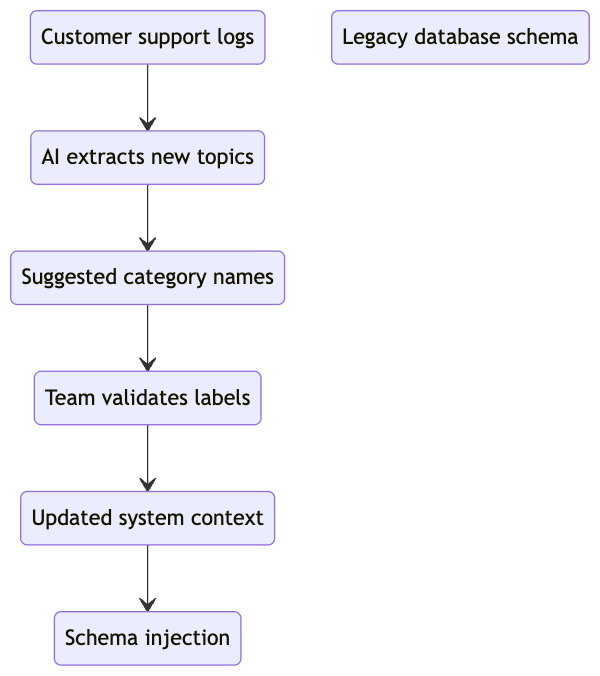
The extraction pipeline identifies unfamiliar terms like Starlink interference and routes them for manual validation before updating the schema.
It is 10:00 PM on a Tuesday. The lead engineer, Sarah, stares at a flickering monitor while a stream of raw text logs scrolls by like a waterfall of digital chaos. She is part of a team of twelve people trying to manage a massive infrastructure for a regional telecom provider. They built the backbone of the company's support system a decade ago. It was a masterpiece of its time. It handled millions of "Billing" and "Hardware" requests perfectly.
But the world changed.
A new 5G rollout and the rise of satellite internet sparked a flood of new complaints. Customers were reporting "Starlink interference" and "5G tower outages." Sarah's current system saw these as "Connectivity" issues. Is that enough? No. Because a "5G outage" needs an immediate technician dispatch, while a "weak signal" might just need a different router. The system couldn't tell the difference.
If Sarah and her team wanted to fix this the old way, they would have to open a new ticket with the legal team, rewrite the database schema, and run a month of regression tests. It is a nightmare. They can't wait a month while customers are frustrated. They need a way to spot these new patterns without rewriting the foundation of their house.
The cost of failure is high. Every "5G outage" ticket buried under the "Connectivity" pile is a lost opportunity to fix a major infrastructure failure. It results in angry customers, lost revenue, and a team that is burnt out from manually triaging thousands of logs. They need the system to "see" the new labels. They need a way to catch these emerging trends the moment they appear in the raw text.
Can we see exactly how the code handles a ticket that mentions "5G tower"?
# Building the Dynamic Expansion Pipeline
The engineers at the telecommunications company were staring at a dashboard of "Miscellaneous" tickets and feeling a genuine sense of dread. They saw a spike in 400 unique logs containing the phrase "5G tower outage," yet the system stubbornly shoved them into the "Connectivity" bucket. Is it frustrating? Yes.
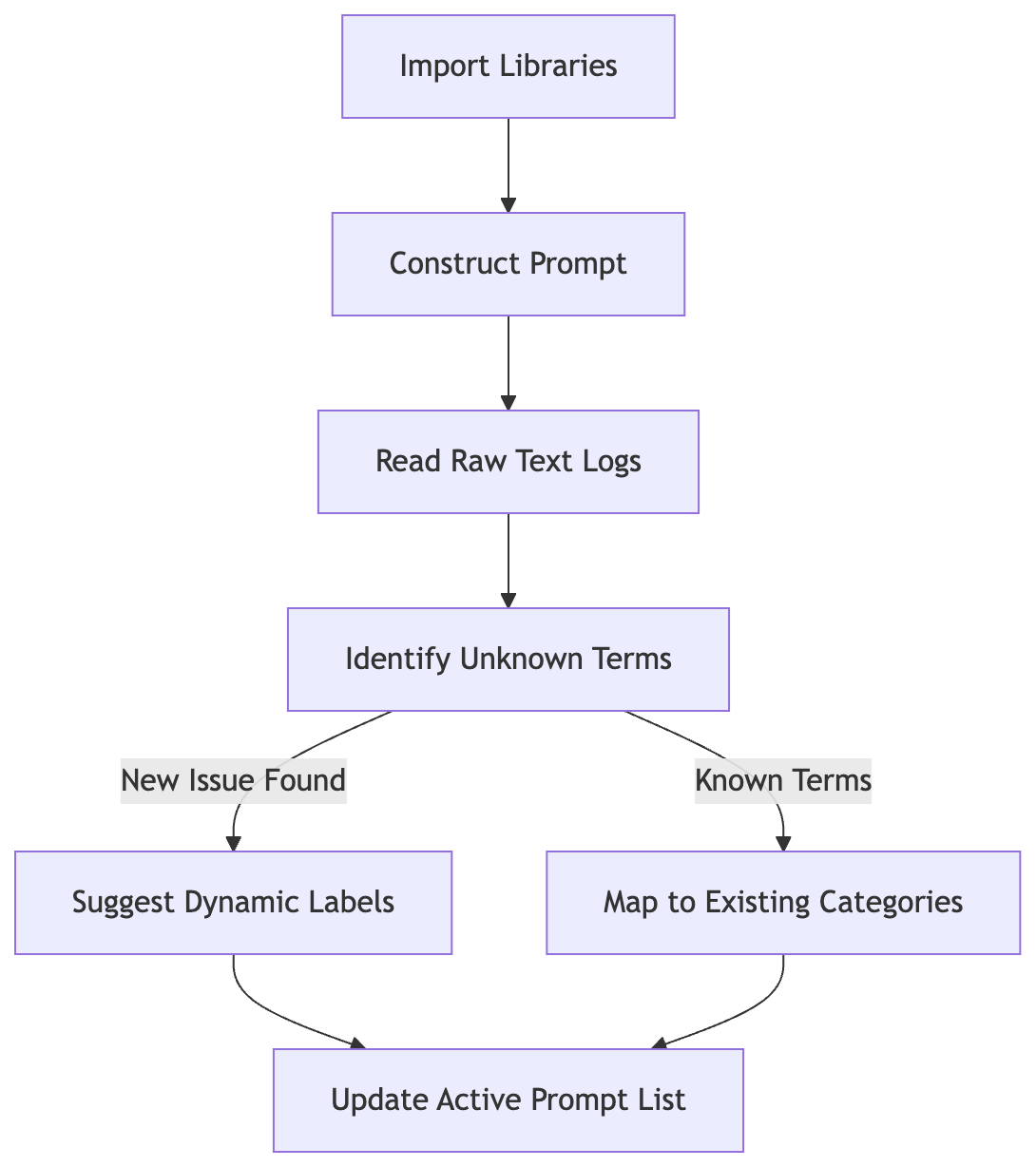
The import step feeds raw logs into a prompt that distinguishes unknown terms like Starlink interference from known categories before updating the active list.
Back to Legacy Support Ticket Stream.
The problem wasn't that the system couldn't read the words. The problem was that the system was "blind" to the fact that these words represented a new, distinct category. To fix this manually, they would have had to map every new variation of "Starlink" or "5G" to a new database ID. That's a lot of meetings. Let's skip the meetings and go straight to the code.
To solve this, we aren't going to change the database schema. Instead, we are going to build a "Discovery Layer" using the Gemini API. This layer acts like a scout. It looks at the raw text, identifies patterns that don't fit our current labels, and suggests new ones.
Here is the step-by-step walk-through of how we build this pipeline.
# 1. The Initial Symptom
The team first noticed the "leak" during a weekly report. They saw a specific cluster of 150 tickets that all mentioned "Starlink interference" and "5G." Because these terms were not in the hard-coded schema, the legacy logic defaulted them to "Connectivity."
The Signal: 150+ tickets in 48 hours with a high frequency of the keywords "5G" and "Starlink." The Gap: The system had no way to distinguish a "5G outage" from a "Slow Fiber" issue because both fell under the "Connectivity" umbrella.
# 2. The Investigation
The team performed three specific checks to see if they could fix this using standard methods:
- Regex Mapping: They tried to write a script to catch "5G" and "Starlink" via regular expressions. This failed because customers use synonyms like "satellite drop" or "tower down," making it impossible to catch every variation.
- Manual Category Expansion: They looked into adding a "New Tech" category to the database. This was ruled out because the legal and engineering teams required a three-week "impact study" to change the schema.
- Manual Triage: They tried assigning a human to sort the "Connectivity" bucket. This was ruled out because the volume of data (thousands of logs daily) made human triage physically impossible.
# 3. The Implementation
We can solve this by using a zero-shot classification approach. We feed the raw text to Gemini and ask it to identify if the content belongs to our existing categories or if it represents a "New Emerging Trend."
Here is the Python implementation using the google-genai SDK. This script uses the model to identify potential new categories and suggest names for them, without touching the underlying database.
Note: This script runs locally on your computer and requires the google-genai Python package.
# First, install the library: pip install google-genai
from google import genai
from typing import List

# Initialize the Gemini client
# Replace 'YOUR_API_KEY' with your actual Google AI Studio key
client = genai.Client(api_key="YOUR_API_KEY")

# This is our existing, "locked" database schema
CURRENT_CATEGORIES = ["Billing", "Connectivity", "Hardware"]

def process_support_logs(raw_texts: List[str]):
    results = []

    for text in raw_texts:
        # The prompt asks Gemini to either pick a current category
        # OR suggest a new one if the content is distinct.
        prompt = f"""
        You are an expert triage assistant. Categorize the following customer
        support ticket.

        Existing Categories: {", ".join(CURRENT_CATEGORIES)}

        If the ticket fits a current category, respond with the name of that
        category. If the ticket describes a specific new technology or
        issue not covered by the existing categories (like 5G, Starlink,
        or specific tower issues), respond with 'NEW_TREND: [Short Descriptive Name]'.

        Ticket Text: {text}
        """

        response = client.models.generate_content(
            model="gemini-3.5-flash",
            contents=prompt
        )

        # Extract the result
        decision = response.text.strip()
        results.append(decision)

    return results

# Example of the "messy" logs coming from the legacy system
incoming_logs = [
    "My bill is $20 too high this month.",
    "The 5G tower near my house keeps dropping the signal.",
    "My router has a blinking red light."
]

# Run the discovery pipeline
processed_results = process_support_logs(incoming_logs)

# Display the findings
for i, result in enumerate(processed_results):
    print(f"Log {i}: {result}")
# 4. The Verification
To confirm this worked, the team didn't just look at the code; they ran a batch of 100 "problem" tickets through the script and checked the output by hand rather than trusting it blindly.
What to look for:
- Consistency across similar tickets: in a scenario like this, you would typically see the "5G" tickets grouped under a small number of new labels, for example
NEW_TREND: Wireless InfrastructureorNEW_TREND: 5G Coverage, rather than one label per ticket. - Isolation: the existing "Billing" and "Hardware" tickets should still map to their existing buckets, not get swept into a new category by mistake.
- Automation: the team now has a "Discovery Report" generated every night. If the report shows a high frequency of a specific
NEW_TREND(like "Satellite Connectivity"), they can decide to officially add it to the database only when it's worth the administrative effort.
They successfully bypassed the "three-week meeting" requirement by using the AI as a buffer between the raw data and the rigid database.
Follow along as we initialize the connection, process a sample log, and see the new label appear.
# Debugging Common Pitfalls in Label Discovery
Even the best systems can stumble, and knowing how to spot a bad suggestion is half the battle.
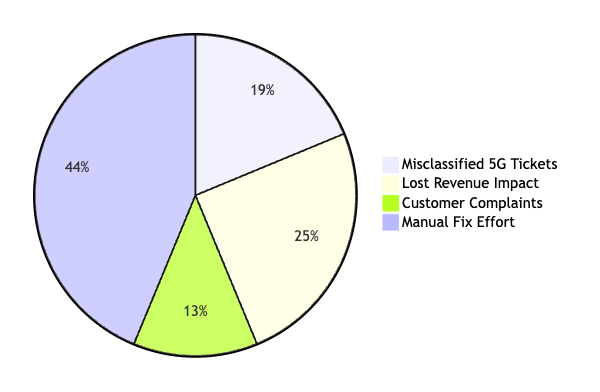
The pie chart quantifies the specific costs of failing to distinguish new network terms from generic connectivity issues in the legacy support stream.
One morning, the telecom team noticed a strange trend in their dashboard. Instead of a clean "5G Connectivity" category, the system had started creating a chaotic mess of "5G_Network", "5G_Mobile", and "5G_Signal". In practice, models can drift into generating variations of the same concept as if they were distinct, creating near-duplicate labels instead of recognizing they mean the same thing.
It was frustrating to see the logic drift. Why did this happen? Sometimes, the Gemini model struggles with high-granularity differences. If your prompt is slightly too broad, the model might treat "4G" and "5G" as distinct entities when they should be grouped, or it might create "Low_Battery" and "Battery_Low" as two different labels.
Is it hard to catch these? Yes.
To solve this, you must implement a validation layer. Before a new label is "committed" to your system, run it through a similarity check. If a new label has a high text similarity to an existing one, flag it for manual review or merge them.
Another common headache involves the "context overflow." When you feed too many historical logs into a single prompt to help the model "learn" the context, it can lose focus on the actual classification task. It might start summarizing the logs instead of extracting labels.
| Symptom | Likely Cause | How to Confirm | Action |
|---|---|---|---|
| Duplicate labels like "5G_Error" and "5G_Issue" | High model variance on similar terms | Compare the text similarity ratio of the new label against existing ones (for example with difflib.SequenceMatcher, as below) |
Add a post-processing step to merge labels with >0.8 similarity |
| Model provides summary instead of labels | Too many context tokens | Check the prompt length against the model's token limit | Reduce the number of example logs in the context window |
| Label "hallucination" (e.g., "Unknown_Error_99") | Lack of clear constraints | Check if the output contains special characters or extra words | Refine the system prompt to demand strictly plain-text labels |
# This script demonstrates a basic validation check to
# ensure a new label isn't too similar to an existing one.
from difflib import SequenceMatcher

def is_too_similar(new_label, existing_labels, threshold=0.8):
    for label in existing_labels:
        # SequenceMatcher compares two strings to see how similar they are
        ratio = SequenceMatcher(None, new_label, label).ratio()
        if ratio > threshold:
            return True, label
    return False, None

# Example usage
existing = ["5G_Connectivity", "4G_Network"]
new_suggestion = "5G_Connection"

is_dup, match = is_too_similar(new_suggestion, existing)
if is_dup:
    print(f"Warning: {new_suggestion} is too similar to {match}")
Why does the model sometimes suggest a label that is just slightly off?
# Conclusion and Next Steps
We have walked through the theory, seen the example, and written the code. You are now ready to apply this to your own projects.
You have a mountain of messy data, and you might feel like you need to rebuild your entire database just to make sense of it. You do not. The core takeaway is this: your data organization can just grow organically. By prompting Gemini for zero-shot classification, you can use it to identify new categories as they appear in the text. You are building a system that adapts. It is smart. It is flexible. It does not need a manual update every time a new trend emerges.
But do not rush the rollout. Start small. Pick one single stream of logs, maybe just your "unknown" or "misc" bucket, and run it through the pipeline. Is it overwhelming? No. Just start with one. Once you see the results, you can scale. Also, keep a human in the loop. Always validate the AI's suggested labels before you let them become permanent parts of your production workflow. It is your safety net.
What should you do this week?
First, ensure you have a Python environment ready and an API key from Google AI Studio.
Second, grab a small CSV of your own historical logs.
Third, write a script using the google-genai library to send a sample of those logs to Gemini.
Ask the model to suggest three new categories based on the content.
Fourth, look for patterns in its output. You should learn about prompt engineering next. Better prompts mean more consistent labels, which is the secret sauce to making your automated system reliable.
What other areas of your work could benefit from this kind of automatic adaptation?
If you want to contact me, feel free to drop an e-mail at [email protected] or check out my
website at adityaseth.in
:)
Also, here’s my LinkedIn.
Thank you everyone for reading,

Over and out,
Aditya Seth.
Frequently asked
- What is zero-shot classification?
- It is a method where an AI model sorts text into categories it was never specifically trained on, relying on the general language understanding it already has instead of requiring labeled examples for every category in advance.
- Do you need to update a database schema to classify new categories with Gemini?
- No. The Gemini API can be prompted with a list of existing labels and asked to flag text that does not fit any of them, so new categories can be discovered and tracked as plain strings in application code before any schema change is made.
- What is the difference between this approach and embedding-based similarity search?
- Embedding-based similarity converts labels and text into vectors and measures cosine distance between them entirely on your own infrastructure, while prompting Gemini for zero-shot classification asks the model to reason about the best label directly, with no vector math performed on the caller's side.
- Why do models sometimes create near-duplicate labels like "5G_Network" and "5G_Mobile"?
- This can happen when a prompt is too broad or the model is asked to distinguish overly fine-grained variations of the same concept, producing labels that describe the same idea in slightly different words rather than recognizing them as one category.
Comments