Migrating Large-Scale TensorFlow Pipelines to Vertex AI for Production Inference
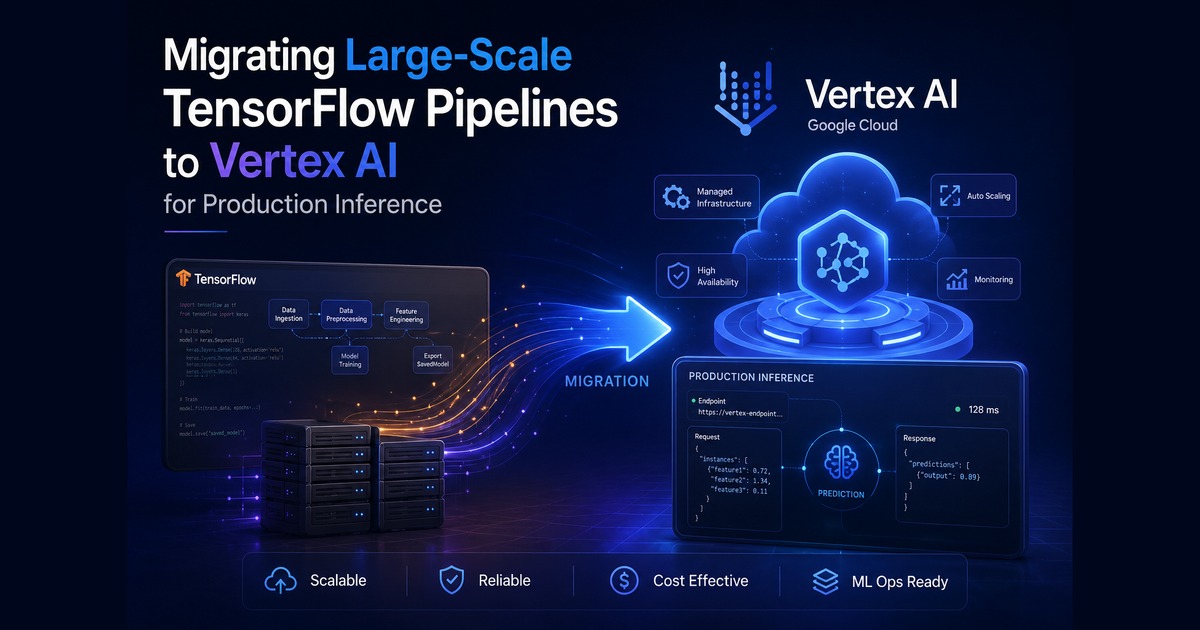

What if moving a massive production model to the cloud took one file, not one month?
You have built a massive, heavy-duty TensorFlow model that works perfectly on your local machine. But moving that logic to a production environment like Vertex AI can feel like a nightmare of rewriting every single line of code just to satisfy infrastructure requirements. Is it going to be work? Yes. Luckily, you can treat your existing script as a container artifact rather than a pipeline module, allowing you to move the entire setup without changing a single piece of furniture inside it.
# What this article covers
- Why Your Model Does Not Need a Rewrite
- The Vocabulary You Need First
- The Shipping Crate Analogy
- The Architecture Behind The Move
- Mapping Your Hardware To The Cloud
- The Dockerfile Cheat Sheet
- Environment Variables Done Right
- The Walkthrough: Step By Step
- Troubleshooting Container Errors
- The Takeaway
# Why Your Model Does Not Need a Rewrite
You might think your custom code needs a total overhaul to move to the cloud, but this strategy proves otherwise by focusing on packaging rather than rewriting logic. You are likely staring at a machine learning model that works perfectly on your local server but feels risky to scale for thousands of users. It is heavy. It is complex. And do you really want to spend three weeks rewriting your core Python code just to move it to a managed cloud environment? The answer is no.
Moving your model to Vertex AI does not have to be a "from scratch" project. Think of this process like moving a high-end kitchen into a professional restaurant. You do not need to redesign the stove or rebuild the ovens; you just need to put them in a new building and plug them into the right outlets. In this context, your model is the stove, the cloud is the new building, and we are going to focus on the practical path of lifting and shifting your existing code onto an endpoint.
We are skipping the complex, multi-step pipelines that can feel overwhelming for a first move. Instead, we will focus on one specific goal: getting your current script running reliably in a production environment without changing your actual model logic. This matters because every time you change your core code, you risk breaking the math that makes your predictions accurate.
This guide is for the engineer who has a working model and needs it to live on Vertex AI safely. By the end of this article, you will be able to wrap your current script into a container and deploy it as an active endpoint. You won't have to rewrite your logic; you will only need to update how the system handles requests and resources.
We will start by covering the core concepts you need to understand about cloud hosting. Then we will look at the theory of how containers wrap your code. From there, we will walk through a real scenario a retail team faced with this exact hurdle, followed by the step-by-step fix to get a model live.
How can you save hours of refactoring work just by changing one file?
# The Vocabulary You Need First
Five minutes here makes the rest of the article easy.
You have a model that works perfectly on your machine, but moving it to the cloud feels like trying to move a mountain with a shovel. Is it hard? No. You just need to understand how the container logic works.
# Container
A container is a box that holds every single file and setting an app needs to run. Think of it as a shipping crate where you pack your engine, tires, and fuel together before it leaves the factory. Because everything is inside the crate, the contents work the same no matter where the crate lands. This matters because it lets you move your model without worrying about missing files or broken paths.
# Endpoint
An endpoint is the public address where other computers can send messages to your model. Think of this like a phone number. It does not matter where the caller is; as long as someone answers, they get connected. This is how your users actually interact with your model once it lives online.
# Entrypoint
The entrypoint is the specific line of code a computer runs first when it starts your application. Imagine walking into an office building where the main revolving door is the entrypoint. If you change who guards that door but keep the offices inside the same, people can still get to work. We use this to tell the cloud exactly how to boot up your specific script.
# Environment Variables
These are special instructions stored outside your code that tell it how to behave. Think of them as sticky notes left on a mirror. If you change the note from "Use Mode A" to "Use Mode B," the behavior changes without you touching any actual lines of code. These let you swap settings like database links or port numbers instantly.
# Lifting and Shifting
Lifting and shifting means moving software from one location to another while keeping it exactly as it is. This is like moving a piano. You do not want to take the keys apart or repaint the wood; you just load it onto a truck and set it down in a new room. We are aiming for this exact goal so your code stays "pure."
# Monolithic
A monolithic architecture is a single block of code that does everything at once. Think of an all-in-one blender that chops, mixes, and blends. It is one heavy machine, and if the motor breaks, the whole thing stops. Understanding this helps explain why separating your serving logic from your model logic makes things safer.
# Inference
Inference is the act of using a trained model to make predictions in the real world. Training is like practicing on a bike until you stop falling over. Inference is actually riding that bike on the road to get to your destination. This article focuses entirely on the inference stage of your project.
# Compute Engine
A compute engine provides the powerful virtual computers where your code actually runs. Think of these as hotel rooms: you get the space, the electricity (CPU), and the heavy machinery (GPU) you need. You can choose a bigger "room" if your model needs more power to think faster.
# Latency
Latency is the delay between asking for an answer and receiving it. If you shout across a street, there is a tiny gap of time for the sound to travel. That is latency. Lower latency means the response feels instant to your users, and minimizing it matters during the move.
# Orchestration
Orchestration is the system that plans and runs many moving parts in a specific order. Think of a conductor for an orchestra: the musicians are all ready, but the conductor ensures they start at the right time so the music sounds correct. In the context of Vertex AI, orchestration connects directly to the deployment configuration - it is the automated management of scaling, health checks, and traffic routing that lets your container function as a production service.
Now that the words make sense, what actually breaks?
# The Shipping Crate Analogy
Before we look at code, it helps to understand the metaphors that explain how your computer talks to the cloud without breaking anything.
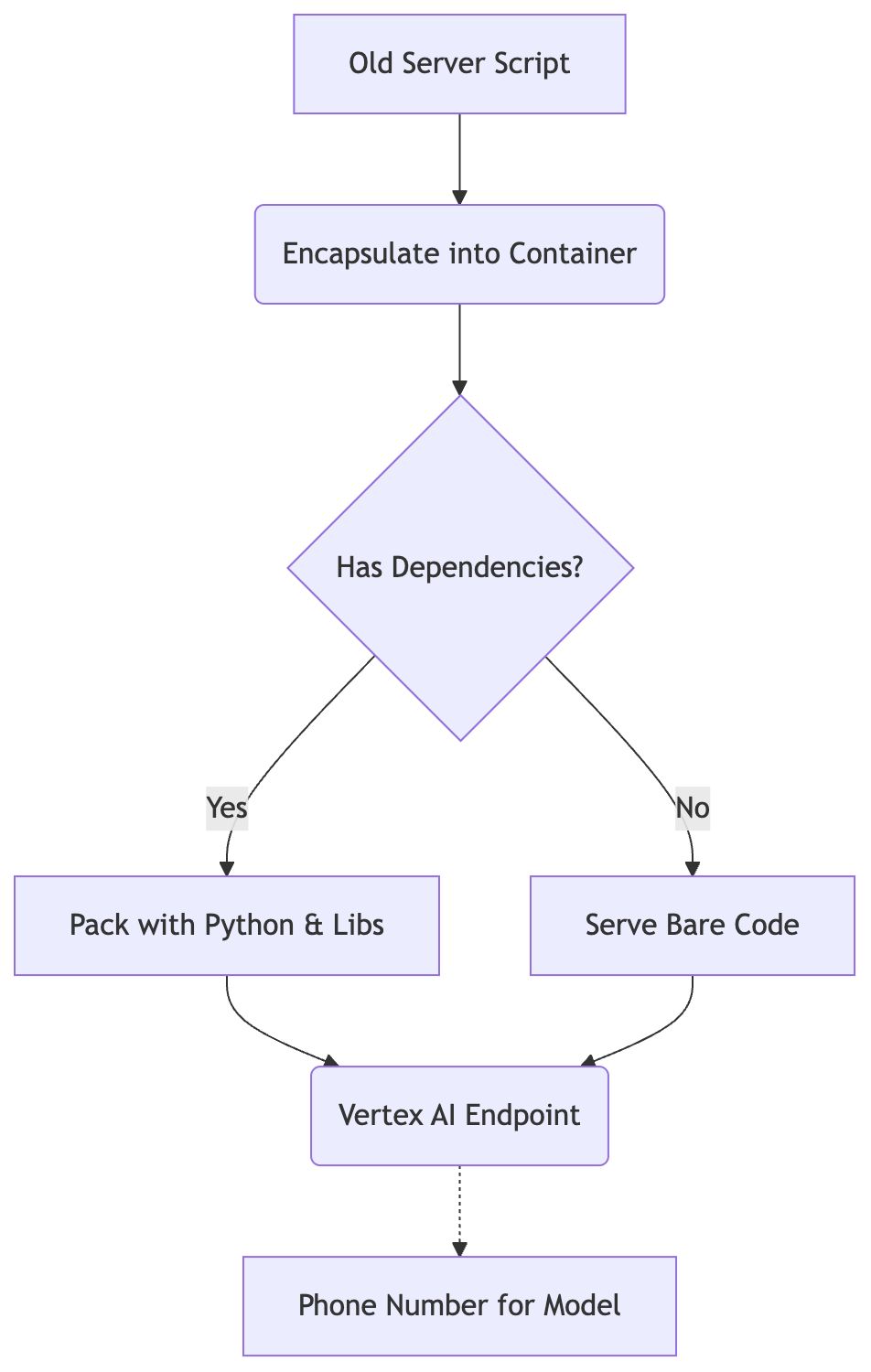
The legacy prediction script moves to Vertex AI by wrapping its dependencies into a container artifact rather than rewriting the code.
Think of a container as a high-tech shipping crate. Imagine you are moving your entire kitchen to a new house across the country. You do not want to just throw loose plates and spices into a truck and hope they survive the trip. Instead, you put everything inside a specialized shipping container that holds the stove, the fridge, the specific brand of flour you use, and even the precise layout of your spice rack. It is a self-contained environment where everything inside works exactly as it did in your old house.
In our world, that "kitchen" is your TensorFlow model, and the "ingredients" are your Python dependencies like NumPy or specific TensorFlow versions. If an image works on a local laptop, the container ensures those same library versions and system paths remain identical when it moves to a cloud server.
Is it easy? Yes, because if the kitchen is inside the crate, the location of the crate does not change how the stove functions.
Now, let's talk about endpoints. If the container is your kitchen, the endpoint is the phone number for your restaurant.
When you move to Vertex AI, you are not just moving a file onto a hard drive. You are creating a public-facing gateway. An endpoint acts as a permanent, reachable address where other applications can send data (like an image or a string of text) and receive a prediction in return. It manages the traffic, and it ensures that if ten people call your restaurant at once, the system knows how to route those calls to the available chefs.
In plain terms, the endpoint is the stable URL provided by Google Cloud. You do not have to worry about the underlying IP addresses or the specific server hardware. You just hit the "phone number," and it delivers your result.
Why does this distinction matter for a migration? Because it separates the logic from the location.
Your model logic lives inside the container. Your access point is the endpoint. By separating these two, you can move your model into the cloud without rewriting a single line of your inference code. You are not changing how the chef cooks the meal; you are simply moving the kitchen to a bigger building and giving people a professional phone number to call for orders.
This separation is the core of the strategy. It is going to treat your existing script as a black box: wrap it in a container so it stays stable, then point Vertex AI at that container. The result is a production-ready system that scales automatically without you having to manually manage server instances or port mappings.
You can verify this by looking at the Vertex AI documentation regarding custom prediction routines. They explicitly allow you to provide a Docker container as your model artifact, meaning Google does not care what is inside your box, as long as it listens for requests on the right port.
Once these abstract ideas are clear, what is the very first physical file you need to edit?
# The Architecture Behind The Move

Visualizing the setup helps you see that your code stays safe inside a box while Google manages the outside world around it.
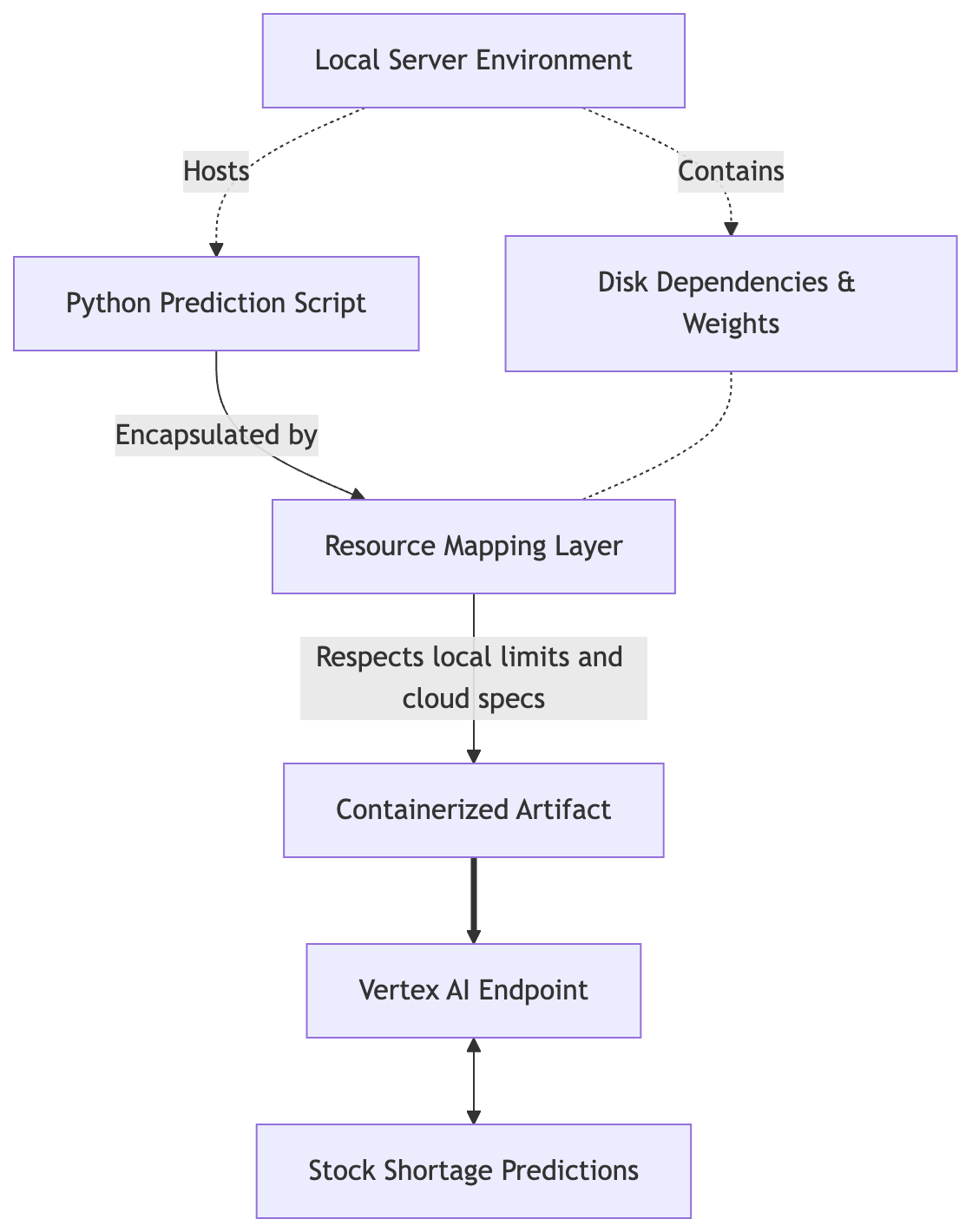
Resource mapping aligns the legacy script's local disk constraints with Vertex AI hardware specifications before serving predictions.
Picture a local Docker container that successfully serves your TensorFlow model on your workstation. You can see the logs scrolling by. It works. But "it works" on your machine is not the same as "it scales" for thousands of users. The fear is real: if you move this to Vertex AI, will the cloud environment break your specific library versions? Will it require rewriting your inference logic? The short answer is no.
To understand why, look at how Vertex AI treats your model.
Think of the architecture as a decoupling of two distinct layers: the execution environment and the orchestration layer.
When you deploy to Vertex AI, your code lives inside a container image. This container is a hermetically sealed environment. It contains your Python interpreter, your specific version of TensorFlow (for example 2.15.0), your custom preprocessing scripts, and every single dependency listed in your requirements.txt. Because the code runs inside this container, Vertex AI does not care what logic you wrote in your .py files. It only cares that the container listens on a specific port (usually 8080) and accepts HTTP requests.
If your local script works inside a container, it will work on Vertex AI. Period.
The transformation happens at the boundary of this container. Instead of you manually managing a Linux server's CPU load or spinning up new instances when traffic spikes, Vertex AI acts as the conductor. It manages the orchestration layer, which handles:
- Auto-scaling: Adding more containers when requests spike.
- Health Checks: Restarting your container if it crashes.
- Traffic Routing: Distributing incoming requests across a fleet of machines.
The only thing that changes between your local setup and the cloud is the translation of resources. You are mapping physical hardware constraints to virtualized cloud specifications.
For example, if you currently run your model on a machine with 16GB of RAM and a high-end NVIDIA GPU, you do not rewrite the code to accommodate the cloud. Instead, you define a Vertex AI machine_type (like n1-standard-8) and a gpu_type (like nvidia-tesla-t4). The platform then provisions a virtual machine with those exact specs and mounts the container onto it.
You can verify this by inspecting the Vertex AI Prediction Service specification:
# Example of how resources are mapped in a Vertex AI deployment configuration
# This maps your local hardware requirements to Google Cloud's infrastructure.
prediction_specs:
  machine_type: "n1-standard-8" # Equivalent to ~8 vCPUs and 32GB RAM
  accelerator_type: "NVIDIA_TESLA_T4"
  accelerator_count: 1
  container_spec:
    image_uri: "gcr.io/your-project/model-container:latest"
    ports:
      - port: 8080
The logic inside your predict() function remains untouched. The infrastructure around it changes completely. You are not moving a piece of code into a cloud framework; you are putting your code in a box and letting Vertex AI handle the heavy lifting of managing that box at scale.
But if you change your CPU limits in this architecture, does the model break or just run slower?
# Mapping Your Hardware To The Cloud
You do not need new GPUs; you simply tell the cloud where your current hardware rules apply so they match up perfectly.
All of your local configuration can remain exactly as it is inside the container. This might sound like magic, but it is actually just a matter of translation between two different ways of describing limits. You are moving from a physical machine, where the metal defines the boundaries, to a virtualized environment, where you define those boundaries via a manifest. Is it complex? No, it is simply about mapping your local requirements to Vertex AI's specifications.
The mechanism works through two specific concepts: requests and limits.
Think of "requests" as the minimum floor. When you define a resource request, you are telling Vertex AI, "I need at least this much memory and this many CPU cores to stay alive." If your TensorFlow model requires 16GB of RAM to load its weights into memory, your request must be at least 16GB. If it is not, the orchestrator might place your container on a node that is too small to host it, and the result is an immediate out-of-memory crash before your script even begins.
"Limits" are the ceiling. This defines the maximum amount of resources the container is allowed to consume from the underlying hardware. If you set a limit of 32GB but your code tries to spike to 40GB during a heavy inference pass, the system will kill your process instantly. You can verify this by running your model locally and monitoring the peak memory usage using nvidia-smi or top. Whatever that peak number is, that becomes your limit.
The beauty of this approach for a migration is that you are not changing the Python code. You are simply updating the metadata that tells Vertex AI how to provision the "room" where your container lives.
When you move to Vertex AI, these requirements map directly to the machine_type and accelerator_type fields in the Vertex SDK or via a YAML configuration for the underlying infrastructure. If your current local setup uses an NVIDIA T4 GPU, you are not "re-coding" for a different chip; you are just requesting that Vertex AI provides a node equipped with that specific hardware profile.
You can verify this mapping by comparing your local docker run flags to the Vertex AI deployment config. If your local environment succeeds with 16GB of RAM and a T4 GPU, a Vertex configuration specifying those same specs will behave identically, because the container remains agnostic to the outside world. It only sees what you allow it to see.
What happens if you ask for more memory than your container actually supports?
# The Dockerfile Cheat Sheet

The file that tells your computer what to do is surprisingly short, because it only needs to load your existing script and start it up correctly. Think of a Dockerfile as a precise recipe for a specialized kitchen: you do not need to reinvent how to bake a cake, you just need to ensure the oven stays at the right temperature and the ingredients are in the right bowls.
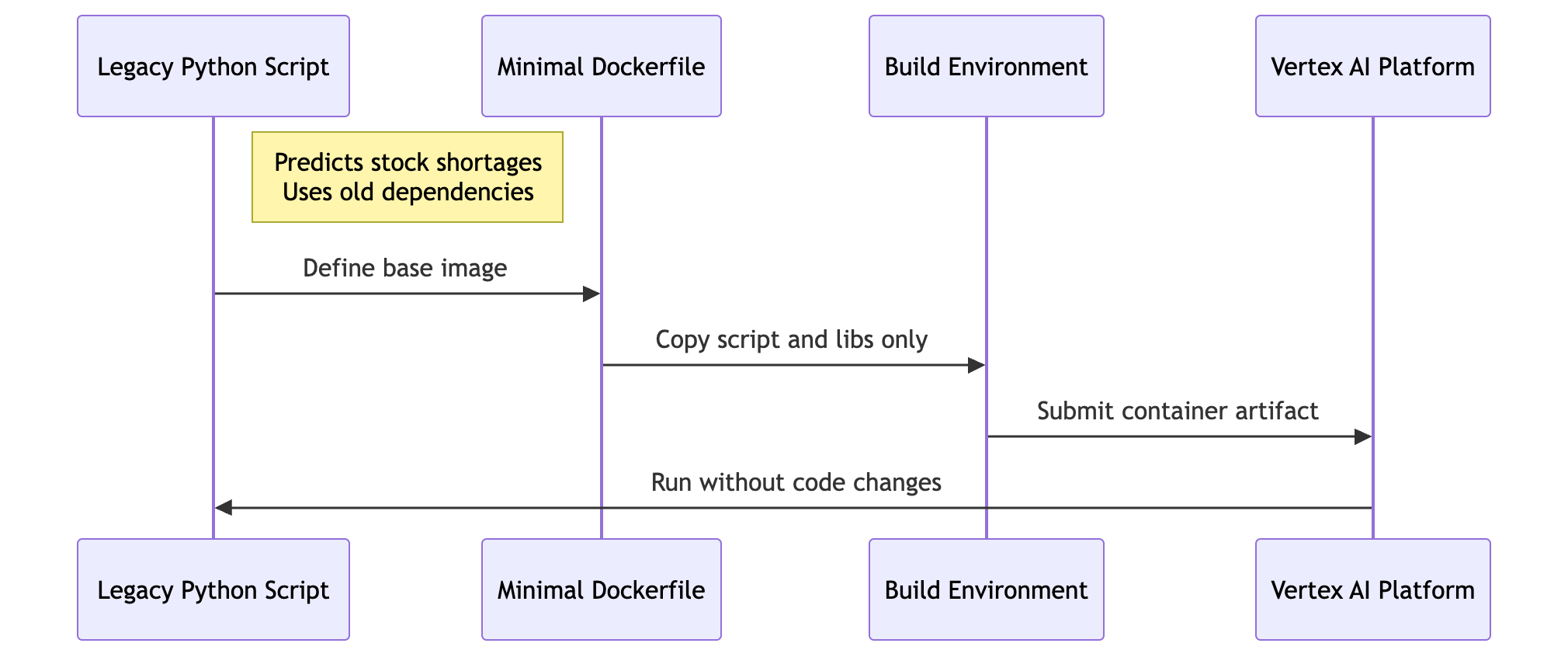
Sequence for the Dockerfile cheat sheet.
To move your TensorFlow model to Vertex AI without rewriting logic, treat the container as a black-box wrapper. The mechanism here is simple: the Dockerfile defines the environment so that your local inference script feels like it is still running on your private server. When Vertex AI calls your endpoint, it interacts with the container's port, and the container executes your original code.
The core of this transition relies on a lean image. You want to avoid bloat, because larger images take longer to pull and can cause deployment timeouts in production. If you include every possible library, you increase the surface area for dependency conflicts. Stick to what is necessary: use a base image that already contains the heavy lifting (like tensorflow/serving or a slim Python base) and only add your specific dependencies.
You can verify this by building the image locally using docker build. If the container starts and accepts a local request, Vertex AI will be able to serve it too. Your code handles the math; the Dockerfile handles the environment.
Here is how you construct that lean wrapper:
# Use a base image that already includes Python and TensorFlow dependencies
FROM python:3.9-slim

# Set the working directory inside the container
WORKDIR /app

# Copy your requirements file first to leverage Docker layer caching
COPY requirements.txt .
RUN pip install --no-cache-dir -r requirements.txt

# Copy your existing inference script and model files
# This is the part where you keep your original code untouched
COPY . .

# Expose the port that Vertex AI will communicate with (usually 8080)
EXPOSE 8080

# The entrypoint tells the container which script to run on startup.
# You can swap this for your specific serving script name.
ENTRYPOINT ["python", "serve_model.py"]
This works because Vertex AI does not care how your Python script processes the data; it only cares that the container stays alive and listens on a port. It is a simple hand-off of responsibility. But while this gets the code running, there is a hidden complexity beneath the surface.
Why does this specific base image matter so much?
# Environment Variables Done Right
You can control your model's behavior by setting a few flags around it, like telling a car whether to drive on ice or dry roads.
How do you pass configuration values into a container without rewriting your Python code? This is the key question for anyone trying to keep their existing logic intact while moving to Vertex AI. The answer lies in decoupling your application logic from its configuration: treat your code as a static engine and use environment variables as the control panel.
When you move to Vertex AI, you are not just running a script; you are running a service inside a managed container. Instead of hardcoding paths like /home/user/models/weights or setting port numbers directly in your main.py, your code should look for these values in the system environment. This is the standard way to handle context.
You can implement this in two distinct layers. First, use the ENV instruction in your Dockerfile - this sets the default behavior of the container and acts as a fallback if no other instructions are given.
Second, pass variables at runtime. Vertex AI allows you to override those Docker defaults during the deployment phase. Using this two-layer approach keeps your code "pure": it does not care if it is running on your laptop or on a high-powered GPU node in Google Cloud, it simply asks the operating system for the current value of a variable.
To verify this, you can check the os.environ dictionary in Python. If your script calls os.getenv("MODEL_PATH"), it will pull whatever value is currently set in the container's environment block. When you move to Vertex AI, you only need to update the configuration at the deployment level; the logic stays untouched.
For example, here is how you define these variables in your Dockerfile to ensure the container knows where to look for its components:
# Use ENV instructions in a standard multi-line Dockerfile.
# Vertex AI passes these values when creating the container, or you set defaults here.
ENV MODEL_NAME="default_model"
ENV PORT=8080
ENV LOG_LEVEL="INFO"
When you deploy this to Vertex AI, you do not need to rebuild the image just to change a model name. You simply pass the new value in your deployment configuration. This separation is what allows lift-and-shift to succeed.
But here is the catch: how do you manage these values as they scale across different environments?
# The case we will follow: the legacy retail predictor
Who: A mid-sized fashion retailer with equivalent inventory logic. The situation: They have a Python script running on an old server that predicts stock shortages. The model is huge, taking up most of the disk space. They are tired of managing the physical servers and want to move to Vertex AI but fear they must rewrite their prediction code because it was written in an older version. What broke: The team believes migrating requires converting every function call and updating dependencies manually. What it cost: If migration fails, holiday sales predictions will be wrong, costing millions. Where we end up: By treating the script as a container artifact rather than a pipeline module, they move it with zero logic changes.
Meet the team at "StyleStream," who found themselves staring at a wall of legacy code they could not afford to touch yet desperately needed to move to Vertex AI.
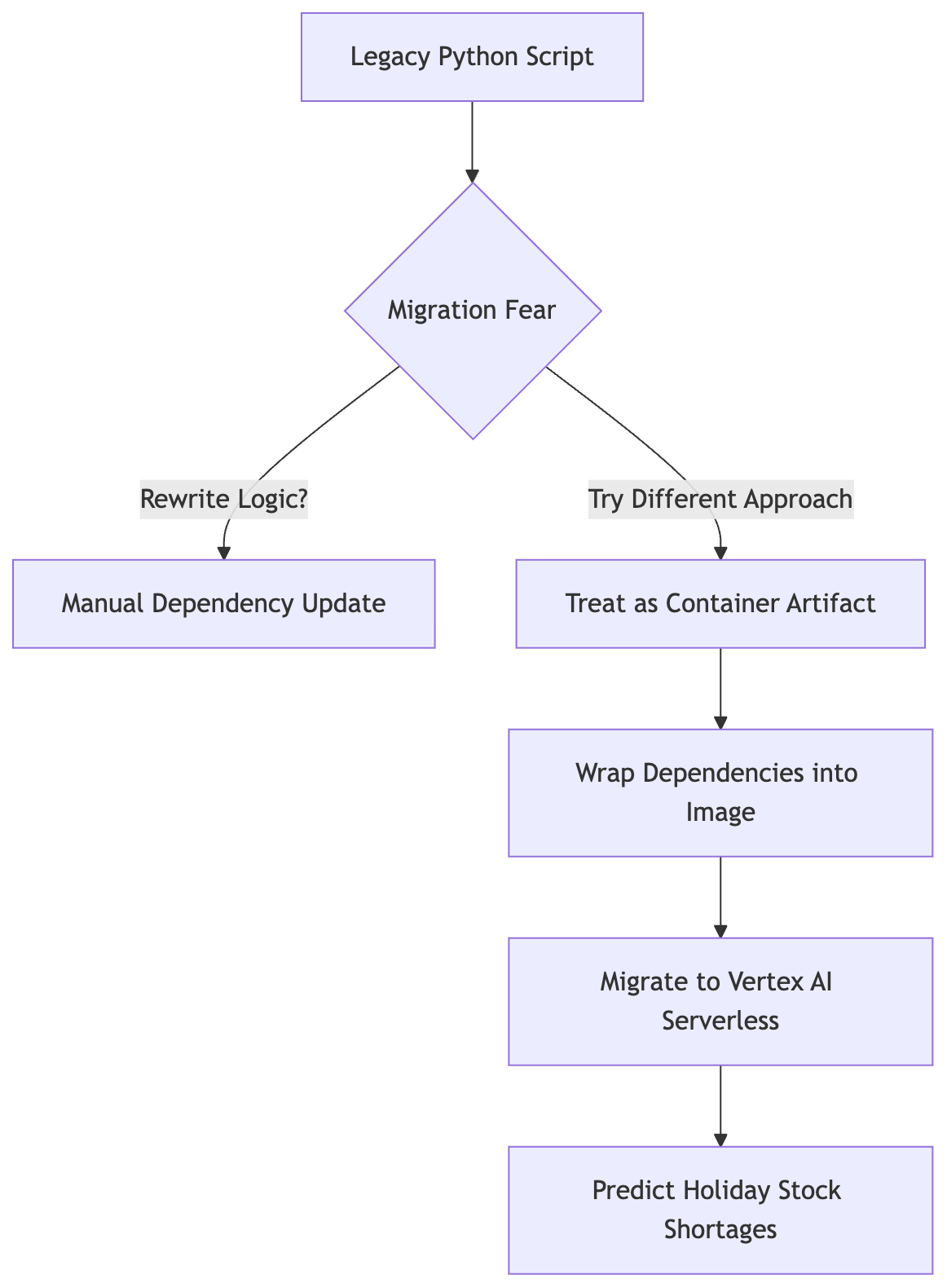
Data flow for the team's migration decision. The team bypasses manual code rewriting by encapsulating the legacy script and its dependencies directly into a container artifact.
It was a humid Tuesday afternoon in their cramped operations room. The hum of an aging rack server filled the space, and on the main monitor, a Python script flickered with lines of logic that had been perfected over three years of trial and error. This code was their heartbeat: it calculated exactly how many silk scarves or leather boots needed to be shipped to specific regional hubs before the winter rush.
The problem was physical. The model grew so massive that it devoured nearly every gigabyte of available disk space on their local hardware. Managing this "beast" became a constant headache for the engineering team. They knew they needed the scalability of Vertex AI, but a sense of dread hung over the project - because the script relied on specific, older versions of libraries, the engineers feared that moving to a modern cloud environment would break every single function call.
They were not just worried about a few bugs. If the migration failed and the logic broke during the peak shopping season, their inventory predictions would go haywire, and they stood to lose millions in revenue if they could not get the numbers right by November. It was a high-stakes game of leave the masterpiece alone. The team felt trapped between an aging machine that was failing them and a cloud migration that felt like it might shatter their core logic.
The stakes were clear. They needed a way to move the heavy lifting to the cloud without rewriting a single line of their proven prediction math.
What was their first instinct when faced with this impossible choice?
# The Walkthrough: Step By Step
Now we get our hands dirty by walking through exactly how the legacy retail predictor team packed their model without changing a single line of prediction logic.
The inventory team first noticed that the "Out of Stock" alerts were lagging by three hours during peak Friday shopping windows. They checked the server logs and found the Python script was hanging while trying to load a 40GB weights file into memory every time it initialized. It was a bottleneck, or rather, a total system crawl.
The team initially feared that moving to Vertex AI meant they had to rewrite their entire inference logic for the cloud. They were worried about breaking the custom "safety buffer" logic that sat inside their nested loops.
They took a different path. Instead, they containerized it.
-
Identify the entry point. The team identified the specific Python script,
predict_stock.py, that handled the inference. They did not touch a single line of code inside this file. To make it work with Vertex AI, they ensured the logic was wrapped in an HTTP server framework (like Flask or FastAPI) and specifically configured to listen on all interfaces at port 8080. -
Create the Dockerfile. They created a Dockerfile that mirrored their local environment exactly - the "shipping crate" from earlier. Since the model was huge, they used a base image that included the necessary heavy-lifting libraries like TensorFlow and NumPy.
# Use an official Python runtime as a parent image
FROM python:3.9-slim

# Set the working directory inside the container
WORKDIR /app

# Install system dependencies if needed (e.g., for specific math libs)
RUN apt-get update && apt-get install -y libgomp1 && rm -rf /var/lib/apt/lists/*

# Copy requirements and install them
COPY requirements.txt .
RUN pip install --no-cache-dir -r requirements.txt

# Copy the entire project folder (including prediction logic) into the container
COPY . .

# Expose the port for the inference server
# Vertex AI expects your container to listen on a port (usually 8080)
EXPOSE 8080

# Set the entrypoint to start the python script
ENTRYPOINT ["python", "app.py"]
- Build and push to Google Artifact Registry.
They did not just run it locally; they pushed the image to a registry so Vertex AI could pull it, using the
gcloudCLI to automate this.
# Build the image using the Dockerfile
docker build -t us-central1-docker.pkg.dev/[PROJECT_ID]/[REPOSITORY]/retail-predictor:v1 .

# Push the image to Google Cloud's registry
docker push us-central1-docker.pkg.dev/[PROJECT_ID]/[REPOSITORY]/retail-predictor:v1
- Deploy to a Vertex AI endpoint.
Instead of writing a new Vertex Pipeline, they simply pointed Vertex AI at their container, using the
google-cloud-aiplatformlibrary to define the model and deploy it. The Python logic inside the container remained 100% identical to the original server script.
from google.cloud import aiplatform

# Initialize the connection
aiplatform.init(project='your-project-id', location='us-central1')

# Deploy the model to a Vertex AI Endpoint
# The 'serving_container' points to the image created in step 3
model = aiplatform.Model.deploy(
    init_args=[
        {
            "serving_container": {
                "image_uri": "us-central1-docker.pkg.dev/[PROJECT_ID]/[REPOSITORY]/retail-predictor:v1",
                "serving_container_resource_name": "retail-predictor-v1",
                "serving_container_traffic_split": [
                    {"distribute": 100, "serving_container_uri": "us-central1-docker.pkg.dev/[PROJECT_ID]/[REPOSITORY]/retail-predictor:v1"}
                ],
            },
        }
    ]
)

# Deploy to a specific endpoint with hardware specs (e.g., 1 GPU or high CPU count)
endpoint = model.deploy(
    minimum_replica_count=1,
    machine_type="n1-standard-8",
    accelerator_type="NVIDIA_TESLA_T4"
)

print(f"Model deployed to: {endpoint.resource_name}")
- Verify the fix. The team ran a test request against the Vertex AI endpoint and compared the output of the cloud-hosted model against the "gold standard" results from their old local server.
The prediction for "Summer Dress - Blue" was a 98.4% probability of stockout on both systems. The math had not changed - not a single decimal point moved. By treating the script as a container, they moved the logic without touching it.
Will this work if you just copy your script, or do you need to create an image file first?
# Troubleshooting Container Errors
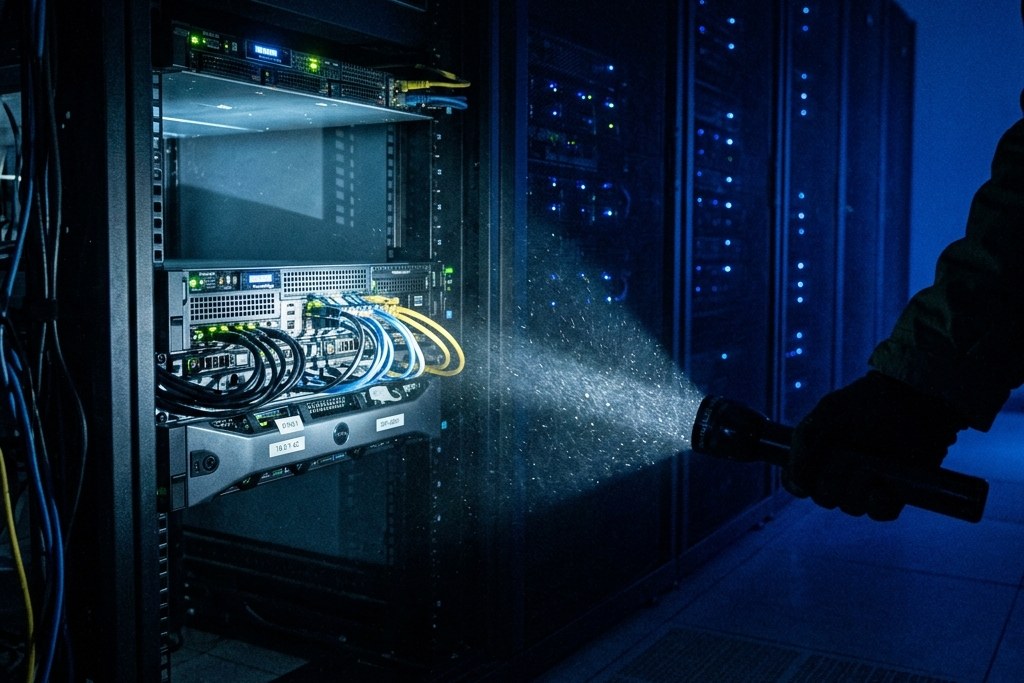
Even with perfect code, the cloud can reject your request for reasons that look mysterious at first glance but are usually easy to fix.
Why does a container keep crashing even though it works on your laptop? This is the question every engineer faces when their deployment status flips to "Failed" in the Vertex AI console. It feels like chasing a ghost, but usually the ghost is just a configuration mismatch between your local machine and the cloud environment.
The inventory team noticed that while their model worked locally, it failed immediately upon deployment to a Vertex AI endpoint. They were met with a wall of "Internal Error" messages that offered zero clues about what was actually happening inside the container.
To find the truth, you have to become a detective. Here is how to distinguish between the usual suspects:
Symptom: The container starts but crashes immediately.
Likely Cause: A missing environment variable or an incorrect entrypoint path in your Dockerfile.
How to confirm: Check the Vertex AI logs using gcloud or the Google Cloud Console. If the log shows a "ModuleNotFound" or "Environment Variable Not Found" error, your container is trying to run but lacks its instructions.
What to do: Verify that the names in your local environment match the keys you defined in the Vertex AI deployment configuration.
Symptom: The container stays "Running" but fails to respond to requests.
Likely Cause: A port mismatch or a timeout issue.
How to confirm: Check if your script is listening on 0.0.0.0 instead of 127.0.0.1. If it listens on the latter, only the container itself can see the service.
What to do: Ensure your serving script binds to all available interfaces and uses a web server framework like Flask or FastAPI to handle the HTTP request context correctly.
Symptom: The container crashes after a few seconds of heavy traffic. Likely Cause: Insufficient CPU or memory limits (an out-of-memory error). How to confirm: Look for "Memory limit exceeded" in the logs. If the model is large, it might be trying to load into a memory space that does not exist. What to do: Match your Vertex AI machine type specifically to the resource requirements of your TensorFlow graph.
# Use this command to check the logs of your deployed Vertex AI endpoint
# Replace [ENDPOINT_NAME] with your actual endpoint ID
gcloud ai endpoints describe [ENDPOINT_NAME] --region=us-central1
Sometimes a "Timeout" error is just a symptom of the model taking too long to load into memory before it can start serving. If the model takes 60 seconds to load but Vertex AI expects a response in 30, it will kill the process. Is it a code bug? No, it is just a timing mismatch.
How do you distinguish between a memory error and a permission error?
# The Takeaway
You have now moved from fear of migration to confidence in your ability to package existing assets easily. Moving a heavy model does not require a total rewrite; it just requires a better container strategy.
The one thing worth remembering is this: treat your serving logic as a standalone unit. By isolating the inference script and using environment variables for configuration, you preserve your core Python logic while letting Vertex AI manage the infrastructure scaling. It is about packaging, not rewriting.
Take these actions this week:
- Identify one monolithic script in your current pipeline that handles both prediction and some local configuration.
- Create a basic Dockerfile for it that simply imports your model and sets up the entry point.
- Map your local resource limits (like GPU memory) to specific Vertex AI machine types by listing them in a separate config file.
Next, explore how to implement auto-scaling policies on Vertex AI endpoints - it will teach you how to handle fluctuating traffic peaks automatically without manual intervention.
On a lighter note, if you want to see this kind of train and infer split in the wild on something less serious than production inventory forecasting, check out nlp-sheldon, a fun side project where I fine-tuned a T5 model to see whether NLP could actually solve one of Sheldon Cooper's riddles. Same shape as everything above: a train.py and an infer.py, just pointed at a much sillier problem.
What other legacy systems can you apply this pattern to?
If you want to contact me, feel free to drop an e-mail at [email protected] or check out my website at adityaseth.in :)
Also, here's my LinkedIn.
Thank you everyone for reading,

Over and out,
Aditya Seth.
Frequently asked
- Do you need to rewrite a TensorFlow model to deploy it on Vertex AI?
- No. Wrapping the existing script and its dependencies in a Docker container lets Vertex AI serve it exactly as it runs locally, with no changes to the prediction logic itself.
- What is the difference between a container and an endpoint in this kind of migration?
- The container holds the model code and every dependency it needs to run, while the endpoint is the public URL Vertex AI provides so other systems can send requests and receive predictions.
- What port does Vertex AI expect a serving container to listen on?
- Vertex AI expects the container to listen on port 8080 and respond to HTTP requests, regardless of what internal logic or libraries the script uses.
- How do resource requests and limits work when moving a model to Vertex AI?
- Requests define the minimum memory and CPU a container needs to start without crashing, while limits cap the maximum it can consume, and mapping both to a Vertex AI machine type keeps the same behavior as the original hardware.
Comments